
Copy cell value if condition is met
MATHIEUE91
Posted messages
2
Status
Member
-
Frenchie83 Posted messages 2254 Status Member -
Frenchie83 Posted messages 2254 Status Member -
Hello everyone.
I have a small issue to submit:
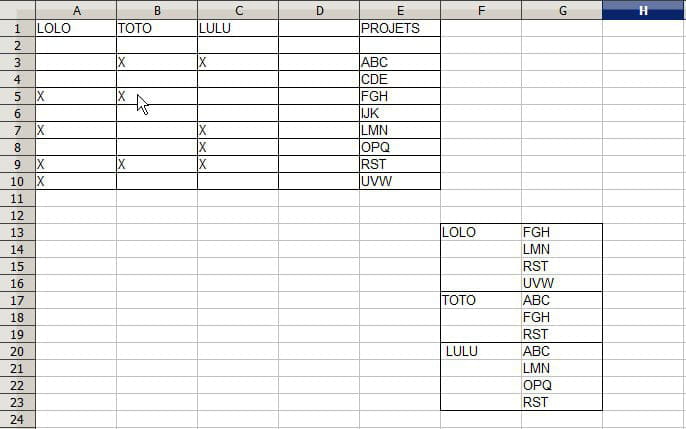
I have a list of 3 names and in front of them are 10 project names. I would like the projects handled by the people (marked by the X) to be copied next to the names in the table below, like the attached example.
Thank you for any help you can provide.

I have a small issue to submit:
I have a list of 3 names and in front of them are 10 project names. I would like the projects handled by the people (marked by the X) to be copied next to the names in the table below, like the attached example.
Thank you for any help you can provide.
2 answers
-
Hello,
Bad display of the table, the projects must be on the left (column A) to easily allow for the extension of the names.
Here is a proposal in VBA
https://mon-partage.fr/f/S4omVLsF/
The code usedSub Restit() Dim DerLig As Long, DerCol As Long, Lig As Long, Col As Long Dim NomTraite As Boolean Dim l As Long, c As Long Application.ScreenUpdating = False DerLig = [A1000].End(xlUp).Row DerCol = [A1].End(xlToRight).Column Lig = 13 'starting row of the collection table Col = 5 'starting column of the collection table For c = 2 To DerCol Nom = Cells(1, c) NomTraite = False For l = 2 To DerLig If Cells(l, c) = "x" Then If NomTraite = False Then Cells(Lig, Col) = Nom Cells(Lig, Col + 1) = Cells(l, "A") NomTraite = True Lig = Lig + 1 End If Next l Next c End Sub
You can add as many names as you want. However, if you choose to change the location of the returned table, you just need to modify the parameters "Lig" and "Col" in the program (currently in row 13 and column 5)
Best regards-
-
Hello Frenchie83.
Thank you again for your proposal. That works perfectly. I just wanted to ask for a bit more if it's not too much trouble for you: How could I go about making an update by name? Let me explain:
In the original table, I have X rows per name (10 in this example), which ensures that the names remain positioned on the same original rows.
I would like to have an update button for LOLO, one for LULU, and one for TOTO, so that I can keep the respective updates of each project leader in the dedicated space of each of their 10 rows...
I’m attaching an image again based on your proposed file.
Thanks again for your help.
- Hello,
I didn't understand everything, you assign the same number of rows to each person, even if there are gaps (this could be a lot, as seen in post 3, about 120 rows, all multiplied by each name). Moreover, this does not correspond to the initial idea.
Let's adopt the following terms for better understanding:
Tab_A: input value table (in A1:D9 in the example)
Tab_B: output table in columns (in E13:F43 in the example)
Next, you want an update for a chosen name, so we complete Tab_B if there is an addition of "x" in Tab_A, but if you remove an "x" in Tab_A, should we remove it or keep it in Tab_B?
To clarify things and save time, please provide a "Before and After" example of what you expect.
Best regards.
-

