
Depuis Excel créer une présentation sur PowerPoint

Guiiggs
Messages postés
30
Statut
Membre
-
cs_Le Pivert Messages postés 8437 Statut Contributeur -
cs_Le Pivert Messages postés 8437 Statut Contributeur -
Bonjour,
Je souhaite créer une présentation PowerPoint via Excel mais j'ai 2 message d'erreur qui s'affiche.
Voici mon code :
1ère erreur :
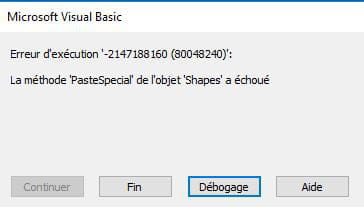
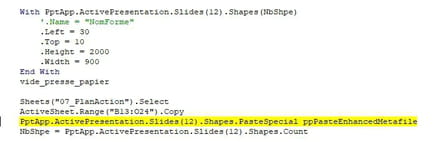
2ème erreur :

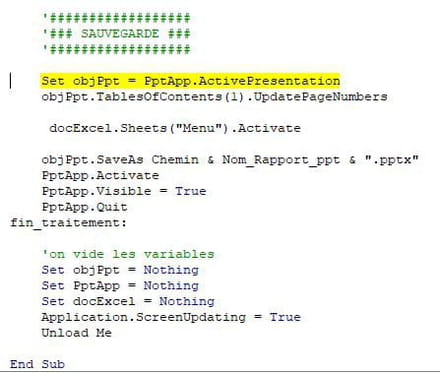
Pourriez-vous m'aider s'il vous plaît ?
Cordialement,
Guiiggs
Je souhaite créer une présentation PowerPoint via Excel mais j'ai 2 message d'erreur qui s'affiche.
Voici mon code :
'Dim Wb As Workbook
Dim Nom_Rapport_ppt As String
Dim Chemin As String
Dim PptApp As PowerPoint.Application
Dim PptDoc As PowerPoint.Presentation
Dim Diapo1 As Slide
Dim Sh1 As PowerPoint.Shape
Dim Sh2 As PowerPoint.Shape
Dim Sh3 As PowerPoint.Shape
Set PptApp = CreateObject("Powerpoint.Application")
Set PptDoc = PptApp.Presentations.Add
Application.ScreenUpdating = False
Set docExcel = ThisWorkbook
'Récupération nom du rapport généré et chemin
Nom_Rapport_ppt = TextBox_Nom_Rapport_ppt.Text
Chemin = TextBox_Chemin_Rapport_ppt.Text
If Chemin = "" Then
MsgBox "Sélectionner un dossier de destination pour le rapport PowerPoint", vbExclamation
Exit Sub
Else
If Right(Chemin, 1) <> "\" Then
Chemin = Chemin & "\"
End If
End If
'##################################'
'##### PAGE DE GARDE - PAGE 1 #####'
'##################################'
vide_presse_papier
With PptApp.ActivePresentation
'##### AJOUTER UN SLIDE #####'
.Slides.Add Index:=1, Layout:=ppLayoutBlank
ThisWorkbook.Worksheets("Plan_PPT").Select
ActiveSheet.Shapes("Image 2").Copy
.Slides(1).Shapes.Paste
'##### CRÉER UNE ZONE DE TEXTE #####'
Set Sh1 = .Slides(1).Shapes.AddLabel(Orientation:=msoTextOrientationHorizontal, _
Left:=350, Top:=50, Width:=150, Height:=60)
'##### INSÉRER LA VALEUR DE LA CELLULE E5 DANS UNE ZONE DE TEXTE #####'
Sheets("01_DescriptionProjet").Select
Sh1.TextFrame.TextRange.Text = Range("E5")
Sheets("12_RapportWord").Select
ActiveSheet.Shapes("Image 6").Copy
.Slides(1).Shapes.Paste
Set Sh2 = .Slides(1).Shapes.AddLabel(Orientation:=msoTextOrientationHorizontal, _
Left:=700, Top:=430, Width:=150, Height:=60)
Sh2.TextFrame.TextRange.Text = Range("C6")
Set Sh3 = .Slides(1).Shapes.AddLabel(Orientation:=msoTextOrientationHorizontal, _
Left:=700, Top:=480, Width:=150, Height:=60)
Sh3.TextFrame.TextRange.Text = Range("C7")
'##### MODIFIER LA COULEUR DU TEXTE #####'
With Sh1.TextFrame.TextRange.Font
.Color = RGB(255, 255, 255)
.Size = 48
.Name = "Arial Black"
End With
With Sh2.TextFrame.TextRange.Font
.Color = RGB(255, 255, 255)
.Size = 30
.Name = "Arial Black"
End With
With Sh3.TextFrame.TextRange.Font
.Color = RGB(255, 255, 255)
.Size = 30
.Name = "Arial Black"
End With
End With
vide_presse_papier
'##############################'
'##### SOMMAIRE - PAGE 2 #####'
'##############################'
With PptApp.ActivePresentation
.Slides.Add Index:=2, Layout:=ppLayoutTitle
End With
PptApp.ActivePresentation.Slides(2).Shapes(1).Top = 75
PptApp.ActivePresentation.Slides(2).Shapes(1).Height = 1.5
PptApp.ActivePresentation.Slides(2).Shapes(2).Top = 100
PptApp.ActivePresentation.Slides(2).Shapes(2).Height = 16
With PptApp.ActivePresentation.Slides(2).Shapes(2)
With .TextFrame.TextRange.Font
.Size = 24
End With
With .TextFrame.TextRange.ParagraphFormat
.Alignment = ppAlignLeft
End With
End With
vide_presse_papier
'###################'
'##### PAGE 3 #####'
'###################'
With PptApp.ActivePresentation
Sheets("Plan_PPT").Select
'##### AJOUTER UN SLIDE #####'
.Slides.Add Index:=3, Layout:=ppLayoutTitleOnly
PptApp.ActivePresentation.Slides(3).Shapes.Title.TextFrame.TextRange.Text = Range("A2")
With PptApp.ActivePresentation.Slides(3).Shapes(1)
With .TextFrame.TextRange.Font
.Size = 24
.Name = "Arial Black"
End With
With .TextFrame.TextRange.ParagraphFormat
.Alignment = ppAlignLeft
End With
End With
PptApp.ActivePresentation.Slides(3).Shapes(1).Top = 50
PptApp.ActivePresentation.Slides(3).Shapes(1).Height = 1.5
End With
vide_presse_papier
'###################'
'##### PAGE 4 #####'
'###################'
With PptApp.ActivePresentation
Sheets("Plan_PPT").Select
'##### AJOUTER UN SLIDE #####'
.Slides.Add Index:=4, Layout:=ppLayoutTitle
PptApp.ActivePresentation.Slides(4).Shapes.Title.TextFrame.TextRange.Text = Range("A3")
PptApp.ActivePresentation.Slides(4).Shapes.Placeholders(2).TextFrame.TextRange.Text = Range("A4")
With PptApp.ActivePresentation.Slides(4).Shapes(1)
With .TextFrame.TextRange.Font
.Size = 24
.Name = "Arial Black"
End With
With .TextFrame.TextRange.ParagraphFormat
.Alignment = ppAlignLeft
End With
End With
PptApp.ActivePresentation.Slides(4).Shapes(1).Top = 50
PptApp.ActivePresentation.Slides(4).Shapes(1).Height = 1.5
With PptApp.ActivePresentation.Slides(4).Shapes(2)
With .TextFrame.TextRange.Font
.Size = 20
.Name = "Arial"
End With
With .TextFrame.TextRange.ParagraphFormat
.Alignment = ppAlignLeft
End With
End With
PptApp.ActivePresentation.Slides(4).Shapes(2).Top = 60
End With
Sheets("01_DescriptionProjet").Select
ActiveSheet.Range("B4:I7").Copy
PptApp.ActivePresentation.Slides(4).Shapes.PasteSpecial ppPasteEnhancedMetafile
NbShpe = PptApp.ActivePresentation.Slides(4).Shapes.Count
With PptApp.ActivePresentation.Slides(4).Shapes(NbShpe)
'.Name = "NomForme"
.Left = 30
.Top = 90
.Height = 1400
.Width = 900
End With
ActiveSheet.Range("B10:I23").Copy
PptApp.ActivePresentation.Slides(4).Shapes.PasteSpecial ppPasteEnhancedMetafile
NbShpe = PptApp.ActivePresentation.Slides(4).Shapes.Count
With PptApp.ActivePresentation.Slides(4).Shapes(NbShpe)
'.Name = "NomForme"
.Left = 30
.Top = 190
.Height = 2600
.Width = 900
End With
vide_presse_papier
'###################'
'##### PAGE 5 #####'
'###################'
With PptApp.ActivePresentation
Sheets("Plan_PPT").Select
'##### AJOUTER UN SLIDE #####'
.Slides.Add Index:=5, Layout:=ppLayoutTitle
PptApp.ActivePresentation.Slides(5).Shapes.Placeholders(2).TextFrame.TextRange.Text = Range("A5")
With PptApp.ActivePresentation.Slides(5).Shapes(2)
With .TextFrame.TextRange.Font
.Size = 20
.Name = "Arial"
End With
With .TextFrame.TextRange.ParagraphFormat
.Alignment = ppAlignLeft
End With
End With
PptApp.ActivePresentation.Slides(5).Shapes(2).Top = 10
PptApp.ActivePresentation.Slides(5).Shapes(1).Delete
End With
Sheets("03_AnalyseGravite").Select
ActiveSheet.Range("B12:E17").Copy
PptApp.ActivePresentation.Slides(5).Shapes.PasteSpecial ppPasteEnhancedMetafile
NbShpe = PptApp.ActivePresentation.Slides(5).Shapes.Count
With PptApp.ActivePresentation.Slides(5).Shapes(NbShpe)
'.Name = "NomForme"
.Left = 30
.Top = 90
.Height = 800
.Width = 400
End With
vide_presse_papier
'###################'
'##### PAGE 6 #####'
'###################'
With PptApp.ActivePresentation
Sheets("Plan_PPT").Select
'##### AJOUTER UN SLIDE #####'
.Slides.Add Index:=6, Layout:=ppLayoutTitle
PptApp.ActivePresentation.Slides(6).Shapes.Title.TextFrame.TextRange.Text = Range("A6")
PptApp.ActivePresentation.Slides(6).Shapes.Placeholders(2).TextFrame.TextRange.Text = Range("A7")
With PptApp.ActivePresentation.Slides(6).Shapes(1)
With .TextFrame.TextRange.Font
.Size = 24
.Name = "Arial black"
End With
With .TextFrame.TextRange.ParagraphFormat
.Alignment = ppAlignLeft
End With
End With
PptApp.ActivePresentation.Slides(6).Shapes(1).Top = 50
PptApp.ActivePresentation.Slides(6).Shapes(1).Height = 1.5
With PptApp.ActivePresentation.Slides(6).Shapes(2)
With .TextFrame.TextRange.Font
.Size = 20
.Name = "Arial"
End With
With .TextFrame.TextRange.ParagraphFormat
.Alignment = ppAlignLeft
End With
End With
PptApp.ActivePresentation.Slides(6).Shapes(2).Top = 60
End With
Sheets("03_AnalyseGravite").Select
ActiveSheet.Range("B3:E10").Copy
PptApp.ActivePresentation.Slides(6).Shapes.PasteSpecial ppPasteEnhancedMetafile
NbShpe = PptApp.ActivePresentation.Slides(6).Shapes.Count
With PptApp.ActivePresentation.Slides(6).Shapes(NbShpe)
'.Name = "NomForme"
.Left = 30
.Top = 100
.Height = 800
.Width = 400
End With
vide_presse_papier
'###################'
'##### PAGE 7 #####'
'###################'
With PptApp.ActivePresentation
Sheets("Plan_PPT").Select
'##### AJOUTER UN SLIDE #####'
.Slides.Add Index:=7, Layout:=ppLayoutTitle
PptApp.ActivePresentation.Slides(7).Shapes.Placeholders(2).TextFrame.TextRange.Text = Range("A8")
With PptApp.ActivePresentation.Slides(7).Shapes(2)
With .TextFrame.TextRange.Font
.Size = 20
.Name = "Arial"
End With
With .TextFrame.TextRange.ParagraphFormat
.Alignment = ppAlignLeft
End With
End With
PptApp.ActivePresentation.Slides(7).Shapes(2).Top = 10
PptApp.ActivePresentation.Slides(7).Shapes(1).Delete
End With
Sheets("04_AnalyseMenaces").Select
ActiveSheet.Range("B3:I13").Copy
PptApp.ActivePresentation.Slides(7).Shapes.PasteSpecial ppPasteEnhancedMetafile
NbShpe = PptApp.ActivePresentation.Slides(7).Shapes.Count
With PptApp.ActivePresentation.Slides(7).Shapes(NbShpe)
'.Name = "NomForme"
.Left = 30
.Top = 40
.Height = 1400
.Width = 850
End With
vide_presse_papier
'###################'
'##### PAGE 8 #####'
'###################'
With PptApp.ActivePresentation
Sheets("Plan_PPT").Select
'##### AJOUTER UN SLIDE #####'
.Slides.Add Index:=8, Layout:=ppLayoutTitle
PptApp.ActivePresentation.Slides(8).Shapes.Placeholders(2).TextFrame.TextRange.Text = Range("A9")
With PptApp.ActivePresentation.Slides(8).Shapes(2)
With .TextFrame.TextRange.Font
.Size = 20
.Name = "Arial"
End With
With .TextFrame.TextRange.ParagraphFormat
.Alignment = ppAlignLeft
End With
End With
PptApp.ActivePresentation.Slides(8).Shapes(2).Top = 10
PptApp.ActivePresentation.Slides(8).Shapes(1).Delete
End With
Sheets("05_AnalyseVraisemblance").Select
ActiveSheet.Range("B3:F9").Copy
PptApp.ActivePresentation.Slides(8).Shapes.PasteSpecial ppPasteEnhancedMetafile
NbShpe = PptDoc.Slides(8).Shapes.Count
With PptApp.ActivePresentation.Slides(8).Shapes(NbShpe)
'.Name = "NomForme"
.Left = 30
.Top = 40
.Height = 1400
.Width = 850
End With
vide_presse_papier
'###################'
'##### PAGE 9 #####'
'###################'
With PptApp.ActivePresentation
Sheets("Plan_PPT").Select
'##### AJOUTER UN SLIDE #####'
.Slides.Add Index:=9, Layout:=ppLayoutTitle
PptApp.ActivePresentation.Slides(9).Shapes.Placeholders(2).TextFrame.TextRange.Text = Range("A10")
With PptApp.ActivePresentation.Slides(9).Shapes(2)
With .TextFrame.TextRange.Font
.Size = 20
.Name = "Arial"
End With
With .TextFrame.TextRange.ParagraphFormat
.Alignment = ppAlignLeft
End With
End With
PptApp.ActivePresentation.Slides(9).Shapes(2).Top = 10
PptApp.ActivePresentation.Slides(9).Shapes(1).Delete
End With
Sheets("06_GestionRisque").Select
ActiveSheet.Range("H10:Q24").Copy
PptApp.ActivePresentation.Slides(9).Shapes.PasteSpecial ppPasteEnhancedMetafile
NbShpe = PptApp.ActivePresentation.Slides(9).Shapes.Count
With PptApp.ActivePresentation.Slides(9).Shapes(NbShpe)
'.Name = "NomForme"
.Left = 30
.Top = 40
.Height = 1000
.Width = 600
End With
vide_presse_papier
'####################'
'##### PAGE 10 #####'
'####################'
With PptApp.ActivePresentation
Sheets("Plan_PPT").Select
'##### AJOUTER UN SLIDE #####'
.Slides.Add Index:=10, Layout:=ppLayoutTitle
PptApp.ActivePresentation.Slides(10).Shapes.Title.TextFrame.TextRange.Text = Range("A11")
PptApp.ActivePresentation.Slides(10).Shapes.Placeholders(2).TextFrame.TextRange.Text = Range("A12")
With PptApp.ActivePresentation.Slides(10).Shapes(1)
With .TextFrame.TextRange.Font
.Size = 24
.Name = "Arial black"
End With
With .TextFrame.TextRange.ParagraphFormat
.Alignment = ppAlignLeft
End With
End With
PptApp.ActivePresentation.Slides(10).Shapes(1).Top = 50
PptApp.ActivePresentation.Slides(10).Shapes(1).Height = 1.5
With PptApp.ActivePresentation.Slides(10).Shapes(2)
With .TextFrame.TextRange.Font
.Size = 20
.Name = "Arial"
End With
With .TextFrame.TextRange.ParagraphFormat
.Alignment = ppAlignLeft
End With
End With
PptApp.ActivePresentation.Slides(10).Shapes(2).Top = 60
End With
Sheets("06_GestionRisque").Select
ActiveSheet.Range("B3:I9").Copy
PptApp.ActivePresentation.Slides(10).Shapes.PasteSpecial ppPasteEnhancedMetafile
NbShpe = PptApp.ActivePresentation.Slides(10).Shapes.Count
With PptApp.ActivePresentation.Slides(10).Shapes(NbShpe)
'.Name = "NomForme"
.Left = 30
.Top = 100
.Height = 1000
.Width = 800
End With
vide_presse_papier
'#############################'
'##### PAGE 11 A PAGE 15 #####'
'#############################'
With PptApp.ActivePresentation
Sheets("Plan_PPT").Select
'##### AJOUTER UN SLIDE #####'
.Slides.Add Index:=11, Layout:=ppLayoutTitle
PptApp.ActivePresentation.Slides(11).Shapes.Placeholders(2).TextFrame.TextRange.Text = Range("A13")
With PptApp.ActivePresentation.Slides(11).Shapes(2)
With .TextFrame.TextRange.Font
.Size = 20
.Name = "Arial"
End With
With .TextFrame.TextRange.ParagraphFormat
.Alignment = ppAlignLeft
End With
End With
PptApp.ActivePresentation.Slides(11).Shapes(2).Top = 10
PptApp.ActivePresentation.Slides(11).Shapes(1).Delete
End With
Sheets("07_PlanAction").Select
ActiveSheet.Range("B3:O12").Copy
PptApp.ActivePresentation.Slides(11).Shapes.PasteSpecial ppPasteEnhancedMetafile
NbShpe = PptApp.ActivePresentation.Slides(11).Shapes.Count
With PptApp.ActivePresentation.Slides(11).Shapes(NbShpe)
'.Name = "NomForme"
.Left = 30
.Top = 40
.Height = 2000
.Width = 900
End With
vide_presse_papier
With PptApp.ActivePresentation
.Slides.Add Index:=12, Layout:=ppLayoutBlank
End With
Sheets("07_PlanAction").Select
ActiveSheet.Range("B3:O4").Copy
PptApp.ActivePresentation.Slides(12).Shapes.PasteSpecial ppPasteEnhancedMetafile
NbShpe = PptApp.ActivePresentation.Slides(12).Shapes.Count
With PptApp.ActivePresentation.Slides(12).Shapes(NbShpe)
'.Name = "NomForme"
.Left = 30
.Top = 10
.Height = 2000
.Width = 900
End With
vide_presse_papier
Sheets("07_PlanAction").Select
ActiveSheet.Range("B13:O24").Copy
PptApp.ActivePresentation.Slides(12).Shapes.PasteSpecial ppPasteEnhancedMetafile
NbShpe = PptApp.ActivePresentation.Slides(12).Shapes.Count
With PptApp.ActivePresentation.Slides(12).Shapes(NbShpe)
'.Name = "NomForme"
.Left = 30
.Top = 45
.Height = 2000
.Width = 900
End With
vide_presse_papier
With PptApp.ActivePresentation
.Slides.Add Index:=13, Layout:=ppLayoutBlank
End With
Sheets("07_PlanAction").Select
ActiveSheet.Range("B3:O4").Copy
PptApp.ActivePresentation.Slides(13).Shapes.PasteSpecial ppPasteEnhancedMetafile
NbShpe = PptApp.ActivePresentation.Slides(13).Shapes.Count
With PptApp.ActivePresentation.Slides(13).Shapes(NbShpe)
'.Name = "NomForme"
.Left = 30
.Top = 10
.Height = 2000
.Width = 900
End With
vide_presse_papier
Sheets("07_PlanAction").Select
ActiveSheet.Range("B25:O37").Copy
PptApp.ActivePresentation.Slides(13).Shapes.PasteSpecial ppPasteEnhancedMetafile
NbShpe = PptApp.ActivePresentation.Slides(13).Shapes.Count
With PptApp.ActivePresentation.Slides(13).Shapes(NbShpe)
'.Name = "NomForme"
.Left = 30
.Top = 45
.Height = 2000
.Width = 900
End With
vide_presse_papier
With PptApp.ActivePresentation
.Slides.Add Index:=14, Layout:=ppLayoutBlank
End With
Sheets("07_PlanAction").Select
ActiveSheet.Range("B3:O4").Copy
PptApp.ActivePresentation.Slides(14).Shapes.PasteSpecial ppPasteEnhancedMetafile
NbShpe = PptApp.ActivePresentation.Slides(14).Shapes.Count
With PptApp.ActivePresentation.Slides(14).Shapes(NbShpe)
'.Name = "NomForme"
.Left = 30
.Top = 10
.Height = 2000
.Width = 900
End With
vide_presse_papier
Sheets("07_PlanAction").Select
ActiveSheet.Range("B38:O49").Copy
PptApp.ActivePresentation.Slides(14).Shapes.PasteSpecial ppPasteEnhancedMetafile
NbShpe = PptApp.ActivePresentation.Slides(14).Shapes.Count
With PptApp.ActivePresentation.Slides(14).Shapes(NbShpe)
'.Name = "NomForme"
.Left = 30
.Top = 45
.Height = 2000
.Width = 900
End With
vide_presse_papier
With PptApp.ActivePresentation
.Slides.Add Index:=15, Layout:=ppLayoutBlank
End With
Sheets("07_PlanAction").Select
ActiveSheet.Range("B3:O4").Copy
PptApp.ActivePresentation.Slides(15).Shapes.PasteSpecial ppPasteEnhancedMetafile
NbShpe = PptApp.ActivePresentation.Slides(15).Shapes.Count
With PptApp.ActivePresentation.Slides(15).Shapes(NbShpe)
'.Name = "NomForme"
.Left = 30
.Top = 10
.Height = 2000
.Width = 900
End With
vide_presse_papier
Sheets("07_PlanAction").Select
ActiveSheet.Range("B50:O61").Copy
PptApp.ActivePresentation.Slides(15).Shapes.PasteSpecial ppPasteEnhancedMetafile
NbShpe = PptApp.ActivePresentation.Slides(15).Shapes.Count
With PptApp.ActivePresentation.Slides(15).Shapes(NbShpe)
'.Name = "NomForme"
.Left = 30
.Top = 45
.Height = 2000
.Width = 900
End With
vide_presse_papier
'##############################'
'##### PAGE 16 A PAGE 17 #####'
'##############################'
With PptApp.ActivePresentation
Sheets("Plan_PPT").Select
'##### AJOUTER UN SLIDE #####'
.Slides.Add Index:=16, Layout:=ppLayoutTitle
PptApp.ActivePresentation.Slides(16).Shapes.Placeholders(2).TextFrame.TextRange.Text = Range("A14")
With PptApp.ActivePresentation.Slides(16).Shapes(2)
With .TextFrame.TextRange.Font
.Size = 20
.Name = "Arial"
End With
With .TextFrame.TextRange.ParagraphFormat
.Alignment = ppAlignLeft
End With
End With
PptApp.ActivePresentation.Slides(16).Shapes(2).Top = 10
PptApp.ActivePresentation.Slides(16).Shapes(1).Delete
End With
Sheets("08_RisqueResiduel").Select
ActiveSheet.Range("B3:G10").Copy
PptApp.ActivePresentation.Slides(16).Shapes.PasteSpecial ppPasteEnhancedMetafile
NbShpe = PptApp.ActivePresentation.Slides(16).Shapes.Count
With PptApp.ActivePresentation.Slides(16).Shapes(NbShpe)
'.Name = "NomForme"
.Left = 10
.Top = 50
.Height = 1800
.Width = 700
End With
vide_presse_papier
With PptApp.ActivePresentation
.Slides.Add Index:=17, Layout:=ppLayoutBlank
End With
Sheets("08_RisqueResiduel").Select
ActiveSheet.Range("J5:S19").Copy
PptApp.ActivePresentation.Slides(17).Shapes.PasteSpecial ppPasteEnhancedMetafile
NbShpe = PptApp.ActivePresentation.Slides(17).Shapes.Count
With PptApp.ActivePresentation.Slides(17).Shapes(NbShpe)
'.Name = "NomForme"
.Left = 150
.Top = 50
.Height = 1500
.Width = 600
End With
vide_presse_papier
'####################'
'##### PAGE 18 #####'
'####################'
With PptApp.ActivePresentation
Sheets("Plan_PPT").Select
'##### AJOUTER UN SLIDE #####'
.Slides.Add Index:=18, Layout:=ppLayoutTitle
With PptApp.ActivePresentation.Slides(18).Shapes.Placeholders
.Item(1).TextFrame.TextRange.Text = Range("A15")
.Item(2).TextFrame.TextRange.Text = Range("A16")
End With
With PptApp.ActivePresentation.Slides(18).Shapes(1)
With .TextFrame.TextRange.Font
.Size = 24
.Name = "Arial black"
End With
With .TextFrame.TextRange.ParagraphFormat
.Alignment = ppAlignLeft
End With
End With
PptApp.ActivePresentation.Slides(18).Shapes(1).Top = 50
PptApp.ActivePresentation.Slides(18).Shapes(1).Height = 1.5
With PptApp.ActivePresentation.Slides(18).Shapes(2)
With .TextFrame.TextRange.Font
.Size = 20
.Name = "Arial"
End With
With .TextFrame.TextRange.ParagraphFormat
.Alignment = ppAlignLeft
End With
End With
PptApp.ActivePresentation.Slides(18).Shapes(2).Top = 60
Sheets("09_PlanAudit").Select
ActiveSheet.Range("B3:G9").Copy
PptApp.ActivePresentation.Slides(18).Shapes.PasteSpecial ppPasteEnhancedMetafile
NbShpe = PptApp.ActivePresentation.Slides(18).Shapes.Count
With PptApp.ActivePresentation.Slides(18).Shapes(NbShpe)
'.Name = "NomForme"
.Left = 30
.Top = 100
.Height = 1800
.Width = 850
End With
vide_presse_papier
End With
'####################'
'##### PAGE 19 #####'
'####################'
With PptApp.ActivePresentation
Sheets("Plan_PPT").Select
'##### AJOUTER UN SLIDE #####'
.Slides.Add Index:=19, Layout:=ppLayoutTitle
PptApp.ActivePresentation.Slides(19).Shapes.Placeholders(2).TextFrame.TextRange.Text = Range("A17")
With PptApp.ActivePresentation.Slides(19).Shapes(2)
With .TextFrame.TextRange.Font
.Size = 20
.Name = "Arial"
End With
With .TextFrame.TextRange.ParagraphFormat
.Alignment = ppAlignLeft
End With
End With
PptApp.ActivePresentation.Slides(19).Shapes(2).Top = 10
PptApp.ActivePresentation.Slides(19).Shapes(1).Delete
End With
Sheets("10_RisqueAudit").Select
ActiveSheet.Range("J5:S19").Copy
PptApp.ActivePresentation.Slides(19).Shapes.PasteSpecial ppPasteEnhancedMetafile
NbShpe = PptApp.ActivePresentation.Slides(19).Shapes.Count
With PptApp.ActivePresentation.Slides(19).Shapes(NbShpe)
'.Name = "NomForme"
.Left = 150
.Top = 50
.Height = 1500
.Width = 600
End With
vide_presse_papier
'#############################'
'##### PAGE 20 A PAGE 21 #####'
'#############################'
With PptApp.ActivePresentation
Sheets("Plan_PPT").Select
'##### AJOUTER UN SLIDE #####'
.Slides.Add Index:=20, Layout:=ppLayoutTitle
PptDoc.Slides(20).Shapes.Title.TextFrame.TextRange.Text = Range("A18")
With PptApp.ActivePresentation.Slides(20).Shapes(1)
With .TextFrame.TextRange.Font
.Size = 24
.Name = "Arial Black"
End With
With .TextFrame.TextRange.ParagraphFormat
.Alignment = ppAlignLeft
End With
End With
PptApp.ActivePresentation.Slides(20).Shapes(1).Top = 50
PptApp.ActivePresentation.Slides(20).Shapes(1).Height = 1.5
PptApp.ActivePresentation.Slides(20).Shapes(2).Delete
End With
Sheets("11_Homologation").Select
ActiveSheet.Range("B3:D5").Copy
PptApp.ActivePresentation.Slides(20).Shapes.PasteSpecial ppPasteEnhancedMetafile
NbShpe = PptApp.ActivePresentation.Slides(20).Shapes.Count
With PptApp.ActivePresentation.Slides(20).Shapes(NbShpe)
'.Name = "NomForme"
.Left = 30
.Top = 60
.Height = 1500
.Width = 800
End With
vide_presse_papier
Sheets("11_Homologation").Select
ActiveSheet.Range("B7:F13").Copy
PptApp.ActivePresentation.Slides(20).Shapes.PasteSpecial ppPasteEnhancedMetafile
NbShpe = PptApp.ActivePresentation.Slides(20).Shapes.Count
With PptApp.ActivePresentation.Slides(20).Shapes(NbShpe)
'.Name = "NomForme"
.Left = 30
.Top = 220
.Height = 1500
.Width = 800
End With
vide_presse_papier
With PptApp.ActivePresentation
.Slides.Add Index:=21, Layout:=ppLayoutBlank
End With
Sheets("11_Homologation").Select
ActiveSheet.Range("B22:F37").Copy
PptApp.ActivePresentation.Slides(21).Shapes.PasteSpecial ppPasteEnhancedMetafile
NbShpe = PptApp.ActivePresentation.Slides(21).Shapes.Count
With PptApp.ActivePresentation.Slides(21).Shapes(NbShpe)
'.Name = "NomForme"
.Left = 30
.Top = 10
.Height = 1600
.Width = 900
End With
vide_presse_papier
Sheets("11_Homologation").Select
ActiveSheet.Range("E3:F4").Copy
PptApp.ActivePresentation.Slides(21).Shapes.PasteSpecial ppPasteEnhancedMetafile
NbShpe = PptApp.ActivePresentation.Slides(21).Shapes.Count
With PptApp.ActivePresentation.Slides(21).Shapes(NbShpe)
'.Name = "NomForme"
.Left = 300
.Top = 400
.Height = 800
.Width = 400
End With
vide_presse_papier
'####################'
'##### SOMMAIRE #####'
'####################'
Dim txtSommaire As TextRange
Dim y As Long
With PptApp.ActivePresentation
' ajout d'un titre à la slide ajoutée
.Slides(2).Shapes.Title.TextFrame.TextRange = "Plan"
' attribut une variable au texte du sommaire
Set txtSommaire = PptApp.ActivePresentation.Slides(2).Shapes(2).TextFrame.TextRange
' passe en revue toutes les slides pour récupérer leur titre
For y = 3 To PptApp.ActivePresentation.Slides.Count
' attribue une variable pour la slide en cours
Set Diapo1 = PptApp.ActivePresentation.Slides(y)
'si la slide a un titre
If Diapo1.Shapes.HasTitle Then
' ajoute le titre au sommaire
txtSommaire = txtSommaire & Diapo1.Shapes.Title.TextFrame.TextRange.Text & vbNewLine
End If
Next y
End With
PptApp.Visible = True
'PptDoc.SaveAs (ThisWorkbook.Path & "\Présentation1.pptx")
'#######################################'
'##### AJOUTER LES NUMÉROS DE PAGE #####'
'#######################################'
Dim i As Integer
Dim sld As Slide
Dim shp As Object
'Dim ppt As PowerPoint.Application
'Set ppt = CreateObject("PowerPoint.Application")
PptApp.Visible = True ' Indispensable, sinon il ne peut pas ouvrir de fichier (Erreur)
' On crée maintenant un objet Presentation
Dim Pres As PowerPoint.Presentation
' Et on lui dit de quelle présentation il s'agit :
Set Pres = PptApp.ActivePresentation
For i = 3 To PptApp.ActivePresentation.Slides.Count
'affectation à l'objet slide la première diapositive de la présentation en cours.
' création de la zone de texte
Set shp = Pres.Slides(i).Shapes. _
AddTextbox(msoTextOrientationHorizontal, _
850, 510, 100, 50)
' ajout du texte
With shp.TextFrame.TextRange
.Font.Name = "Arial"
.Font.Size = 14
.InsertSlideNumber
.Text = i & " sur " & PptApp.ActivePresentation.Slides.Count
End With
Next
PptApp.ActivePresentation.PageSetup.FirstSlideNumber = 0
PptApp.ActivePresentation.Slides(1).DisplayMasterShapes = msoFalse
Set shp = Nothing
Set sld = Nothing
' Et on quitte PowerPoint proprement :
'PptApp.Quit
Set PptApp = Nothing
'##################
'### SAUVEGARDE ###
'##################
Set objPpt = PptApp.ActivePresentation
objPpt.TablesOfContents(1).UpdatePageNumbers
docExcel.Sheets("Menu").Activate
objPpt.SaveAs Chemin & Nom_Rapport_ppt & ".pptx"
PptApp.Activate
PptApp.Visible = True
PptApp.Quit
fin_traitement:
'on vide les variables
Set objPpt = Nothing
Set PptApp = Nothing
Set docExcel = Nothing
Application.ScreenUpdating = True
Unload Me
End Sub
1ère erreur :
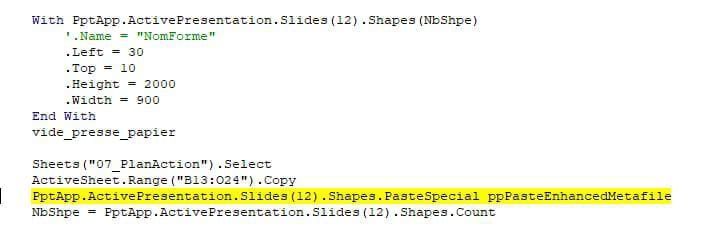
2ème erreur :

Pourriez-vous m'aider s'il vous plaît ?
Cordialement,
Guiiggs
1 réponse
-
Bonjour,
Tu trouveras toutes les réponses à tes questions ici
https://excel.developpez.com/faq/?page=Powerpoint

