USB with a VBS script
jo2041
Posted messages
3
Status
Member
-
bazfile Posted messages 58498 Registration date Status Moderator Last intervention -
bazfile Posted messages 58498 Registration date Status Moderator Last intervention -
Hello,
After using my USB stick in an internet café, I noticed when I reconnected it to my laptop that it only contained a shortcut "lexar" and the document I had scanned.
Unfortunately, I opened the shortcut, not finding my old files.
I first scanned the drive with Microsoft security and saw that vbs files were detected.
I deleted the shortcut, copied my drive to the desktop, and since the folder remained empty despite the space being occupied, I searched for a way to make hidden files reappear, using the display option. They reappeared after an "attrib" command I found online.
However, at the root of the drive, there are now 3 folders: one with - where are my files, one windowsservices, one system volume information.
I researched to see if there were tutorials to ensure there was no more infection and used Rem-VBSqt.
My problem is that when I use it, the letter of my USB drive is not recognized (it is in fat) and also that after restarting, I have an empty errorlog.txt file that opens.
So I don't think the drive is healthy, nor the laptop.
I saw that there was a procedure with the software FRST64, but I am unable to understand the diagnostic files.
I believe I can find help on this forum.
After using my USB stick in an internet café, I noticed when I reconnected it to my laptop that it only contained a shortcut "lexar" and the document I had scanned.
Unfortunately, I opened the shortcut, not finding my old files.
I first scanned the drive with Microsoft security and saw that vbs files were detected.
I deleted the shortcut, copied my drive to the desktop, and since the folder remained empty despite the space being occupied, I searched for a way to make hidden files reappear, using the display option. They reappeared after an "attrib" command I found online.
However, at the root of the drive, there are now 3 folders: one with - where are my files, one windowsservices, one system volume information.
I researched to see if there were tutorials to ensure there was no more infection and used Rem-VBSqt.
My problem is that when I use it, the letter of my USB drive is not recognized (it is in fat) and also that after restarting, I have an empty errorlog.txt file that opens.
So I don't think the drive is healthy, nor the laptop.
I saw that there was a procedure with the software FRST64, but I am unable to understand the diagnostic files.
I believe I can find help on this forum.
4 answers
-
Hello,
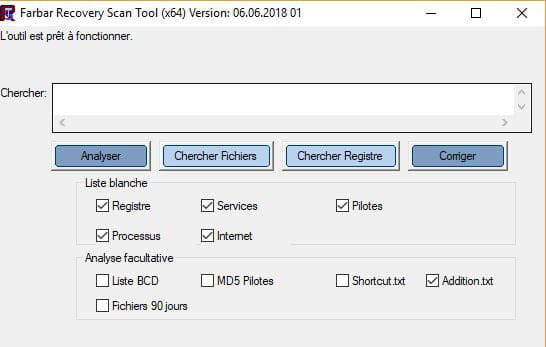
Download FRST, once downloaded put it on the desktop and then open it. You will see this:
Click on Analyze. At the end of the analysis, you will have two text files on the desktop FRST and Addition. Send these reports to https://pjjoint.malekal.com/ and then provide the two links generated by Pjoint in your next message.
--
bazfile security contributor. -
Thank you very much
I want to specify that before I launched Rem-VBsqt (option a, option b not working because the USB drive's root letter is not recognized) and I removed the USB stick before using FRST
here are the files:
FRST:
https://pjjoint.malekal.com/files.php?id=FRST_20190108_o13x10b95t13
Addition:
https://pjjoint.malekal.com/files.php?id=20190108_v14u9c5f9k10 -
Hello,
You've already used quite a few things to disinfect your USB key:
- Rem-VBsqt
- Panda Vaccine
- Marmiton against scripts
Procedure to follow in the order indicated:
1- Open FRST and do not close the FRST window during the procedure otherwise it won't work, press CTRL and Y simultaneously to open the notepad, copy/paste the script that is in the box below:CreateRestorePoint:
CloseProcesses:
AlternateDataStreams: C:\ProgramData\Reprise:wupeogjxlctlfudivq`qsp`28hfm [0]
Startup: C:\ProgramData\Microsoft\Windows\Start Menu\Programs\Startup\errorlog.txt [2019-01-08] ()
RemoveProxy:
EmptyTemp:
Reboot:
2- In the notepad click on File then Save and close the notepad.
3- Return to the open FRST, click on Fix.
Let the fix run, once it's finished restart your computer.
Then once your computer has restarted:
4- You will have a Fixlog file on your desktop, send it via https://pjjoint.malekal.com/ then put the link generated by Pjoint in your next message.
5- Reset your internet browsers: https://forums.commentcamarche.net/forum/affich-37585758-reinitialiser-son-navigateur
6- Check and let me know if the errorlog.txt file still opens on startup of the pc.
7- For your USB key since Rem-VBsqt doesn't work, download and install the antivirus Kaspersky Free it is more effective than your current antivirus (Microsoft Security Essentials), Microsoft Security Essentials will automatically deactivate in favor of Kaspersky Free.
Once Kaspersky Free is installed, connect your USB key to your pc and scan it with Kaspersky Free which will anyway prompt you via a popup as soon as it detects that the USB key is connected, it should be able to disinfect it as it is quite effective against this type of infection.
-
Here is the Fixlog file:
https://pjjoint.malekal.com/files.php?id=20190109_y11p15l12n15w12
Otherwise, the ctrl + Y manipulation with FRST surprised me a bit by generating a txt file already named randomly, I had read that it should be done differently but the correction seems to have worked
I threw the txt files for FRST in the trash (the content of the corrective file was erased)
There was no errorlog.txt file after a somewhat long restart
I reset Chrome and Firefox.
Tomorrow I will clean the USB drive as you indicated
I should also repeat the same procedure because I put my USB drive on another computer and I can’t remember if I had opened the fraudulent link.
Thank you again for your precise response in the evening
Good evening