Problem file script stream.x64.x-all.dat.vbs
Solved/Closedbazfile Posted messages 58526 Registration date Status Moderator Last intervention -
Every time I start Windows, it tells me that a script file is missing, specifically: C:\Users/XXXXX\AppData\Roaming\stream.x64.x-all.dat.vbs
I tried cleaning the PC and diagnosing it, but nothing works. I looked into the FRST tool, but let's just say I'm not proficient ^^'.
If anyone has any idea on how to solve this issue...
7 answers
-
Hello,
If you have run a FRST analysis, please post the generated FRST and Addition reports
All reports must be hosted on https://security-x.fr/up/ and you should provide the obtained links in your response
--
Security contributor.-
The analysis is done:
Here are the links:
FRST: https://up.security-x.fr/file.php?h=R3ddab65b22b4f47e70cbf3ebf76e7bb7
Addition: https://up.security-x.fr/file.php?h=R16418c3277e74c50fe51492fe9a443f1
-
-
RE_
--> Copy what is found here: https://textup.fr/592065DE from start:: to end:: (without pasting it anywhere)
--> Open FRST (or FRST64) as administrator and click on Fix
If FRST seems to freeze or not respond, let it run
--> The PC will restart
--> A fixlog file is created in the same location as FRST, post it
--> Let me know if you're still having the problem.
--
Security contributor. -
Thank you very much for taking the time to help me, the problem is fixed!
https://up.security-x.fr/file.php?h=Rb70b5b2b4e2fe0da68d9dadc9eeb229c -
RE_
OK, it's fine for me
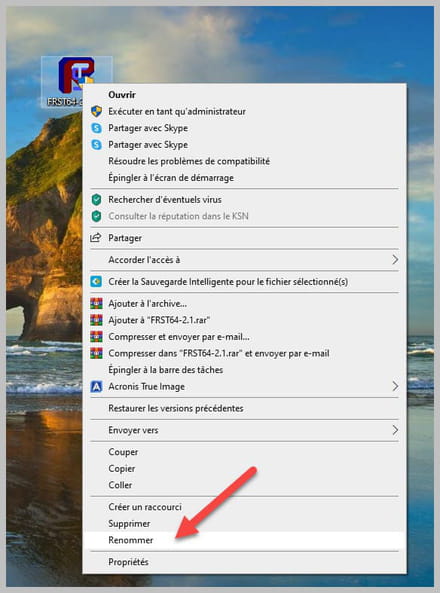
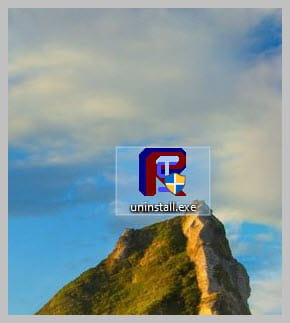
To automatically delete all files/folders created by FRST and the tool itself, rename FRST/FRST64.exe to uninstall.exe and execute it.
The procedure requires a restart
Good luck :-)
--
Security contributor. -
Hello, I'm encountering the same problem.
Could you take a look at it? Thank you
Here are the analysis links:
FRST: https://up.security-x.fr/file.php?h=R3ddab65b22b4f47e70cbf3ebf76e7bb7
Addition: https://up.security-x.fr/file.php?h=R16418c3277e74c50fe51492fe9a443f1 -
Hello,
Reactivate system restore and Create a restore point
*******
******************************
--> Copy what is here https://textup.fr/648754Bl from start:: to end:: (without pasting it anywhere)
--> Open FRST (or FRST64) as administrator and click on Fix
If FRST seems to freeze or is unresponsive, let it run--> The PC will restart
--> A fixlog file is created in the same location as FRST, post it like the other reports
--> Let me know if you still have the problem.
-
Hello, I also have this problem.
Could you help me?
Thank you in advance
Analysis files:
FRST.txt
https://up.security-x.fr/file.php?h=R6c28459f117d0e739a589fb9d2757a29
Addition.txt
https://up.security-x.fr/file.php?h=R01f0550cd1baf2298c286f837f049fdb
-
Procedure to follow in the indicated order:
1- Open FRST as an administrator by right-clicking on FRST and choosing run as administrator
2 - Copy the entire script that is in the box below:Start:: CreateRestorePoint: CloseProcesses: Startup: C:\Users\COD Antéposé\AppData\Roaming\Microsoft\Windows\Start Menu\Programs\Startup\stream.x64.x-all.dat.lnk [2021-04-18] ShortcutAndArgument: stream.x64.x-all.dat.lnk -> C:\Windows\system32\wscript.exe => /E:vbscript "C:\Users\COD Antéposé\AppData\Roaming\stream.x64.x-all.dat.vbs" Task: {E4DC42A1-E7E0-434F-8457-AAEBE5B371C3} - System32\Tasks\Opera scheduled Autoupdate 1640702029 => C:\Users\COD Antéposé\AppData\Local\Programs\Opera\launcher.exe --scheduledautoupdate $(Arg0) (No file) S3 mfeavfk01; \Device\mfeavfk01.sys [X] S3 netprotection_network_filter2; System32\drivers\netprotection_network_filter2.sys [X] HKLM\SOFTWARE\Microsoft\Windows Defender: [DisableAntiSpyware] Restriction HKLM\SOFTWARE\Microsoft\Windows Defender: [DisableAntiVirus] Restriction GroupPolicy-Firefox: Restriction C:\Users\COD Antéposé\AppData\Roaming\stream.x64.x-all.dat.vbs" EmptyTemp: End::3- Once the script is copied, click on Fix, FRST will automatically take the script that is in the clipboard.

Let the fix complete, once it's done you will be asked to restart your PC, do so as soon as prompted, see below.
Then once your computer has restarted:
4- You will have a Fixlog file on your desktop, then send this fixlog report to PJJOINT and give the generated link from PJJOINT in your response.5- CHECK AND TELL ME IF YOUR PROBLEM IS STILL PRESENT
-