
Nb.IF "neither ..., nor ..., nor ..."
Solved
VicRoll
Posted messages
2
Status
Member
-
VicRoll Posted messages 2 Status Member -
VicRoll Posted messages 2 Status Member -
Hello everyone and thanks in advance to those who take the time to respond to me.
Everything is in my screenshot. Don't hesitate if you need more details.
Obviously, my formula attempt doesn't work but it should help you understand the spirit of what I want to do.
Note: The letters A, B, etc. in my spreadsheet symbolize text (not numbers).
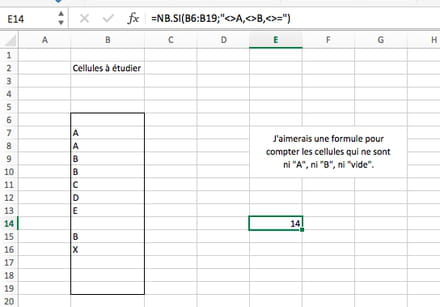
Everything is in my screenshot. Don't hesitate if you need more details.
Obviously, my formula attempt doesn't work but it should help you understand the spirit of what I want to do.
Note: The letters A, B, etc. in my spreadsheet symbolize text (not numbers).

3 answers
-
Hello,
You can write like this
=COUNT(B6:B19)-(COUNTIF(B6:B19,"A")+COUNTIF(B6:B19,"B"))
or even
=COUNTIF(B6:B19,"<>")-(COUNTIF(B6:B19,"A")+COUNTIF(B6:B19,"B"))
A+
Mike-31
I am responsible for what I say, not for what you understand... -
Re,
you can also count the values and subtract each series
=COUNTA(B6:B19)-COUNTIF(B6:B19,"A")-COUNTIF(B6:B19,"B")
or
=COUNTIF(B6:B19,"<>")-COUNTIF(B6:B19,"A")-COUNTIF(B6:B19,"B")
--
A+
Mike-31
I am responsible for what I say, not for what you understand... -
