Disk Adapter: Barracuda 7200.7, 160 Gbytes
Solved
DarkBune
Posted messages
215
Registration date
Status
Member
Last intervention
-
DarkBune Posted messages 215 Registration date Status Member Last intervention -
DarkBune Posted messages 215 Registration date Status Member Last intervention -
Hello, I would like to recover data from an old hard drive dating back to at least 2006. This hard drive is
in ATA, I believe. To do this, I found an old adapter at home that allows me to connect this hard drive to today's PC
. But to be honest, I'm not exactly sure how to connect it. I'm sending you a few
pictures to see if you can help me, thank you :)
https://imagizer.imageshack.com/a/img924/8205/rKswaC.jpg => Hard drive
https://imagizer.imageshack.com/a/img922/89/Y60oon.jpg => hard drive port
https://imagizer.imageshack.com/a/img923/3668/1nT2nq.jpg => ATA 100/133 bidirectional adapter card
https://imagizer.imageshack.com/a/img923/4954/CKLgDz.jpg => adapter + hard drive
https://imagizer.imageshack.com/a/img924/8408/wf4Om0.jpg => adapter connection
in ATA, I believe. To do this, I found an old adapter at home that allows me to connect this hard drive to today's PC
. But to be honest, I'm not exactly sure how to connect it. I'm sending you a few
pictures to see if you can help me, thank you :)
https://imagizer.imageshack.com/a/img924/8205/rKswaC.jpg => Hard drive
https://imagizer.imageshack.com/a/img922/89/Y60oon.jpg => hard drive port
https://imagizer.imageshack.com/a/img923/3668/1nT2nq.jpg => ATA 100/133 bidirectional adapter card
https://imagizer.imageshack.com/a/img923/4954/CKLgDz.jpg => adapter + hard drive
https://imagizer.imageshack.com/a/img924/8408/wf4Om0.jpg => adapter connection
4 answers
-
Hi.
Here are some graphical explanations:
http://imagizer.imageshack.com/img924/0/taEEkH.jpg
you may need to install a driver (or not...)
Talk to you later
--
If you need anything, just let me know!... -
vieu bison boiteu Posted messages 44334 Registration date Status Contributor Last intervention Ambassador 3 592
Hello
there is no need for a driver
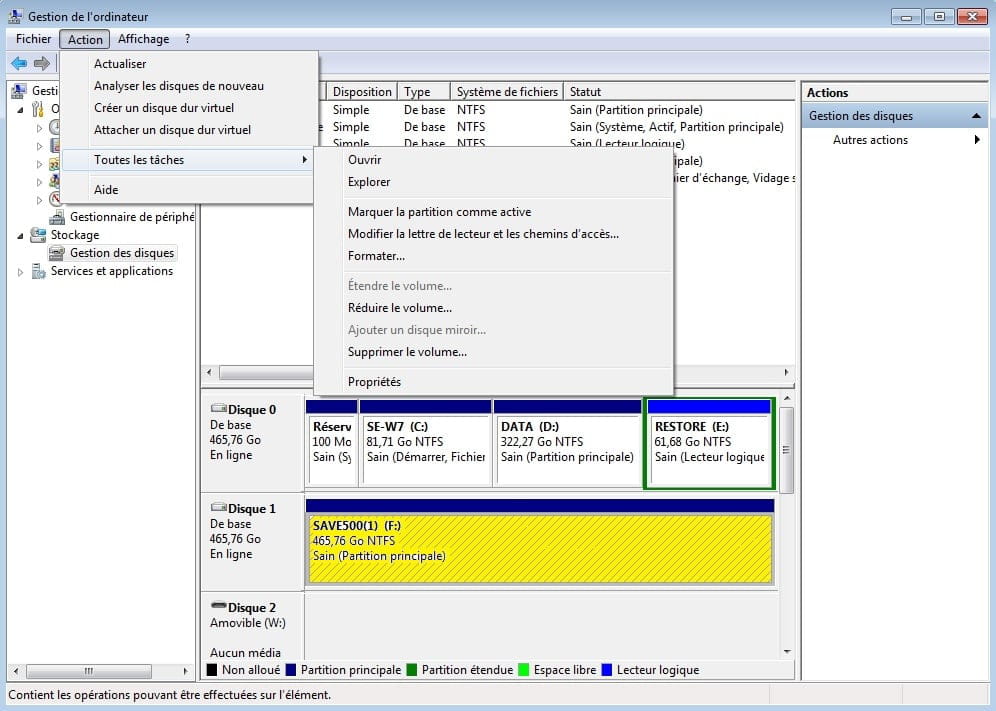
it would be good to take a screenshot of the Disk Management; to see how it looks
see you later
--
no link on the English web page, I'm already flying solo enough-
Hello, I went there but the disk is not detected: https://imagizer.imageshack.com/a/img922/8397/UWAEVF.png
-
-
-
-
Hi
BEFORE detecting it in Windows, check if it's visible in the BIOS (because if it's not there, it won't be under Windows either)
See you later
--
If you need anything, just let me know!... -
vieu bison boiteu Posted messages 44334 Registration date Status Contributor Last intervention Ambassador 3 592
dismantle the disk to do exactly what???
all you could do is replace the green circuit board with another one from the same series
but you need to find one that works
--
no link on an English web page, I'm already stealing enough on my own