Windows Media can't find my music
Solved
monkey7fire
Posted messages
15
Status
Member
-
Firearmygirl -
Firearmygirl -
Hello,
I transferred music (mp3) from my USB stick to my computer, but unfortunately when I go to Windows Media it tells me that there is no music in the folders, even though when I look in the file explorer all the music is there.
If someone could help me, please.
I transferred music (mp3) from my USB stick to my computer, but unfortunately when I go to Windows Media it tells me that there is no music in the folders, even though when I look in the file explorer all the music is there.
If someone could help me, please.
5 answers
-
Hello;
I suggest you do as indicated below if your albums are indeed in the music folder
1- Launch WMP
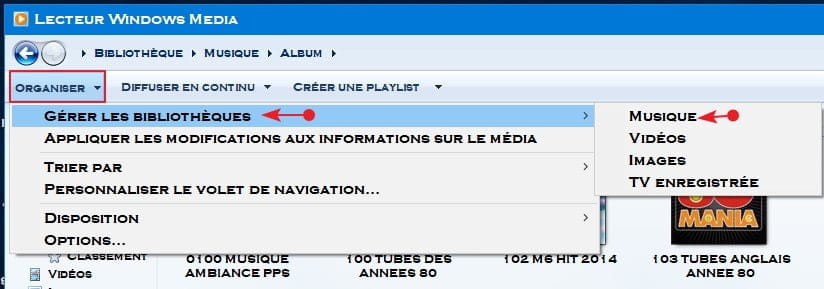
2- Organize tab (at the top left)
3- Click on the little arrow
4- Manage libraries >> Music on the right
5- In the window that opens, click on add and go to the location where the albums are stored and select them >> Include folder and Add >> OK, and normally WMP should recognize and import your albums
See you for your upcoming comments, but if none >>Resolved
--
SincerelyAging well: It's to prefer the time that remains to the time that passes