PC-burned DVD playable on a standalone player.
Solved
REGIT 2000
-
poupougne13 Posted messages 43203 Registration date Status Member Last intervention -
poupougne13 Posted messages 43203 Registration date Status Member Last intervention -
I have burned DVDs on my PC. I want to play them on a standalone player and watch them on the TV. My standalone DVD player does not recognize the disc. It ejects the disc mentioning: Disc cannot be read.
I then tried connecting my PC directly to the TV with an HDMI cable. I selected the correct input. I play the DVD but there's no image. No result.
Is it possible to correct the already burned DVDs?
If I need to redo them, what preparation should I do on the DVD to ensure it can be read by the standalone player before I remake them?
If you can answer my questions, please do so in a way that's easy to understand for a novice like me.
Thank you in advance.
I then tried connecting my PC directly to the TV with an HDMI cable. I selected the correct input. I play the DVD but there's no image. No result.
Is it possible to correct the already burned DVDs?
If I need to redo them, what preparation should I do on the DVD to ensure it can be read by the standalone player before I remake them?
If you can answer my questions, please do so in a way that's easy to understand for a novice like me.
Thank you in advance.
8 answers
-
Good evening...
In "disk management", or something similar, see if you can "finalize" them....
Regards,
@+
"Who wants to climb a mountain starts from the bottom!"
Signed: "Gillette" aka "nobody"! ;) (°!°) -
Just finishing it?
--
"Who wants to climb a mountain starts from the bottom!"
Signed: "Gillette" alias "nobody"! ;) (°!°) -
Hello,
Can you play the DVD on the computer? If so, with which player? If not, there's already an issue...
How did you burn your DVD? I want to know the procedure used, whether it was data disc or DVD-Video; if you don't know, just forget it...
What types of files did you burn: AVI, MP4, others?
What are the video "formats" compatible with a standalone DVD player?
Can you provide the model of the device?
And how is it connected to the TV: Scart or HDMI?
To respond to you, I would say it's either a burning issue or a problem related to the video files... anyway, it's quite difficult to know with the little information we have.
If you used a DVD RW disc, it can be erased to burn again, otherwise, it is not possible to correct a burned DVD R disc.
Best regards
Long live Bobo! ~ Little fish will grow big ~ -
I burned the DVDs on my Acer PC. I can read them very easily and clearly.
I work with Windows 10. My DVD drive says DVD - RAM/-RW-R/RW/+R. All of this is like Chinese to me. You see that what I wrote as a novice is really true. It is connected to the TV device by 3 cables (white, red and yellow). I tried connecting my computer directly to the TV with an HDMI cable: no results. I was thinking of getting a special cable to connect the PC to the TV. Do you think I might be successful? I want to emphasize that the DVDs I burned play perfectly on my PC. It's just that I would like to watch them and show them on the TV. Thank you in advance for your kindness and patience. I used DVD-Rs to make these burns. Would it be better to burn them on DVD+Rs? -
In "disk management," or something similar, see if you can "finalize" them...
--
"He who wants to climb a mountain starts from the bottom!"
Signed: "Gillette" aka "nobody"! ;) (°!°) -
I will assume that it is the file formats that cannot be read by the standalone DVD player.
DVD+R and DVD-R are compatible with the player, so there is no point in using DVD+R instead of DVD-R. The only advantage of using DVD-RW is that they can be erased and burned again if the disk is unreadable, but it is not necessary to buy them unless you want to.
Don't be "frightened" by the length of what I write below, it is actually quite simple.
If the videos are not too long (the maximum recommended duration is 2h30/3h), I suggest you try to create a DVD-Video that should be readable by any standalone DVD player, not knowing if the device can read AVI files made with the DivX and/or XviD video codec and audio in MP3.
To do this, you need to use an authoring software such as DVDStyler or DVD Flick for example.
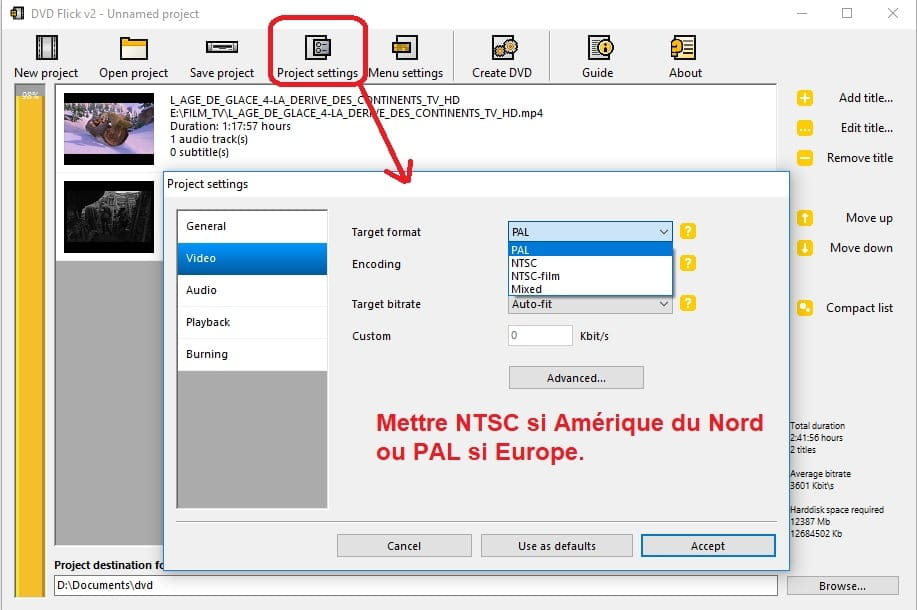
In the software settings, you must set NTSC since you live in Canada, where the standard is different from France, which is PAL.
So you open the software and add your video files. Before or after, you must check that it is indeed NTSC.
You can choose to have a fairly simple menu or not; personally, I don't always include one.
Finally, you start the encoding (conversion) process and you obtain either a folder containing 2 directories AUDIO_TS which is empty and not really important if absent and VIDEO_TS containing IFO, BUP, and VOB files, or an ISO file which is a disk image representing the same content.
To finish, you need to burn using a burning software that allows you to burn DVD-Videos and/or ISO images like CDBurner for example.
In images (click on them to enlarge if needed), this looks like with DVD Flick:
- image 1: adding videos:
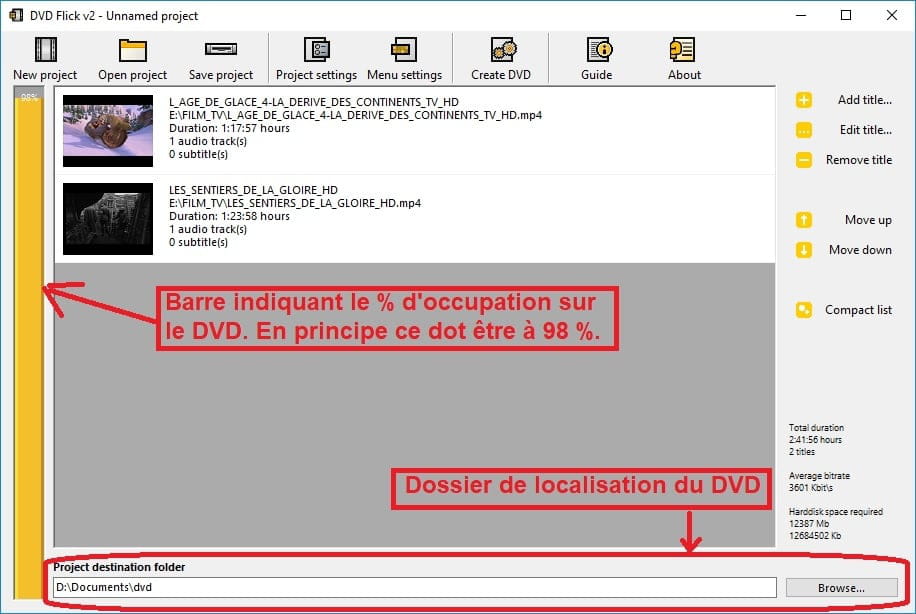
- indications of the software interface:
If the left bar is red, it does not fit because the duration is too long!
- settings for the future DVD to the appropriate standard:
- you can choose a menu or not by going through Menu Setting (they are imposed in this software):
- to start the conversion process, you need to press the Create DVD button at the top and wait. This may take more or less time depending on your computer.
- burning is done with burning software that allows you to burn DVD-Videos like CDBurner for example:
A DVD-Video is always finalized, so there are no worries on that side.
There are many tutorials available online for this software or others of the same type, such as, for example, on this page where the first PDF seems to be quite good: https://www.google.fr/search?q=dvd+flick+tutoriel&ie=utf-8&oe=utf-8&client=firefox-b&gfe_rd=cr&dcr=0&ei=olsBWtKZEuzBXr2sjKgN
Now, if your standalone DVD player can read files in AVI (DivX/XviD and MP3) which I do not know, you can also use conversion software like XMedia Recode or Format Factory.
In this case, however, you need to pay attention to ensure that the dimensions of the video file do not exceed the DVD-Video standard in NTSC, which is 720x480 or 704x480. For Europe, it is 720x576.
If the video is in 16:9, to make the image rendering similar, you need to apply a ratio of approximately 1.778, which gives about 720x404, 704x396 if I am not mistaken, or 640x360 and so on. Use 640x360 if in doubt to be sure ;)
In terms of burning, this is burned as a data disk.
--
Long live Bobo! ~ Little fish will grow big ~ -
Thank you and congratulations. Thanks to you, I was able to solve my DVD problem,
Thanks again and see you next time. -
Good luck REGIT 2000 here and elsewhere,
Bye
--
Long live Bobo! ~ Little fish will become big ~