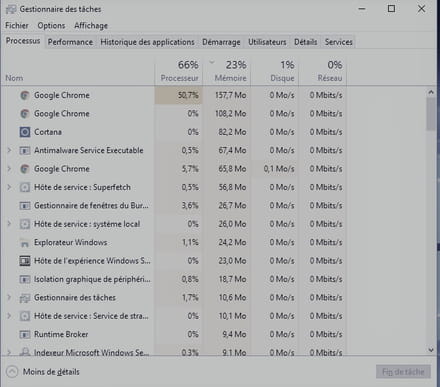
MsMpEng/ svchost is ruining my life completely
gameur
-
Malekal_morte- Posted messages 178136 Registration date Status Moderator, Security Contributor Last intervention -
Malekal_morte- Posted messages 178136 Registration date Status Moderator, Security Contributor Last intervention -
Hello, recently
MsMpEng and svchost (when it's not one, it's the other) are totally ruining my gameplay in my game which is World of Warcraft. They are consuming resources like there's no tomorrow, causing my ms to spike which makes it practically unplayable afterwards... I've noticed recently that when I play, there's a small hissing sound that's quite loud, but it doesn't happen constantly—just once in a while and then it goes away, and so on. I don't know if that's affecting the game or not, which is why I'm wondering what's going on. I hope it's nothing serious. I've already tried a lot of things but to no avail... Thank you for taking the time to read and respond to my post HELP =)
Configuration: Windows / Chrome 59.0.3071.115
MsMpEng and svchost (when it's not one, it's the other) are totally ruining my gameplay in my game which is World of Warcraft. They are consuming resources like there's no tomorrow, causing my ms to spike which makes it practically unplayable afterwards... I've noticed recently that when I play, there's a small hissing sound that's quite loud, but it doesn't happen constantly—just once in a while and then it goes away, and so on. I don't know if that's affecting the game or not, which is why I'm wondering what's going on. I hope it's nothing serious. I've already tried a lot of things but to no avail... Thank you for taking the time to read and respond to my post HELP =)
Configuration: Windows / Chrome 59.0.3071.115
5 answers
-
Hello,
Take a look at: https://forum.malekal.com/viewtopic.php?t=55579&start=
and:
Follow the FRST tutorial. ( take the time to read carefully - everything is well explained ).
Download and run the FRST scan, 3 FRST reports will be generated:- FRST.txt
- Shortcut.txt
- Additionnal.txt
Send these 3 reports to the site https://pjjoint.malekal.com/ and return the 3 pjjoint links that lead to the reports here in a new reply so that we can review them.
--
Please press a key to continue the disinfection... -
Thank you for your quick response despite it being a Sunday,
addition.txt:
https://pjjoint.malekal.com/files.php?id=20170709_13x13c5v5x9
frst.txt:
https://pjjoint.malekal.com/files.php?id=FRST_20170709_12j5i13l13c9
shortcut.txt:
https://pjjoint.malekal.com/files.php?id=20170709_p8x7t9q68 -
You have many crashes of the Radeon program:
Error: (07/09/2017 09:08:47 AM) (Source: Application Error) (EventID: 1000) (User: )
Description: Name of the faulty application RadeonSettings.exe, version: 10.1.1.1682, timestamp: 0x58fea395
Name of the faulty module: unknown, version: 0.0.0.0, timestamp: 0x00000000
Exception code: 0xc000041d
Error offset: 0x0000000000000000
ID of the faulty process: 0x1a84
Start time of the faulty application: 0x01d2f88143e82a8c
Path of the faulty application: C:\Program Files\AMD\CNext\CNext\RadeonSettings.exe
Path of the faulty module: unknown
Report ID: fa8bb112-d8ef-4551-8c28-82d510b2b365
Full name of the faulty package:
ID of the application related to the faulty package:
After that, nothing abnormal.
Does the given link fix things for MsMpEng?
Can you provide a screenshot of the task manager to see?
Haven't you had any gaming issues since you switched to the Creators Update?
Please press a key to continue the cleaning process... -
-
Not too many ideas, everything is fine except for these crashes.
If the AMD program crashes, it might be related to driver issues.
Also check the AMD settings, reset them to default if you have messed with them.
--
Please press a key to continue the disinfection...