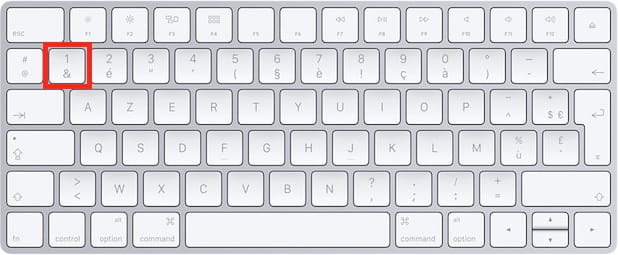
How to create the "&" symbol on a Mac?
Solved
mrterzix
Posted messages
7
Status
Member
-
mrterzix Posted messages 7 Status Member -
mrterzix Posted messages 7 Status Member -
Hello everyone,
here it is, everything is in the title, I can't find how to make the symbol "&" on Mac.
I should specify that I'm posting this message on a Windows computer just in case.
Thank you in advance for your help, see you later! :)
here it is, everything is in the title, I can't find how to make the symbol "&" on Mac.
I should specify that I'm posting this message on a Windows computer just in case.
Thank you in advance for your help, see you later! :)
1 answer
-
Hello,
the & key on Mac is also the key that produces the number 1 in the top row of the keyboard. This is on an Azerty keyboard. On a Qwerty keyboard, it should be the key for the number 7.


Best regards.
EDIT :
https://support.apple.com/kb/PH25242?viewlocale=en_US&locale=en_US
https://support.apple.com/kb/PH25311?locale=en_US&viewlocale=en_US
Always specify your system configuration completely - exact computer model, exact OS version.