Tera Launch Issue
Solved
Haguno
Posted messages
6
Status
Member
-
Haguno Posted messages 6 Status Member -
Haguno Posted messages 6 Status Member -
Hello everyone,
I installed Tera 1 day ago with Gameforge.
I'm asking for help because when I try to launch the game, after all the updates are done, I click on "Play", log in, then click on "Connection" and a red message appears: "An error has occurred, please try again later." (image below)

I want to point out that yesterday, while the error message was present, I quit and then restarted the game and miraculously it launched. I stayed connected for as long as possible before going to sleep.
But this morning, even after several attempts, the game won't start.
So I'm asking for your help because I'm a fan of the game...
If you have any requests (screenshots, etc...) don't hesitate!
Best regards,
Hagu.
I installed Tera 1 day ago with Gameforge.
I'm asking for help because when I try to launch the game, after all the updates are done, I click on "Play", log in, then click on "Connection" and a red message appears: "An error has occurred, please try again later." (image below)
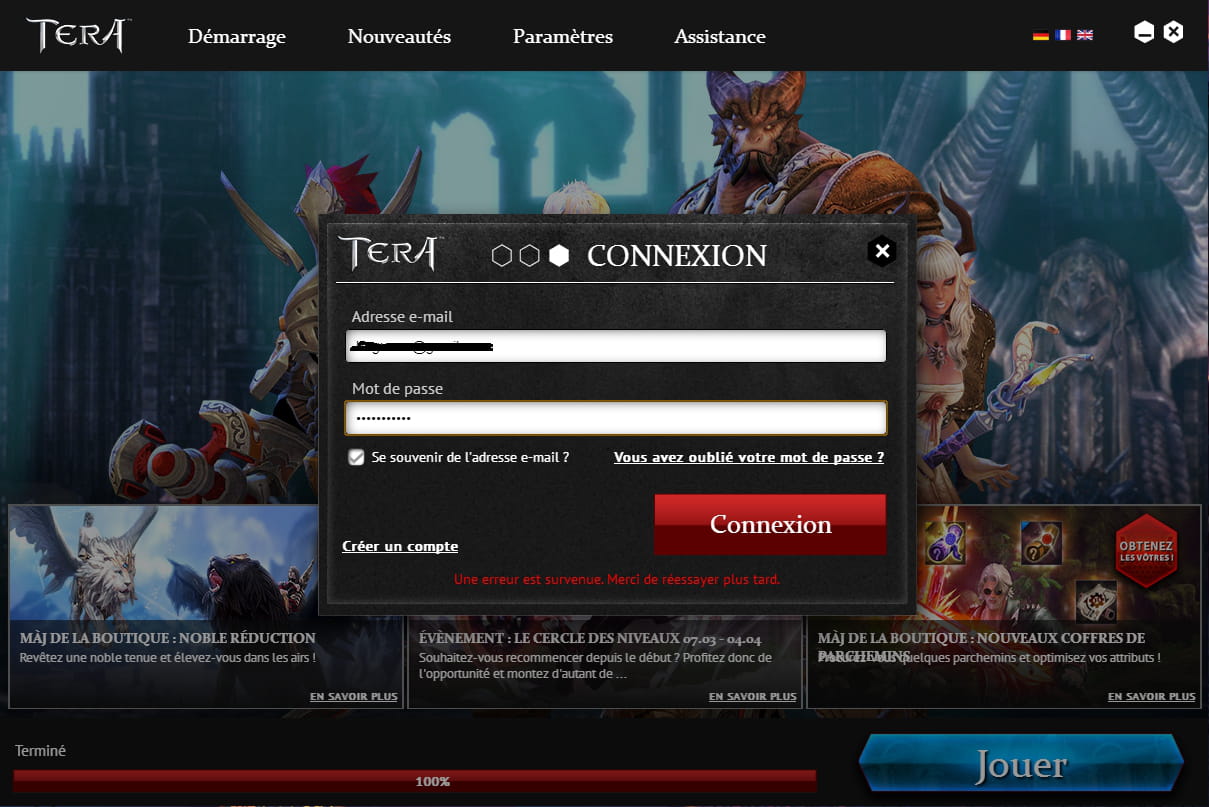
I want to point out that yesterday, while the error message was present, I quit and then restarted the game and miraculously it launched. I stayed connected for as long as possible before going to sleep.
But this morning, even after several attempts, the game won't start.
So I'm asking for your help because I'm a fan of the game...
If you have any requests (screenshots, etc...) don't hesitate!
Best regards,
Hagu.