
Open office auto sum icon

Hello,
My "auto sum" icon has disappeared on Open Office and I can't seem to find it again.
Thank you for your response
Luberonne
My "auto sum" icon has disappeared on Open Office and I can't seem to find it again.
Thank you for your response
Luberonne
2 answers
-
Good evening,
Normally the icon Ʃ is located to the left of the formula bar between fx and =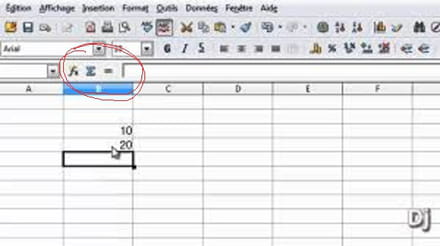
Best regards -
Hi,
What matters is not what appears in the input line but the result in the cell after confirming by pressing Enter following a click on the auto-sum icon.
If the formula is displayed in the cell, you need to go to Tools / Options / Open Office Calc Development on the left side / Display / uncheck Formulas in the Display block on the right side.
Best regards.

