Comment modifier le contenu d'un fichier INI
bistoule
Messages postés
62
Statut
Membre
-
nagaD.scar Messages postés 4500 Statut Membre -
nagaD.scar Messages postés 4500 Statut Membre -
Bonjour,
J'ai besoin de modifier un fichier INI mais il y a des sections.
Apparemment, c'est WRITEINI ou INIWRITE
Quelle est la syntaxe exacte ?
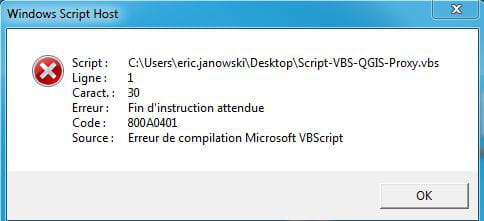
J'ai fait des tests mais ERREUR
Merci de vos réponses
J'ai besoin de modifier un fichier INI mais il y a des sections.
Apparemment, c'est WRITEINI ou INIWRITE
Quelle est la syntaxe exacte ?
J'ai fait des tests mais ERREUR
Merci de vos réponses
3 réponses
-
Salut,
Apparemment, c'est WRITEINI ou INIWRITE
Quel langage?J'ai fait des tests
Quels tests?mais ERREUR
quels erreurs?
naga -
jeannets Messages postés 28462 Date d'inscription Statut Contributeur Dernière intervention Ambassadeur 6 618
Bonjour,
Un fichier ini se modifie avec un éditeur de texte normal comme Notepad ou Notepad ++
voila... il reste à savoir quoi y écrire. -
C'est pour une installation automatisée à distance
Possible à faire en script VBS
WriteINI "C:\test\QGIS2.ini" "proxy" "proxyHost" "monproxy.fr" ????
=> QGIS2.ini => fichier à modifier
=> proxy => c'est la section
=> proxyhost => c'est la clé
=> monproxy.fr => la valeur à mettre par exemple
Avez vous un exemple qui fonctionne ???
Après execution, message erreur
Merci de vos réponses-
A prioris je dirai que la fonction en soit n'existe pas.
Il faut donc rajouter leur définition (read et write) :
Function ReadIni( myFilePath, mySection, myKey )
    ' This function returns a value read from an INI file
    '
    ' Arguments:
    ' myFilePath  [string]  the (path and) file name of the INI file
    ' mySection   [string]  the section in the INI file to be searched
    ' myKey       [string]  the key whose value is to be returned
    '
    ' Returns:
    ' the [string] value for the specified key in the specified section
    '
    ' CAVEAT:     Will return a space if key exists but value is blank
    '
    ' Written by Keith Lacelle
    ' Modified by Denis St-Pierre and Rob van der Woude

    Const ForReading   = 1
    Const ForWriting   = 2
    Const ForAppending = 8

    Dim intEqualPos
    Dim objFSO, objIniFile
    Dim strFilePath, strKey, strLeftString, strLine, strSection

    Set objFSO = CreateObject( "Scripting.FileSystemObject" )

    ReadIni     = ""
    strFilePath = Trim( myFilePath )
    strSection  = Trim( mySection )
    strKey      = Trim( myKey )

    If objFSO.FileExists( strFilePath ) Then
        Set objIniFile = objFSO.OpenTextFile( strFilePath, ForReading, False )
        Do While objIniFile.AtEndOfStream = False
            strLine = Trim( objIniFile.ReadLine )

            ' Check if section is found in the current line
            If LCase( strLine ) = "[" & LCase( strSection ) & "]" Then
                strLine = Trim( objIniFile.ReadLine )

                ' Parse lines until the next section is reached
                Do While Left( strLine, 1 ) <> "["
                    ' Find position of equal sign in the line
                    intEqualPos = InStr( 1, strLine, "=", 1 )
                    If intEqualPos > 0 Then
                        strLeftString = Trim( Left( strLine, intEqualPos - 1 ) )
                        ' Check if item is found in the current line
                        If LCase( strLeftString ) = LCase( strKey ) Then
                            ReadIni = Trim( Mid( strLine, intEqualPos + 1 ) )
                            ' In case the item exists but value is blank
                            If ReadIni = "" Then
                                ReadIni = " "
                            End If
                            ' Abort loop when item is found
                            Exit Do
                        End If
                    End If

                    ' Abort if the end of the INI file is reached
                    If objIniFile.AtEndOfStream Then Exit Do

                    ' Continue with next line
                    strLine = Trim( objIniFile.ReadLine )
                Loop
            Exit Do
            End If
        Loop
        objIniFile.Close
    Else
        WScript.Echo strFilePath & " doesn't exists. Exiting..."
        Wscript.Quit 1
    End If
End Function
Sub WriteIni( myFilePath, mySection, myKey, myValue )
    ' This subroutine writes a value to an INI file
    '
    ' Arguments:
    ' myFilePath  [string]  the (path and) file name of the INI file
    ' mySection   [string]  the section in the INI file to be searched
    ' myKey       [string]  the key whose value is to be written
    ' myValue     [string]  the value to be written (myKey will be
    '                       deleted if myValue is <DELETE_THIS_VALUE>)
    '
    ' Returns:
    ' N/A
    '
    ' CAVEAT:     WriteIni function needs ReadIni function to run
    '
    ' Written by Keith Lacelle
    ' Modified by Denis St-Pierre, Johan Pol and Rob van der Woude

    Const ForReading   = 1
    Const ForWriting   = 2
    Const ForAppending = 8

    Dim blnInSection, blnKeyExists, blnSectionExists, blnWritten
    Dim intEqualPos
    Dim objFSO, objNewIni, objOrgIni, wshShell
    Dim strFilePath, strFolderPath, strKey, strLeftString
    Dim strLine, strSection, strTempDir, strTempFile, strValue

    strFilePath = Trim( myFilePath )
    strSection  = Trim( mySection )
    strKey      = Trim( myKey )
    strValue    = Trim( myValue )

    Set objFSO   = CreateObject( "Scripting.FileSystemObject" )
    Set wshShell = CreateObject( "WScript.Shell" )

    strTempDir  = wshShell.ExpandEnvironmentStrings( "%TEMP%" )
    strTempFile = objFSO.BuildPath( strTempDir, objFSO.GetTempName )

    Set objOrgIni = objFSO.OpenTextFile( strFilePath, ForReading, True )
    Set objNewIni = objFSO.CreateTextFile( strTempFile, False, False )

    blnInSection     = False
    blnSectionExists = False
    ' Check if the specified key already exists
    blnKeyExists     = ( ReadIni( strFilePath, strSection, strKey ) <> "" )
    blnWritten       = False

    ' Check if path to INI file exists, quit if not
    strFolderPath = Mid( strFilePath, 1, InStrRev( strFilePath, "\" ) )
    If Not objFSO.FolderExists ( strFolderPath ) Then
        WScript.Echo "Error: WriteIni failed, folder path (" _
                   & strFolderPath & ") to ini file " _
                   & strFilePath & " not found!"
        Set objOrgIni = Nothing
        Set objNewIni = Nothing
        Set objFSO    = Nothing
        WScript.Quit 1
    End If

    While objOrgIni.AtEndOfStream = False
        strLine = Trim( objOrgIni.ReadLine )
        If blnWritten = False Then
            If LCase( strLine ) = "[" & LCase( strSection ) & "]" Then
                blnSectionExists = True
                blnInSection = True
            ElseIf InStr( strLine, "[" ) = 1 Then
                blnInSection = False
            End If
        End If

        If blnInSection Then
            If blnKeyExists Then
                intEqualPos = InStr( 1, strLine, "=", vbTextCompare )
                If intEqualPos > 0 Then
                    strLeftString = Trim( Left( strLine, intEqualPos - 1 ) )
                    If LCase( strLeftString ) = LCase( strKey ) Then
                        ' Only write the key if the value isn't empty
                        ' Modification by Johan Pol
                        If strValue <> "<DELETE_THIS_VALUE>" Then
                            objNewIni.WriteLine strKey & "=" & strValue
                        End If
                        blnWritten   = True
                        blnInSection = False
                    End If
                End If
                If Not blnWritten Then
                    objNewIni.WriteLine strLine
                End If
            Else
                objNewIni.WriteLine strLine
                    ' Only write the key if the value isn't empty
                    ' Modification by Johan Pol
                    If strValue <> "<DELETE_THIS_VALUE>" Then
                        objNewIni.WriteLine strKey & "=" & strValue
                    End If
                blnWritten   = True
                blnInSection = False
            End If
        Else
            objNewIni.WriteLine strLine
        End If
    Wend

    If blnSectionExists = False Then ' section doesn't exist
        objNewIni.WriteLine
        objNewIni.WriteLine "[" & strSection & "]"
            ' Only write the key if the value isn't empty
            ' Modification by Johan Pol
            If strValue <> "<DELETE_THIS_VALUE>" Then
                objNewIni.WriteLine strKey & "=" & strValue
            End If
    End If

    objOrgIni.Close
    objNewIni.Close

    ' Delete old INI file
    objFSO.DeleteFile strFilePath, True
    ' Rename new INI file
    objFSO.MoveFile strTempFile, strFilePath

    Set objOrgIni = Nothing
    Set objNewIni = Nothing
    Set objFSO    = Nothing
    Set wshShell  = Nothing
End Sub
et maintenant tu peux faire
WriteIni "C:\www\ini_dir\test.ini", "TEST1", "My1stKey", "My1stValue"
naga
-