
Besoin d'aide pour désinfecter mon PC!
Bonjour,
Je me tourne vers vous car je pense que mon PC a un virus mais je n'en suis pas sure.
Il est lent, il plante, il s'éteint tout seul et hier soir j'ai eu droit à l'écran bleu qui fait flipper!!
Je n'ai pas eu le temps de lire le message car l'écran s'est éteint juste après mais l'unité centrale n'a jamais voulu s'arrêter, il a fallu que je l'éteigne manuellement. Et ce matin, il a également eu du mal à démarrer, forcément!
Je ne suis pas une pro mais là, je pense qu'il y a quelque chose qui cloche.
Je vous remercie d'avance pour votre aide.
Cordialement
Vanessa
Je me tourne vers vous car je pense que mon PC a un virus mais je n'en suis pas sure.
Il est lent, il plante, il s'éteint tout seul et hier soir j'ai eu droit à l'écran bleu qui fait flipper!!
Je n'ai pas eu le temps de lire le message car l'écran s'est éteint juste après mais l'unité centrale n'a jamais voulu s'arrêter, il a fallu que je l'éteigne manuellement. Et ce matin, il a également eu du mal à démarrer, forcément!
Je ne suis pas une pro mais là, je pense qu'il y a quelque chose qui cloche.
Je vous remercie d'avance pour votre aide.
Cordialement
Vanessa
6 réponses
-
En parcourant les divers sujets, j'ai essayé d'anticiper un peu et j'ai donc lancé ADWcleaner (que j'avais déjà sur mon pc d'ailleurs)
Voici le rapport, si une âme charitable passe par là...
# AdwCleaner v3.308 - Rapport créé le 27/08/2016 à 12:20:31
# Mis à jour le 20/08/2014 par Xplode
# Système d'exploitation : Windows Vista (TM) Home Premium Service Pack 2 (32 bits)
# Nom d'utilisateur : Vaness - PC-DE-VANESS
# Exécuté depuis : C:\Users\Vaness\Desktop\adwcleaner_3-308_fr_430277.exe
# Option : Nettoyer- [ Services ] *****
- [ Fichiers / Dossiers ] *****
- [ Tâches planifiées ] *****
- [ Raccourcis ] *****
- [ Registre ] *****
- [ Navigateurs ] *****
-\\ Internet Explorer v9.0.8112.16789
-\\ Mozilla Firefox v
-\\ Google Chrome v49.0.2623.112
[ Fichier : C:\Users\Vaness\AppData\Local\Google\Chrome\User Data\Default\preferences ]
AdwCleaner[R0].txt - [7438 octets] - [23/08/2014 04:17:24]
AdwCleaner[R1].txt - [2002 octets] - [12/06/2015 13:33:20]
AdwCleaner[R2].txt - [2130 octets] - [04/02/2016 15:31:45]
AdwCleaner[R3].txt - [1247 octets] - [12/07/2016 14:28:21]
AdwCleaner[R4].txt - [1315 octets] - [27/08/2016 12:18:32]
AdwCleaner[S0].txt - [7366 octets] - [23/08/2014 04:18:35]
AdwCleaner[S1].txt - [2082 octets] - [12/06/2015 13:38:09]
AdwCleaner[S2].txt - [1948 octets] - [04/02/2016 15:34:25]
AdwCleaner[S3].txt - [1237 octets] - [27/08/2016 12:20:31]
########## EOF - C:\AdwCleaner\AdwCleaner[S3].txt - [1297 octets] ########## -
ModérateurSalut,
Pas un problème de virus.
Lance Whocrashed et fourni le rapport
puis :
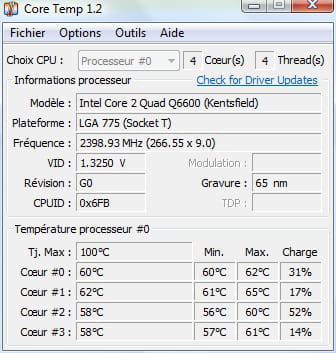
Installe "Real Temp" ou "Coretemp" pour Monitorer la température de l'ordinateur.
Voir à combien monte la température de l'ordinateur lors de son utilisation. Celle-ci ne doit pas dépasser les 60 degrés Celsius. Si possible joindre au message une capture d'écran du logiciel.
et enfin :
Suis le tutoriel FRST. ( prends le temps de lire attentivement - tout y est bien expliqué ).
Télécharge et lance le scan FRST, 3 rapports FRST seront générés :- FRST.txt
- Shortcut.txt
- Additionnal.txt
Envoie ces 3 rapports sur le site http://pjjoint.malekal.com/ et en retour donne les 3 liens pjjoint qui mènent aux rapports ici dans une nouvelle réponse afin que l'on puisse les consulter.
-
Merci de t'occuper de mon cas!!
Voici le rapport Whocrashed:
Crash Dump Analysis
--------------------------------------------------------------------------------
Crash dump directory: C:\Windows\Minidump
Crash dumps are enabled on your computer.
On Fri 22/07/2016 08:06:05 GMT your computer crashed
crash dump file: C:\Windows\Minidump\Mini072216-01.dmp
This was probably caused by the following module: nvlddmkm.sys (nvlddmkm+0x17BBDD)
Bugcheck code: 0x1000007F (0x8, 0xFFFFFFFF80158000, 0x0, 0x0)
Error: UNEXPECTED_KERNEL_MODE_TRAP_M
file path: C:\Windows\system32\drivers\nvlddmkm.sys
product: NVIDIA Windows Kernel Mode Driver, Version 341.44
company: NVIDIA Corporation
description: NVIDIA Windows Kernel Mode Driver, Version 341.44
Bug check description: This indicates that a trap was generated by the Intel CPU and the kernel failed to catch this trap.
This appears to be a typical software driver bug and is not likely to be caused by a hardware problem. This problem might also be caused because of overheating (thermal issue).
A third party driver was identified as the probable root cause of this system error. It is suggested you look for an update for the following driver: nvlddmkm.sys (NVIDIA Windows Kernel Mode Driver, Version 341.44 , NVIDIA Corporation).
Google query: NVIDIA Corporation UNEXPECTED_KERNEL_MODE_TRAP_M
On Fri 22/07/2016 08:06:05 GMT your computer crashed
crash dump file: C:\Windows\memory.dmp
This was probably caused by the following module: ntkrpamp.exe (nt!Kei386EoiHelper+0x1736)
Bugcheck code: 0x7F (0x8, 0xFFFFFFFF80158000, 0x0, 0x0)
Error: UNEXPECTED_KERNEL_MODE_TRAP
Bug check description: This bug check indicates that the Intel CPU generated a trap and the kernel failed to catch this trap.
A third party driver was identified as the probable root cause of this system error. It is suggested you look for an update for the following driver: ntkrpamp.exe .
Google query: ntkrpamp.exe UNEXPECTED_KERNEL_MODE_TRAP
On Thu 21/07/2016 13:51:03 GMT your computer crashed
crash dump file: C:\Windows\Minidump\Mini072116-02.dmp
This was probably caused by the following module: nvlddmkm.sys (nvlddmkm+0x17BBDD)
Bugcheck code: 0x1000007F (0x8, 0xFFFFFFFF80158000, 0x0, 0x0)
Error: UNEXPECTED_KERNEL_MODE_TRAP_M
file path: C:\Windows\system32\drivers\nvlddmkm.sys
product: NVIDIA Windows Kernel Mode Driver, Version 341.44
company: NVIDIA Corporation
description: NVIDIA Windows Kernel Mode Driver, Version 341.44
Bug check description: This indicates that a trap was generated by the Intel CPU and the kernel failed to catch this trap.
This appears to be a typical software driver bug and is not likely to be caused by a hardware problem. This problem might also be caused because of overheating (thermal issue).
A third party driver was identified as the probable root cause of this system error. It is suggested you look for an update for the following driver: nvlddmkm.sys (NVIDIA Windows Kernel Mode Driver, Version 341.44 , NVIDIA Corporation).
Google query: NVIDIA Corporation UNEXPECTED_KERNEL_MODE_TRAP_M
On Thu 21/07/2016 12:05:54 GMT your computer crashed
crash dump file: C:\Windows\Minidump\Mini072116-01.dmp
This was probably caused by the following module: nvlddmkm.sys (nvlddmkm+0x17BBDD)
Bugcheck code: 0x1000007F (0x8, 0xFFFFFFFF8BF16130, 0x0, 0x0)
Error: UNEXPECTED_KERNEL_MODE_TRAP_M
file path: C:\Windows\system32\drivers\nvlddmkm.sys
product: NVIDIA Windows Kernel Mode Driver, Version 341.44
company: NVIDIA Corporation
description: NVIDIA Windows Kernel Mode Driver, Version 341.44
Bug check description: This indicates that a trap was generated by the Intel CPU and the kernel failed to catch this trap.
This appears to be a typical software driver bug and is not likely to be caused by a hardware problem. This problem might also be caused because of overheating (thermal issue).
A third party driver was identified as the probable root cause of this system error. It is suggested you look for an update for the following driver: nvlddmkm.sys (NVIDIA Windows Kernel Mode Driver, Version 341.44 , NVIDIA Corporation).
Google query: NVIDIA Corporation UNEXPECTED_KERNEL_MODE_TRAP_M
On Thu 25/02/2016 17:15:36 GMT your computer crashed
crash dump file: C:\Windows\Minidump\Mini022516-01.dmp
This was probably caused by the following module: avkmgr.sys (avkmgr+0x300F)
Bugcheck code: 0x1000008E (0xFFFFFFFFC0000005, 0xFFFFFFFF81CB2C4D, 0xFFFFFFFF8D751B94, 0x0)
Error: KERNEL_MODE_EXCEPTION_NOT_HANDLED_M
file path: C:\Windows\system32\drivers\avkmgr.sys
product: Avira Product Family
company: Avira Operations GmbH & Co. KG
description: Avira Manager Driver
Bug check description: This indicates that a kernel-mode program generated an exception which the error handler did not catch.
This appears to be a typical software driver bug and is not likely to be caused by a hardware problem.
A third party driver was identified as the probable root cause of this system error. It is suggested you look for an update for the following driver: avkmgr.sys (Avira Manager Driver, Avira Operations GmbH & Co. KG).
Google query: Avira Operations GmbH & Co. KG KERNEL_MODE_EXCEPTION_NOT_HANDLED_M
On Wed 23/12/2015 09:50:56 GMT your computer crashed
crash dump file: C:\Windows\Minidump\Mini122315-01.dmp
This was probably caused by the following module: avgntflt.sys (avgntflt+0x696B)
Bugcheck code: 0x50 (0xFFFFFFFFAEEFF0F0, 0x0, 0xFFFFFFFFA020D96B, 0x0)
Error: PAGE_FAULT_IN_NONPAGED_AREA
file path: C:\Windows\system32\drivers\avgntflt.sys
product: Avira Product Family
company: Avira Operations GmbH & Co. KG
description: Avira Minifilter Driver
Bug check description: This indicates that invalid system memory has been referenced.
This appears to be a typical software driver bug and is not likely to be caused by a hardware problem.
A third party driver was identified as the probable root cause of this system error. It is suggested you look for an update for the following driver: avgntflt.sys (Avira Minifilter Driver, Avira Operations GmbH & Co. KG).
Google query: Avira Operations GmbH & Co. KG PAGE_FAULT_IN_NONPAGED_AREA
On Mon 07/09/2015 20:59:33 GMT your computer crashed
crash dump file: C:\Windows\Minidump\Mini090715-01.dmp
This was probably caused by the following module: avgntflt.sys (avgntflt+0x6931)
Bugcheck code: 0x1000007E (0xFFFFFFFFC0000005, 0xFFFFFFFF90DDD931, 0xFFFFFFFF8BD9BB8C, 0xFFFFFFFF8BD9B888)
Error: SYSTEM_THREAD_EXCEPTION_NOT_HANDLED_M
file path: C:\Windows\system32\drivers\avgntflt.sys
product: Avira Product Family
company: Avira Operations GmbH & Co. KG
description: Avira Minifilter Driver
Bug check description: This indicates that a system thread generated an exception which the error handler did not catch.
This appears to be a typical software driver bug and is not likely to be caused by a hardware problem.
A third party driver was identified as the probable root cause of this system error. It is suggested you look for an update for the following driver: avgntflt.sys (Avira Minifilter Driver, Avira Operations GmbH & Co. KG).
Google query: Avira Operations GmbH & Co. KG SYSTEM_THREAD_EXCEPTION_NOT_HANDLED_M
On Thu 25/06/2015 08:32:10 GMT your computer crashed
crash dump file: C:\Windows\Minidump\Mini062515-01.dmp
This was probably caused by the following module: nvlddmkm.sys (nvlddmkm+0x17BBDD)
Bugcheck code: 0x1000007F (0x8, 0xFFFFFFFF8BD4A130, 0x0, 0x0)
Error: UNEXPECTED_KERNEL_MODE_TRAP_M
file path: C:\Windows\system32\drivers\nvlddmkm.sys
product: NVIDIA Windows Kernel Mode Driver, Version 341.44
company: NVIDIA Corporation
description: NVIDIA Windows Kernel Mode Driver, Version 341.44
Bug check description: This indicates that a trap was generated by the Intel CPU and the kernel failed to catch this trap.
This appears to be a typical software driver bug and is not likely to be caused by a hardware problem. This problem might also be caused because of overheating (thermal issue).
A third party driver was identified as the probable root cause of this system error. It is suggested you look for an update for the following driver: nvlddmkm.sys (NVIDIA Windows Kernel Mode Driver, Version 341.44 , NVIDIA Corporation).
Google query: NVIDIA Corporation UNEXPECTED_KERNEL_MODE_TRAP_M
On Fri 12/06/2015 08:57:27 GMT your computer crashed
crash dump file: C:\Windows\Minidump\Mini061215-01.dmp
This was probably caused by the following module: win32k.sys (win32k+0x1A168A)
Bugcheck code: 0x1000008E (0xFFFFFFFFC0000005, 0xFFFFFFFF81A6168A, 0xFFFFFFFFF4D8BB50, 0x0)
Error: KERNEL_MODE_EXCEPTION_NOT_HANDLED_M
file path: C:\Windows\system32\win32k.sys
product: Système d'exploitation Microsoft® Windows®
company: Microsoft Corporation
description: Pilote Win32 multi-utilisateurs
Bug check description: This indicates that a kernel-mode program generated an exception which the error handler did not catch.
This appears to be a typical software driver bug and is not likely to be caused by a hardware problem.
The crash took place in a standard Microsoft module. Your system configuration may be incorrect. Possibly this problem is caused by another driver on your system that cannot be identified at this time.
--------------------------------------------------------------------------------
Conclusion
--------------------------------------------------------------------------------
9 crash dumps have been found and analyzed. 4 third party drivers have been identified to be causing system crashes on your computer. It is strongly suggested that you check for updates for these drivers on their company websites. Click on the links below to search with Google for updates for these drivers:
avkmgr.sys (Avira Manager Driver, Avira Operations GmbH & Co. KG)
nvlddmkm.sys (NVIDIA Windows Kernel Mode Driver, Version 341.44 , NVIDIA Corporation)
avgntflt.sys (Avira Minifilter Driver, Avira Operations GmbH & Co. KG)
ntkrpamp.exe
If no updates for these drivers are available, try searching with Google on the names of these drivers in combination with the errors that have been reported for these drivers. Include the brand and model name of your computer as well in the query. This often yields interesting results from discussions on the web by users who have been experiencing similar problems.
Read the topic general suggestions for troubleshooting system crashes for more information.
Note that it's not always possible to state with certainty whether a reported driver is responsible for crashing your system or that the root cause is in another module. Nonetheless it's suggested you look for updates for the products that these drivers belong to and regularly visit Windows update or enable automatic updates for Windows. In case a piece of malfunctioning hardware is causing trouble, a search with Google on the bug check errors together with the model name and brand of your computer may help you investigate this further.
-
Maintenant Coretemp:
-
ModérateurAvira et Nvidia reviennent souvent dans les plantages.
Désinstalle Antivir et vois si tu as des mises à jour pour les pilotes de ta carte graphiques.
-
Voici les 3 liens FRST:
FRST: https://pjjoint.malekal.com/files.php?id=FRST_20160828_l5j9f8h6p12
ADDITION: https://pjjoint.malekal.com/files.php?id=20160828_u14m10x7u7z6
SHORTCUT: https://pjjoint.malekal.com/files.php?id=20160828_l10d7w10t15g14
Et donc si j'ai bien compris, je dois désintaller mon antivirus???-
-
-
Modérateur@Vaness4550Non, evite les sites de streaming illégaux etc.
Tu avais des plantages tous les combien ?
Faudrait voir si ça continue. -
Ça plantait 2 ou 3 fois par semaine. On va voir si ça recommence ou pas!
Pour le coup, pas d'antivirus du tout, c'est quand même pas rassurant.
Je viens de desintaller Google Chrome car à chaque fois que je l'ouvrais un message d'alerte s'affichait avec Avira donc pas très rassurant! Quel navigateur choisir maintenant?
Et qu'est ce que je peux faire d'autre pour nettoyer mon PC? Faire en sorte qu'il dure encore...
En tout cas merci pour ton aide! -
Modérateur@Vaness4550Tu peux réinstaller Google, c'est juste qu'il faut faire un reset du profil :
- Exporte tes marques pages / favoris sous Google Chrome
- Désinstalle Google Chrome depuis le "Panneau de configuration", "Programmes et fonctionnalités" en n'oubliant pas de cocher l'option de "Suppression des profils."
Au premier démarrage de Google Chrome, tu dois le trouver vierge, comme lors de la première installation, pas de page de démarrage habituelle, pas d'extensions rajoutées, rien, tout doit avoir disparu.- Ré-initialise Google Chrome
- Ré-installe complètement Google Chrome
- Ré-importe tes marques pages / favoris sous Google Chrome
-
-
Quel navigateur choisir maintenant: Go Mozilla Firefox avec u Block Origin.
--

