Set a video as a screensaver on Windows 10
Anonymous user
-
Anonymous user -
Anonymous user -
Hello, I would like to know how to set a video as a screensaver in Windows 10, thank you.
1 answer
-
pistouri Posted messages 19010 Registration date Status Contributor Last intervention Ambassador 8 732
Good evening,
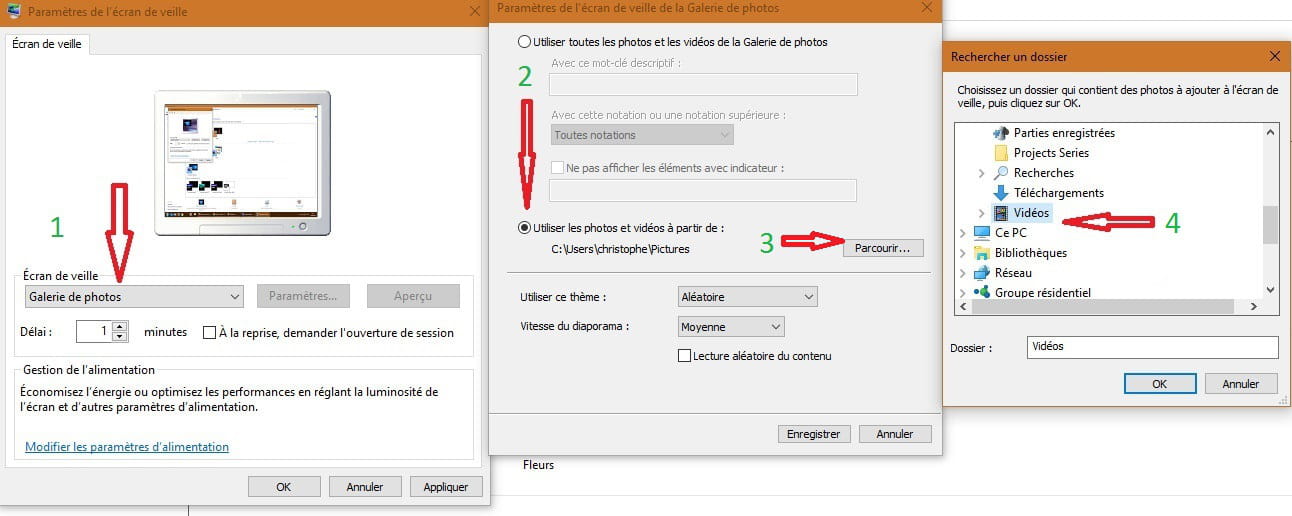
right-click on the desktop
Personalize
Themes
Theme settings (in the right pane)
Screen saver
select photo gallery
set the delay to 7 minutes for example
then click on settings....
use photos and videos from
click on browse
select the video folder (if your videos are indeed in this folder)
and select a video

--
scalpel