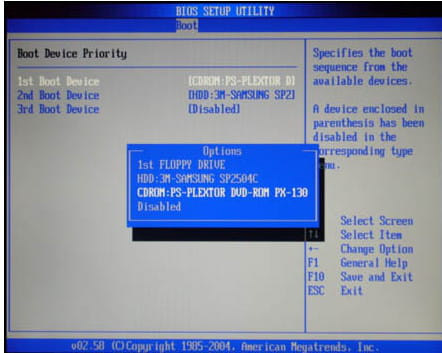
Priorité de démarrage du CD-ROM… Aucun support, système d’exploitation manquant.
Hello,
I have this message when turning on my computer but nothing stayed plugged into it as I’ve seen in other replies, so I wanted to know if you could help me, thanks in advance
Configuration: iPhone / Safari 9.0
I have this message when turning on my computer but nothing stayed plugged into it as I’ve seen in other replies, so I wanted to know if you could help me, thanks in advance
Configuration: iPhone / Safari 9.0
3 answers
-
Contributorgo into the BIOS to check in the boot tab if the hard drive (HDD) is first in the boot order
--
pistouri -
Contributorlook in the startup tab (boot if in English)
the hdd is your main hard drive (it's necessarily there)
then:
boot device priority or boot device or something like that
it must be on the first line
move with the keyboard arrows
example:
then
and there you move with the keyboard arrow to put the hdd on the first line
then press f10 keyboard key to save and restart.
it may already be on the first line.
we'll see later.
--
pistol -
ContributorWhat is the brand of your computer?
otherwise it’s F2 in general
turn off the computer
then turn the computer back on by tapping the F2 key continuously
you will then be in the BIOS.
--
pistori