Unconnected laptop battery
Solved
Hello to you,
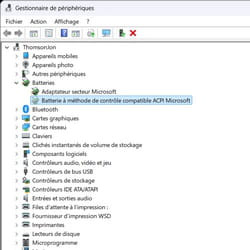
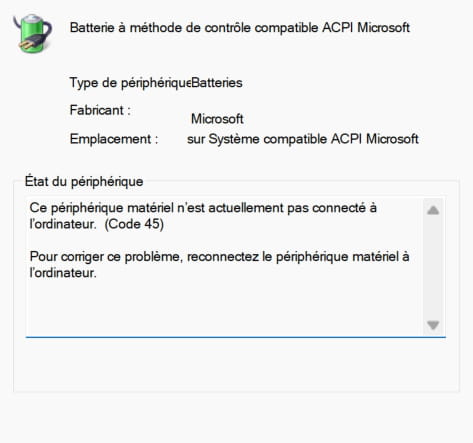
My machine no longer detects its battery and therefore does not show its charge percentage, does not switch to eco mode, and shuts down abruptly once it is empty (so far, logical). In the device manager: battery with Microsoft ACPI Compliant Control Method (code 45).
When plugged in, the fan runs at full speed and then stops constantly.
Thomson N15R53 (sorry about that)
Win11 26H2 build 26300.9711
5 answers
-
Hello,
The most likely issue is that the battery is faulty.
However, you should perform several tests to see if it's Windows that can no longer detect it.
The BIOS should also be checked.
If your PC has been dropped or hit, it's possible that the battery has become disconnected.
What year is the PC?
-
Contributor
Hello everyone
If the battery compartment is designed to be accessible without completely disassembling the computer, try removing and then reinserting the battery (laptop unplugged from the power supply, of course)
If not, don't look for it, as already mentioned by my fellow participants: A one-month-old laptop = return for warranty service
-
-
Contributor@baladur13
Hello baladur13
Thank you for this clarification, so the after-sales return is the best solution for the technician.
-
-
Hello, thank you for your response,
The PC is brand new, I've had it for less than a month. It has never fallen or received any shocks.
It's the code 45 that worries me; I think it might be a factory problem and I can take a look in the BIOS, but I'm not too keen on fiddling with things while the machine is still under warranty.
But if you have any advice for additional checks, I would appreciate it.
Best regards
-
Hi,
The code 45 simply indicates a hardware detection problem.
Have you checked whether the PC only works when the charger is plugged in and shuts down as soon as you unplug it?
At this point, you should suspect the battery is over 80% faulty, I think.
The PC is new, so don’t hesitate to use its warranty and definitely don’t touch anything.
-
-
-
Thank you all for taking the time to look for and answer my question.
There was no factory defect with this computer; the issue occurred while leaving the computer on standby while charging a phone via the USB-C port (located right next to the power port).
Indeed, it’s going back for service and a refund.
When it’s cheap, in reality, it’s already too expensive.
Thanks again to all of you.
-
Hello,
it was while leaving the computer on standby with power, while charging a phone through the USB-C port (located right next to the power port) that the issue occurred.
Your move was daring. I have a powerful laptop, but I've never used its USB connection to charge a smartphone or anything else, especially leaving your laptop on standby, which serves no purpose!
What do you gain... a few precious minutes? It's better to turn it off using the "Start -> Shut down" command. Today's PCs are so fast at starting up the system.
-
@Panth33ra
Hello,
My PC is on 24/7, if only for the night backups, which doesn't affect the battery.
It's true that it's very rare for me to connect something via USB that charges, like a phone, but since it’s hard to see, why should it drain the battery faster than it can charge (except if the phone is connected for something else like file transfer, it's not a good idea compared to a fast charger or even a regular one).
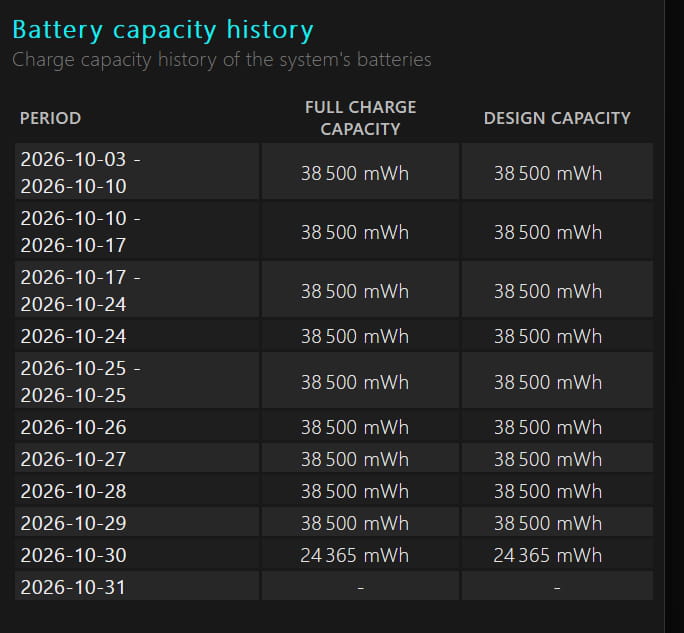
Indirectly, if this problem occurs, it's because the battery is defective or undersized; it’s apparently rated at 38 Wh where the standard is 50-60: indeed, as the author says, cheap can be expensive.
-
-
There was nothing intentional, in fact, I was just charging the laptop and the phone was plugged in. I was called in an emergency and left everything in place.
The mistake is entirely mine, but it's a shame there isn't an automatic safety feature for these situations.
I think everything was fine until the laptop battery was full and the phone was still requesting a charge. I regularly perform this type of operation, I always unplug when the laptop is full, and I've never had this problem in the past, even if the phone remains plugged in.
I have a smartphone charger ???? and I wouldn't put the Thomson N15R53 in the category of "quick-start" computers. It takes about 2 minutes for all the application and service logs.