
Create text columns
Solved
camillavamp
-
camillavamp -
camillavamp -
Hello,
I want to create columns in a text box.
On several forums, they say to go into sections that are not in my Photoshop CS6.
I must be missing an extension.
Does anyone have an idea?
Configuration: Mac OS X (10.10.2) / Chrome 41.0.2272.104
I want to create columns in a text box.
On several forums, they say to go into sections that are not in my Photoshop CS6.
I must be missing an extension.
Does anyone have an idea?
Configuration: Mac OS X (10.10.2) / Chrome 41.0.2272.104
4 answers
-
Hello
Can you please clarify what you mean by "text column"?
Do you mean a text included in a column layout?
What are these sections that you were told about?-
-
to make your text understood in a defined space:
- either you determine this space by default - for example, marked by a colored box on a layer that you will delete at the end - and you type your text inside it while justifying it as best as you can
- or you create a path in which you type your text that will therefore be captive and the justification will occur on its own according to your settings
of course, you can create as many different spaces as you need
you could also create a sort of template with the spaces reserved for the texts
I'm hesitating about what would be more practical for your project, it's up to you to decide -
Thank you.
I don't know how to deal with the things you're suggesting, but I'm probably too much of a beginner.
For now, I've just created 2 boxes and cut my text on one side and pasted it on the other side. I would have liked the text to automatically switch columns. (Like in Word or Pages)
Anyway, I'm too much of a beginner to fully grasp the language :)
Thanks anyway!
-
-
it is not possible for your text to change columns by itself in Photoshop
basically, you will have to do something like this: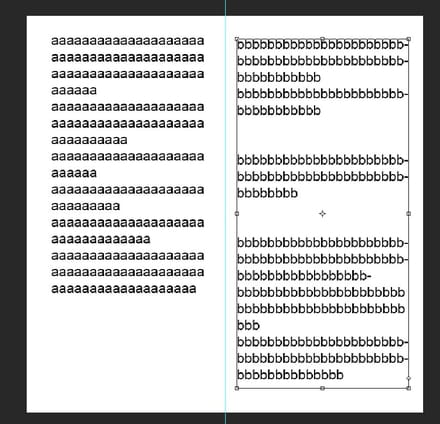
to summarize, it involves drawing a rectangle and typing inside
nothing very complicated, it's doable without knowing the software very well
Photoshop is not ideal for doing this but if you have no other means and if it meets your request I can explain how to do it -
Why not type the text in Word, convert the doc file into an image file, duplicate the layer, remove the background (if needed), and insert that layer into the image file that requires this text? That's basic; the proof is that I know how to do it.
-
Hi
(I saw the Colum add-on but it is not compatible with CS6)
Compatible with Photoshop CC, were you talking about this one?
http://uberplugins.cc/ubercolumns.html-
Yes, I downloaded it and the extension installer doesn't want to install it.
It says the package is incorrect.
I have Photoshop CS6.- Ok, I believe you willingly
On several forums, they say to go to sections that aren’t in my Photoshop CS6.
What are the links? To my knowledge, Photoshop CC doesn’t have more additional functions for aligning text than CS6
Everything is there and it's common to both
https://helpx.adobe.com/fr/photoshop/using/formatting-paragraphs.html
For now, I’ve just created 2 boxes and cut my text on one side and pasted it on the other side.
In your case, that’s the best and simplest method, you pull two parallel text areas with the text tool and it works
For what you wanted in the beginning, it's possible in InDesign, not in Photoshop.
-
-

