Assassin's Creed Rogue display issue, GTX980 29" screen

Cpassimple
Posted messages
3987
Status
Member
-
Kendrickxy Posted messages 404 Status Member -
Kendrickxy Posted messages 404 Status Member -
Hello, I just installed a GTX980 4Gb in my system, the AMD drivers were removed in order to properly install the NVidia drivers. So far, everything is going well (great benchmarks, overclocking with failures and then perfect, re-benchmarking, then returning to stock configuration to try it on games).
Everything was fine until Assassin's Creed Rogue, where the game appears distorted (see image) when the resolution is set to 2560x1080
And at 1920x1080, part of the image is missing
The main screen is a 29-inch LG Ultrawide 2560x1080 75 hertz (configured at 60 Hertz)
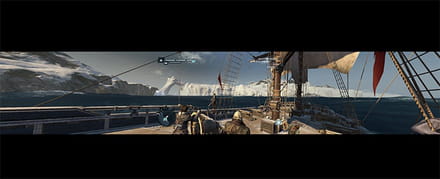
How can I resolve this formatting issue?
Thank you
Configuration: MSI Z87-G45 Gaming / i7 4790k / Crossfire Radeon HD 7950 with Boost - 3 Go / 16Go Corsair DDR3 2133MHz / 250Go SSD Sata III / 4To Sata II HDD / Homemade water cooling EK, XSPC, Swiftech, Noctua / Modular 850Watts 80+ / Phantom USB3
I5 2500k / Asus Sabertooth P67 / Corsair Hydro H80 / 8Go Corsair BallistiX 2133mhz / 120Go Crucial M500 SSD / 3x 500Go 7200RPM / Antec Signature 850Watts 80+ / NZXT Phantom
Dell Alienware M15X (2009)
Android:
Nexus 7 32Go Root
Asus Xperia Z1 Root
Achos 80 Titanium
Achos 90-E Titanium
Everything was fine until Assassin's Creed Rogue, where the game appears distorted (see image) when the resolution is set to 2560x1080
And at 1920x1080, part of the image is missing
The main screen is a 29-inch LG Ultrawide 2560x1080 75 hertz (configured at 60 Hertz)
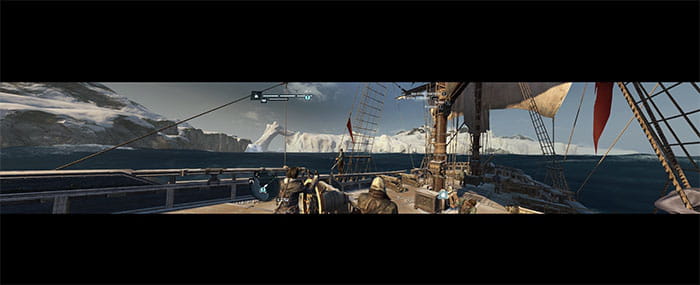
How can I resolve this formatting issue?
Thank you
Configuration: MSI Z87-G45 Gaming / i7 4790k / Crossfire Radeon HD 7950 with Boost - 3 Go / 16Go Corsair DDR3 2133MHz / 250Go SSD Sata III / 4To Sata II HDD / Homemade water cooling EK, XSPC, Swiftech, Noctua / Modular 850Watts 80+ / Phantom USB3
I5 2500k / Asus Sabertooth P67 / Corsair Hydro H80 / 8Go Corsair BallistiX 2133mhz / 120Go Crucial M500 SSD / 3x 500Go 7200RPM / Antec Signature 850Watts 80+ / NZXT Phantom
Dell Alienware M15X (2009)
Android:
Nexus 7 32Go Root
Asus Xperia Z1 Root
Achos 80 Titanium
Achos 90-E Titanium
1 answer
-
Hello, maybe the game doesn't support the resolution, so try to check on the website or online if it does, and also look in the display settings if you are set to your screen's resolution.
--
It's by trying to have the biggest one that we end up regretting it.-
Yes, switch it to 2560 x 1440.. I don't see what this 2560 x 1080 mode is all about... It's not at all the "2K" size...
- There is often confusion with resolution stories
https://fr.wikipedia.org/wiki/1080p
-