RJ45 and RJ11 Sharing
fab475
-
fab475 -
fab475 -
Hello,
It's not really a question, but the answer. I'm sharing this because it might help others. I'm not an expert, but I made the connection at home and it works.
With a network cable, you can easily use both the phone + internet; this means that on the RJ11 / RJ45 socket coming from the wall, you can easily connect a landline phone and the internet (network)
I'll explain:
A network cable has 8 wires
The phone needs 2 wires
Internet uses 4 wires
(so there are even 2 wires left)
It's not really a question, but the answer. I'm sharing this because it might help others. I'm not an expert, but I made the connection at home and it works.
With a network cable, you can easily use both the phone + internet; this means that on the RJ11 / RJ45 socket coming from the wall, you can easily connect a landline phone and the internet (network)
I'll explain:
A network cable has 8 wires
The phone needs 2 wires
Internet uses 4 wires
(so there are even 2 wires left)
4 answers
-
My installation.
Apartment equipped with RJ11 / RJ45 sockets
I only connected 2 sockets (no need for more, one for TV and the other for the internet) and used connectors for the wiring.
In my cabinet, I have 5 telecommunications conduits. To identify: I therefore removed the 2 sockets ONE BY ONE that interest me, connected 2 wires (orange + orange-white) together, then returned to the cabinet. With the ohmmeter, I tested the continuity on the orange + orange-white wires. Repeat for each socket you want to identify.
(once identified, do not forget to disconnect the 2 wires)
Then look at the colors of your wires in the wall.
I had Orange, Yellow, Brown, Purple, Black, Gray . . .
On the wall socket
Black and Gray = Telephone on the wall socket they are on 4 and 5
Arbitrarily, I assigned = on the wall socket:
1 Orange
2 Yellow
3 Brown
6 Purple
So I reiterate:
We identified the sockets.
We wired the sockets that interest us.
Now we are going to connect the cable from the cabinet to the box.
I simply took a network cable that I cut on one side. (the other side will go to the box)
On the cut, stripped part, I connected:
1 Orange -- To --> White Orange
2 Yellow -- To --> Orange
3 Brown -- To --> White Blue
6 Purple -- To --> Green
As I needed internet on 2 sockets, I plugged in 2 cords to the box. Operation to be done 2 times.
And the telephone. The telephone is gray and black. So put these wires where you want to have the landline.
In my case, I wanted to have internet + telephone on one socket, so I connected everything. (4 and 5 for telephone)
So let's recap.
From the box, I go out with an internet cable; cut and connected with a connector to the white cable that goes into my sockets.
At the wall outlet. I plugged in a network internet cable, and again I cut it.
You need to check the colors for internet and reconnect an internet cable, then also cut the telephone cable to 2 wires and reconnect the wires (for telephone it's green and red, that goes with blue and white blue (but I don't remember the polarity)
There you go, I tried to be clear.
The male and female sockets have an order; photo if later.
For the last step, separating telephone and internet, there is apparently this; http://www.touslescables.com/a.php?reffab=H54001&ch=Ok&a=
See you later. -
Hello,
it's true, but a few clarifications:
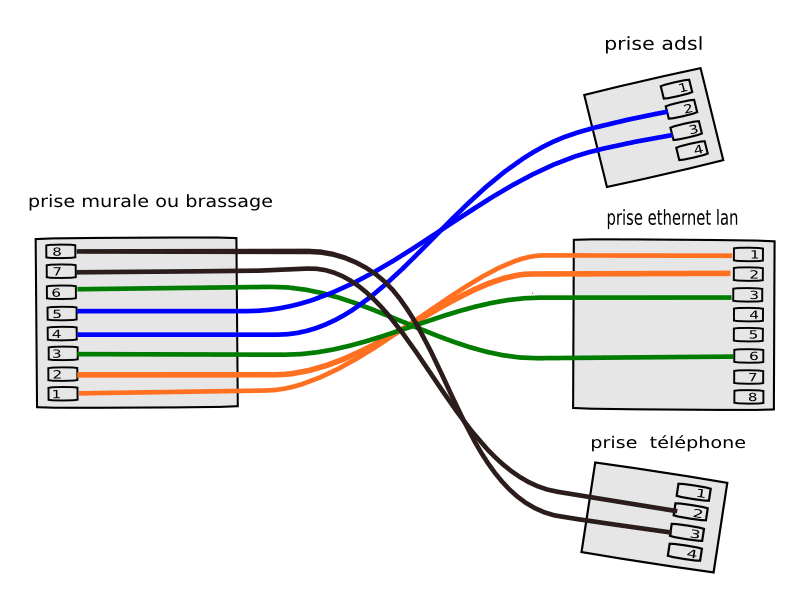
Ethernet (only 10/100 Mbit/s) does not need the internet and requires 4 wires (pairs 1/2 and 3/6)
the phone typically uses the central pair 4/5
The last pair 7/8 can be used for a second line or something else (TV).
Gigabit Ethernet uses all 4 pairs, so it cannot coexist in an RJ45.
and ... There you go! -
Hello,
Quick question.
Can I plug several computers directly into the socket that comes out of my wall at the same time? By crossing the cables?
Thanks for your help. -
yes, it's like I have only one RJ45 output on the box and I need to connect multiple computers (without a hub or anything else)
-
no, not over ethernet:
over ethernet it's one machine per socket, unless you go through a hub or a switch.
however,
it is possible to put 2 ethernet sockets on the same one, actually to use the 4 pairs, with two splitter couplers.
like this:
the diagram of the ethernet splitter couplers is as follows:
2 machines always use 2 switch ports but only one cable "in the walls"
Of course, this setup is limited to 10/100 Mbit/s -
-