Mon pc est infecté svp aidez moi
Résolu
Bonjour,
voila mon pc est lent depuis 1 semaine je suis presque sur que j'ai chopé un virus aidez moi merci
pour info j'ai deja MBAM installé sur mon ordi.
voila mon pc est lent depuis 1 semaine je suis presque sur que j'ai chopé un virus aidez moi merci
pour info j'ai deja MBAM installé sur mon ordi.
16 réponses
-
bonjour
tout d'abord je crois qu'il faut que tu mets un antivirus petite question
as-tu free ? -
non ! orange
-
Contributeur sécuritéHello
On va réaliser un bilan :)
* Télécharge ZHPDiag (de Nicolas Coolman)
https://www.zebulon.fr/telechargements/securite/systeme/zhpdiag.html ou https://www.commentcamarche.net/telecharger/utilitaires/24803-zhpdiag/
* Au cas où le premier lien ne marcherai pas, clique sur celui de dessous
ftp://zebulon.fr/ZHPDiag2.exe
* Laisse toi guider lors de l'installation, il se lancera automatiquement à la fin.
* Surtout, n'oublie pas d'installer son icône sur le bureau l'icône est en forme de parchemin
https://www.cjoint.com/13sp/CIvuQfap3YY_zhpdiag.png
* A l'ouverture du logiciel il te sera proposé deux options "rechercher" et "configurer"
* Cliques sur configurer
* Tournevis puis tous
* Clique sur l'icône représentant une loupe + (« Lancer le diagnostic »)
* Enregistre le rapport sur ton Bureau à l'aide de l'icône représentant une disquette
* Pour héberger le rapport, rends toi sur cjoint.com
* Clique sur choisissez un fichier va chercher le rapport dans ton PC.
* Le rapport est hébergé:
- Pour XP : C:\Documents and Settings\username\Local Settings\Application Data\ZHP
- Depuis Vista : C:\Users\username\AppData\Roaming\ZHP
* Une fois le rapport trouvé, sélectionne le, et clique sur Ouvrir
* Choisis le type de diffusion(je te conseille privée 4 jours il sera détruit)
* Puis cliques sur créer le lien cjoint
* Une fois que tu auras obtenu le lien copies colle dans ta prochaine réponse
* Pour t'aider https://www.commentcamarche.net/faq/29493-utiliser-cjoint-pour-heberger-des-fichiers
-
-
Contributeur sécurité###########| Canned Recherche
# Télécharge UsbFix par El Desaparecido sur ton Bureau.
# Si ton antivirus affiche une alerte, ignore-la et désactive l'antivirus temporairement.
# Branche toutes tes sources de données externes à ton PC (clé USB, disque dur externe, etc...) sans les ouvrir.
# Double clique sur UsbFix.exe.
# Clique sur Recherche.

# Laisse travailler l'outil.
# À la fin du scan, un rapport va s'afficher, poste-le dans ta prochaine réponse sur le forum.
# Le rapport est aussi sauvegardé à la racine du disque système ( C:\UsbFix [Scan ?] Nom de l'ordinateur.txt ).
( CTRL+A pour sélectionner, CTRL+C pour copier et CTRL+V pour coller )
# Tutoriel (aide) en images
-
je n'ai pas de sources de données externes dois je quand meme telecharger ce logiciel ?
-
Contributeur sécuritéOui
Tu as une ligne sur ton rapport qui me plaît pas
-
############################## | UsbFix V 7.166 | [Recherche]
Utilisateur: wahid (Administrateur) # TOTO
Mis à jour le 26/02/2014 par El Desaparecido - Team SosVirus
Lancé à 14:50:57 | 02/03/2014
Site Web : https://www.usbfix.net/
Changelog : https://www.usb-antivirus.com/fr/maj/
Support : https://www.sosvirus.net/
Upload Malware : http://www.sosvirus.net/upload_malware.php
Contact : https://www.usb-antivirus.com/fr/contact/
PC: PEGATRON CORPORATION (NARRA5)
CPU: AMD Athlon(tm) 7550 Dual-Core Processor
RAM -> [Total : 2942 Mo| Free : 1381 Mo]
Bios: Phoenix Technologies, LTD
Boot: Normal boot
OS: Microsoft® Windows Vista(TM) Édition Familiale Basique (6.0.6002 32-Bit) Service Pack 2
WB: Windows Internet Explorer : 9.0.8112.16421
WB: Google Chrome : 33.0.1750.117
WB: Mozilla Firefox : 27.0.1
SC: Security Center [Enabled]
WU: Windows Update [Enabled]
AS: Windows Defender [Enabled | Updated]
FW: Windows FireWall [Enabled]
AS: Malwarebytes' Anti-Malware : 1.75.0001
C:\ (%systemdrive%) -> Disque fixe # 287 Go (179 Go libre(s) - 62%) [COMPAQ] # NTFS
D:\ -> Disque fixe # 11 Go (2 Go libre(s) - 14%) [FACTORY_IMAGE] # NTFS
E:\ -> CD-ROM
################## | Processus Actif |
C:\Windows\system32\csrss.exe (ID: 600 |ParentID: 588)
C:\Windows\system32\wininit.exe (ID: 652 |ParentID: 588)
C:\Windows\system32\csrss.exe (ID: 664 |ParentID: 644)
C:\Windows\system32\services.exe (ID: 696 |ParentID: 652)
C:\Windows\system32\lsass.exe (ID: 708 |ParentID: 652)
C:\Windows\system32\lsm.exe (ID: 716 |ParentID: 652)
C:\Windows\system32\winlogon.exe (ID: 828 |ParentID: 644)
C:\Windows\system32\svchost.exe (ID: 908 |ParentID: 696)
C:\Windows\system32\nvvsvc.exe (ID: 952 |ParentID: 696)
C:\Windows\system32\svchost.exe (ID: 980 |ParentID: 696)
C:\Windows\System32\svchost.exe (ID: 1036 |ParentID: 696)
C:\Windows\System32\svchost.exe (ID: 1076 |ParentID: 696)
C:\Windows\System32\svchost.exe (ID: 1116 |ParentID: 696)
C:\Windows\system32\svchost.exe (ID: 1140 |ParentID: 696)
C:\Windows\system32\svchost.exe (ID: 1220 |ParentID: 696)
C:\Windows\system32\SLsvc.exe (ID: 1236 |ParentID: 696)
C:\Windows\system32\svchost.exe (ID: 1280 |ParentID: 696)
C:\Windows\system32\svchost.exe (ID: 1452 |ParentID: 696)
C:\Windows\system32\rundll32.exe (ID: 1616 |ParentID: 952)
C:\Windows\System32\spoolsv.exe (ID: 1824 |ParentID: 696)
C:\Windows\system32\svchost.exe (ID: 1904 |ParentID: 696)
C:\Windows\system32\taskeng.exe (ID: 1992 |ParentID: 1140)
C:\Windows\system32\Dwm.exe (ID: 2004 |ParentID: 1116)
C:\Windows\Explorer.EXE (ID: 324 |ParentID: 1968)
C:\Windows\system32\taskeng.exe (ID: 804 |ParentID: 1140)
C:\Program Files\Common Files\Adobe\ARM\1.0\armsvc.exe (ID: 1744 |ParentID: 696)
C:\Program Files\Common Files\Apple\Mobile Device Support\AppleMobileDeviceService.exe (ID: 1980 |ParentID: 696)
C:\Program Files\Bonjour\mDNSResponder.exe (ID: 1528 |ParentID: 696)
C:\Program Files\Orange\Assistance Livebox\dedicarz\DedicarzService.exe (ID: 2072 |ParentID: 696)
C:\Windows\system32\taskeng.exe (ID: 2128 |ParentID: 1140)
C:\Windows\system32\dgdersvc.exe (ID: 2168 |ParentID: 696)
C:\Windows\system32\FsUsbExService.Exe (ID: 2236 |ParentID: 696)
C:\Windows\system32\svchost.exe (ID: 2272 |ParentID: 696)
c:\Program Files\Common Files\LightScribe\LSSrvc.exe (ID: 2352 |ParentID: 696)
C:\Program Files\Malwarebytes' Anti-Malware\mbamscheduler.exe (ID: 2432 |ParentID: 696)
C:\Program Files\Orange\Orange Installer\OrangeInstaller.exe (ID: 2464 |ParentID: 2128)
C:\Program Files\Malwarebytes' Anti-Malware\mbamservice.exe (ID: 2524 |ParentID: 696)
C:\Program Files\Windows Defender\MSASCui.exe (ID: 2532 |ParentID: 324)
C:\Windows\System32\svchost.exe (ID: 2572 |ParentID: 696)
C:\Program Files\Malwarebytes' Anti-Malware\mbamgui.exe (ID: 2624 |ParentID: 2524)
C:\Windows\System32\svchost.exe (ID: 2644 |ParentID: 696)
C:\Windows\system32\svchost.exe (ID: 2664 |ParentID: 696)
C:\Windows\system32\svchost.exe (ID: 2708 |ParentID: 696)
C:\Program Files\Hewlett-Packard\HP Odometer\hpsysdrv.exe (ID: 2780 |ParentID: 324)
C:\Windows\System32\svchost.exe (ID: 2804 |ParentID: 696)
C:\Windows\system32\SearchIndexer.exe (ID: 2868 |ParentID: 696)
C:\Windows\System32\rundll32.exe (ID: 3052 |ParentID: 324)
C:\Program Files\HP\HP Software Update\hpwuSchd2.exe (ID: 3132 |ParentID: 324)
C:\Program Files\Common Files\Java\Java Update\jusched.exe (ID: 3148 |ParentID: 324)
C:\Users\wahid\woaurud.exe (ID: 3156 |ParentID: 324)
C:\Windows\System32\WUDFHost.exe (ID: 3180 |ParentID: 1116)
C:\Windows\system32\conime.exe (ID: 3352 |ParentID: 3312)
C:\Windows\system32\svchost.exe (ID: 2248 |ParentID: 696)
C:\Windows\system32\wbem\unsecapp.exe (ID: 4000 |ParentID: 908)
C:\Windows\system32\wbem\wmiprvse.exe (ID: 2792 |ParentID: 908)
C:\Program Files\Google\Chrome\Application\chrome.exe (ID: 4060 |ParentID: 324)
C:\Program Files\Google\Chrome\Application\chrome.exe (ID: 2968 |ParentID: 4060)
C:\Program Files\Google\Chrome\Application\chrome.exe (ID: 2584 |ParentID: 4060)
c:\Program Files\Hewlett-Packard\HP Health Check\hphc_service.exe (ID: 5208 |ParentID: 696)
C:\Windows\servicing\TrustedInstaller.exe (ID: 5612 |ParentID: 696)
C:\Windows\system32\SearchProtocolHost.exe (ID: 4548 |ParentID: 2868)
C:\Windows\system32\SearchFilterHost.exe (ID: 6140 |ParentID: 2868)
C:\Windows\system32\wbem\wmiprvse.exe (ID: 1872 |ParentID: 908)
################## | Regedit Run |
04 - HKCU\..\Run : [woaurud] C:\Users\wahid\woaurud.exe
04 - HKLM\..\Run : [Windows Defender] %ProgramFiles%\Windows Defender\MSASCui.exe -hide
04 - HKLM\..\Run : [hpsysdrv] c:\program files\hewlett-packard\HP odometer\hpsysdrv.exe
04 - HKLM\..\Run : [NvCplDaemon] RUNDLL32.EXE C:\Windows\system32\NvCpl.dll,NvStartup
04 - HKLM\..\Run : [NvMediaCenter] RUNDLL32.EXE C:\Windows\system32\NvMcTray.dll,NvTaskbarInit
04 - HKLM\..\Run : [HP Health Check Scheduler] c:\Program Files\Hewlett-Packard\HP Health Check\HPHC_Scheduler.exe
04 - HKLM\..\Run : [UpdatePSTShortCut] "c:\Program Files\CyberLink\CyberLink DVD Suite Deluxe\MUITransfer\MUIStartMenu.exe" "c:\Program Files\CyberLink\CyberLink DVD Suite Deluxe" UpdateWithCreateOnce "Software\CyberLink\PowerStarter"
04 - HKLM\..\Run : [UpdatePDIRShortCut] "c:\Program Files\CyberLink\PowerDirector\MUITransfer\MUIStartMenu.exe" "c:\Program Files\CyberLink\PowerDirector" UpdateWithCreateOnce "SOFTWARE\CyberLink\PowerDirector\7.0"
04 - HKLM\..\Run : [UpdateP2GoShortCut] "c:\Program Files\CyberLink\Power2Go\MUITransfer\MUIStartMenu.exe" "c:\Program Files\CyberLink\Power2Go" UpdateWithCreateOnce "SOFTWARE\CyberLink\Power2Go\6.0"
04 - HKLM\..\Run : [UpdateLBPShortCut] "c:\Program Files\CyberLink\LabelPrint\MUITransfer\MUIStartMenu.exe" "c:\Program Files\CyberLink\LabelPrint" UpdateWithCreateOnce "Software\CyberLink\LabelPrint\2.5"
04 - HKLM\..\Run : [HP Software Update] C:\Program Files\HP\HP Software Update\HPWuSchd2.exe
04 - HKLM\..\Run : [Adobe ARM] "C:\Program Files\Common Files\Adobe\ARM\1.0\AdobeARM.exe"
04 - HKLM\..\Run : [SunJavaUpdateSched] "C:\Program Files\Common Files\Java\Java Update\jusched.exe"
04 - HKLM\..\RunOnce : []
04 - HKU\S-1-5-19\..\Run : [Sidebar] %ProgramFiles%\Windows Sidebar\Sidebar.exe /detectMem
04 - HKU\S-1-5-19\..\Run : [WindowsWelcomeCenter] rundll32.exe oobefldr.dll,ShowWelcomeCenter
04 - HKU\S-1-5-19\..\Run : [OrangePlayer] C:\Program Files\Orange\Media Player\Media Player.exe /systray
04 - HKU\S-1-5-20\..\Run : [Sidebar] %ProgramFiles%\Windows Sidebar\Sidebar.exe /detectMem
04 - HKU\S-1-5-20\..\Run : [WindowsWelcomeCenter] rundll32.exe oobefldr.dll,ShowWelcomeCenter
04 - HKU\S-1-5-20\..\Run : [OrangePlayer] C:\Program Files\Orange\Media Player\Media Player.exe /systray
04 - HKU\S-1-5-21-2653525133-3819944789-4047992529-1000\..\Run : [woaurud] C:\Users\wahid\woaurud.exe
04 - HKU\S-1-5-18\..\Run : [OrangePlayer] C:\Program Files\Orange\Media Player\Media Player.exe /systray
################## | Recherche générique |
Présent! C:\Users\wahid\woaurud.exe
Présent! C:\Users\wahid\AppData\Roaming\dclogs
################## | Registre |
Présent! HKCU\Software\Microsoft\Windows\CurrentVersion\Explorer\Advanced|Start_ShowPrinters -> 0
Présent! HKU\S-1-5-21-2653525133-3819944789-4047992529-1000\Software\Microsoft\Windows\CurrentVersion\Run|woaurud
Présent! HKCU\Software\Microsoft\Windows\CurrentVersion\Run|woaurud
################## | E.O.F | https://www.usbfix.net/ - https://www.sosvirus.net/ | -
Contributeur sécuritéFaudra changer tout tes mots de passe internet ils ont été pompé :(
# Si ton antivirus affiche une alerte, ignore-la et désactive l'antivirus temporairement.
# Branche toutes tes sources de données externes à ton PC (clé USB, disque dur externe, etc...) sans les ouvrir.
# Double clique sur UsbFix.exe.
# Clique sur Suppression.

# Note : L'ordinateur va redémarrer automatiquement, au redémarrage, clique sur le message transmis par UsbFix et laisse le programme travailler.
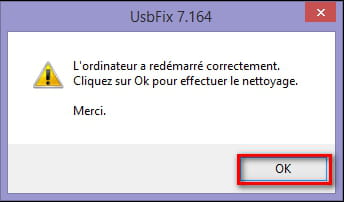
# Laisse travailler l'outil, ton bureau ne sera pas accessible durant la phase de nettoyage, c'est normal.
# À la fin du scan, un rapport va s'afficher, poste-le dans ta prochaine réponse sur le forum.
# Le rapport est aussi sauvegardé à la racine du disque système ( C:\UsbFix [Clean ?] Nom de l'ordinateur.txt ).
( CTRL+A pour sélectionner, CTRL+C pour copier et CTRL+V pour coller )
# ->> Tutoriel (aide) en images sur le site de l'auteur.
-
############################## | UsbFix V 7.166 | [Suppression]
Utilisateur: wahid (Administrateur) # TOTO
Mis à jour le 26/02/2014 par El Desaparecido - Team SosVirus
Lancé à 15:04:23 | 02/03/2014
Site Web : https://www.usbfix.net/
Changelog : https://www.usb-antivirus.com/fr/maj/
Support : https://www.sosvirus.net/
Upload Malware : http://www.sosvirus.net/upload_malware.php
Contact : https://www.usb-antivirus.com/fr/contact/
PC: PEGATRON CORPORATION (NARRA5)
CPU: AMD Athlon(tm) 7550 Dual-Core Processor
RAM -> [Total : 2942 Mo| Free : 1591 Mo]
Bios: Phoenix Technologies, LTD
Boot: Normal boot
OS: Microsoft® Windows Vista(TM) Édition Familiale Basique (6.0.6002 32-Bit) Service Pack 2
WB: Windows Internet Explorer : 9.0.8112.16421
WB: Google Chrome : 33.0.1750.117
WB: Mozilla Firefox : 27.0.1
SC: Security Center [Enabled]
WU: Windows Update [Enabled]
AS: Windows Defender [Enabled | Updated]
FW: Windows FireWall [Enabled]
AS: Malwarebytes' Anti-Malware : 1.75.0001
C:\ (%systemdrive%) -> Disque fixe # 287 Go (179 Go libre(s) - 62%) [COMPAQ] # NTFS
D:\ -> Disque fixe # 11 Go (2 Go libre(s) - 14%) [FACTORY_IMAGE] # NTFS
E:\ -> CD-ROM
################## | Processus Actif |
C:\Windows\system32\csrss.exe (ID: 600 |ParentID: 588)
C:\Windows\system32\wininit.exe (ID: 652 |ParentID: 588)
C:\Windows\system32\csrss.exe (ID: 664 |ParentID: 644)
C:\Windows\system32\services.exe (ID: 696 |ParentID: 652)
C:\Windows\system32\lsass.exe (ID: 708 |ParentID: 652)
C:\Windows\system32\lsm.exe (ID: 716 |ParentID: 652)
C:\Windows\system32\winlogon.exe (ID: 828 |ParentID: 644)
C:\Windows\system32\svchost.exe (ID: 908 |ParentID: 696)
C:\Windows\system32\nvvsvc.exe (ID: 952 |ParentID: 696)
C:\Windows\system32\svchost.exe (ID: 980 |ParentID: 696)
C:\Windows\System32\svchost.exe (ID: 1036 |ParentID: 696)
C:\Windows\System32\svchost.exe (ID: 1076 |ParentID: 696)
C:\Windows\System32\svchost.exe (ID: 1116 |ParentID: 696)
C:\Windows\system32\svchost.exe (ID: 1140 |ParentID: 696)
C:\Windows\system32\svchost.exe (ID: 1220 |ParentID: 696)
C:\Windows\system32\SLsvc.exe (ID: 1236 |ParentID: 696)
C:\Windows\system32\svchost.exe (ID: 1280 |ParentID: 696)
C:\Windows\system32\svchost.exe (ID: 1452 |ParentID: 696)
C:\Windows\system32\rundll32.exe (ID: 1616 |ParentID: 952)
C:\Windows\System32\spoolsv.exe (ID: 1824 |ParentID: 696)
C:\Windows\system32\svchost.exe (ID: 1904 |ParentID: 696)
C:\Windows\system32\taskeng.exe (ID: 1992 |ParentID: 1140)
C:\Windows\system32\Dwm.exe (ID: 2004 |ParentID: 1116)
C:\Windows\Explorer.EXE (ID: 324 |ParentID: 1968)
C:\Windows\system32\taskeng.exe (ID: 804 |ParentID: 1140)
C:\Program Files\Common Files\Adobe\ARM\1.0\armsvc.exe (ID: 1744 |ParentID: 696)
C:\Program Files\Common Files\Apple\Mobile Device Support\AppleMobileDeviceService.exe (ID: 1980 |ParentID: 696)
C:\Program Files\Bonjour\mDNSResponder.exe (ID: 1528 |ParentID: 696)
C:\Program Files\Orange\Assistance Livebox\dedicarz\DedicarzService.exe (ID: 2072 |ParentID: 696)
C:\Windows\system32\taskeng.exe (ID: 2128 |ParentID: 1140)
C:\Windows\system32\dgdersvc.exe (ID: 2168 |ParentID: 696)
C:\Windows\system32\FsUsbExService.Exe (ID: 2236 |ParentID: 696)
C:\Windows\system32\svchost.exe (ID: 2272 |ParentID: 696)
c:\Program Files\Common Files\LightScribe\LSSrvc.exe (ID: 2352 |ParentID: 696)
C:\Program Files\Malwarebytes' Anti-Malware\mbamscheduler.exe (ID: 2432 |ParentID: 696)
C:\Program Files\Orange\Orange Installer\OrangeInstaller.exe (ID: 2464 |ParentID: 2128)
C:\Program Files\Malwarebytes' Anti-Malware\mbamservice.exe (ID: 2524 |ParentID: 696)
C:\Program Files\Windows Defender\MSASCui.exe (ID: 2532 |ParentID: 324)
C:\Windows\System32\svchost.exe (ID: 2572 |ParentID: 696)
C:\Program Files\Malwarebytes' Anti-Malware\mbamgui.exe (ID: 2624 |ParentID: 2524)
C:\Windows\System32\svchost.exe (ID: 2644 |ParentID: 696)
C:\Windows\system32\svchost.exe (ID: 2664 |ParentID: 696)
C:\Windows\system32\svchost.exe (ID: 2708 |ParentID: 696)
C:\Program Files\Hewlett-Packard\HP Odometer\hpsysdrv.exe (ID: 2780 |ParentID: 324)
C:\Windows\System32\svchost.exe (ID: 2804 |ParentID: 696)
C:\Windows\system32\SearchIndexer.exe (ID: 2868 |ParentID: 696)
C:\Windows\System32\rundll32.exe (ID: 3052 |ParentID: 324)
C:\Program Files\HP\HP Software Update\hpwuSchd2.exe (ID: 3132 |ParentID: 324)
C:\Program Files\Common Files\Java\Java Update\jusched.exe (ID: 3148 |ParentID: 324)
C:\Users\wahid\woaurud.exe (ID: 3156 |ParentID: 324)
C:\Windows\System32\WUDFHost.exe (ID: 3180 |ParentID: 1116)
C:\Windows\system32\conime.exe (ID: 3352 |ParentID: 3312)
C:\Windows\system32\svchost.exe (ID: 2248 |ParentID: 696)
C:\Windows\system32\wbem\unsecapp.exe (ID: 4000 |ParentID: 908)
C:\Windows\system32\wbem\wmiprvse.exe (ID: 2792 |ParentID: 908)
C:\Program Files\Google\Chrome\Application\chrome.exe (ID: 4060 |ParentID: 324)
C:\Program Files\Google\Chrome\Application\chrome.exe (ID: 2968 |ParentID: 4060)
C:\Program Files\Google\Chrome\Application\chrome.exe (ID: 2584 |ParentID: 4060)
c:\Program Files\Hewlett-Packard\HP Health Check\hphc_service.exe (ID: 5208 |ParentID: 696)
C:\Windows\system32\SearchProtocolHost.exe (ID: 840 |ParentID: 2868)
C:\Windows\system32\SearchFilterHost.exe (ID: 1736 |ParentID: 2868)
C:\Windows\system32\SearchProtocolHost.exe (ID: 3536 |ParentID: 2868)
C:\Windows\system32\DllHost.exe (ID: 3596 |ParentID: 908)
C:\Windows\system32\wbem\wmiprvse.exe (ID: 3812 |ParentID: 908)
################## | Regedit Run |
04 - HKCU\..\Run : [woaurud] C:\Users\wahid\woaurud.exe
04 - HKLM\..\Run : [Windows Defender] %ProgramFiles%\Windows Defender\MSASCui.exe -hide
04 - HKLM\..\Run : [hpsysdrv] c:\program files\hewlett-packard\HP odometer\hpsysdrv.exe
04 - HKLM\..\Run : [NvCplDaemon] RUNDLL32.EXE C:\Windows\system32\NvCpl.dll,NvStartup
04 - HKLM\..\Run : [NvMediaCenter] RUNDLL32.EXE C:\Windows\system32\NvMcTray.dll,NvTaskbarInit
04 - HKLM\..\Run : [HP Health Check Scheduler] c:\Program Files\Hewlett-Packard\HP Health Check\HPHC_Scheduler.exe
04 - HKLM\..\Run : [UpdatePSTShortCut] "c:\Program Files\CyberLink\CyberLink DVD Suite Deluxe\MUITransfer\MUIStartMenu.exe" "c:\Program Files\CyberLink\CyberLink DVD Suite Deluxe" UpdateWithCreateOnce "Software\CyberLink\PowerStarter"
04 - HKLM\..\Run : [UpdatePDIRShortCut] "c:\Program Files\CyberLink\PowerDirector\MUITransfer\MUIStartMenu.exe" "c:\Program Files\CyberLink\PowerDirector" UpdateWithCreateOnce "SOFTWARE\CyberLink\PowerDirector\7.0"
04 - HKLM\..\Run : [UpdateP2GoShortCut] "c:\Program Files\CyberLink\Power2Go\MUITransfer\MUIStartMenu.exe" "c:\Program Files\CyberLink\Power2Go" UpdateWithCreateOnce "SOFTWARE\CyberLink\Power2Go\6.0"
04 - HKLM\..\Run : [UpdateLBPShortCut] "c:\Program Files\CyberLink\LabelPrint\MUITransfer\MUIStartMenu.exe" "c:\Program Files\CyberLink\LabelPrint" UpdateWithCreateOnce "Software\CyberLink\LabelPrint\2.5"
04 - HKLM\..\Run : [HP Software Update] C:\Program Files\HP\HP Software Update\HPWuSchd2.exe
04 - HKLM\..\Run : [Adobe ARM] "C:\Program Files\Common Files\Adobe\ARM\1.0\AdobeARM.exe"
04 - HKLM\..\Run : [SunJavaUpdateSched] "C:\Program Files\Common Files\Java\Java Update\jusched.exe"
04 - HKLM\..\RunOnce : []
04 - HKU\S-1-5-19\..\Run : [Sidebar] %ProgramFiles%\Windows Sidebar\Sidebar.exe /detectMem
04 - HKU\S-1-5-19\..\Run : [WindowsWelcomeCenter] rundll32.exe oobefldr.dll,ShowWelcomeCenter
04 - HKU\S-1-5-19\..\Run : [OrangePlayer] C:\Program Files\Orange\Media Player\Media Player.exe /systray
04 - HKU\S-1-5-20\..\Run : [Sidebar] %ProgramFiles%\Windows Sidebar\Sidebar.exe /detectMem
04 - HKU\S-1-5-20\..\Run : [WindowsWelcomeCenter] rundll32.exe oobefldr.dll,ShowWelcomeCenter
04 - HKU\S-1-5-20\..\Run : [OrangePlayer] C:\Program Files\Orange\Media Player\Media Player.exe /systray
04 - HKU\S-1-5-21-2653525133-3819944789-4047992529-1000\..\Run : [woaurud] C:\Users\wahid\woaurud.exe
04 - HKU\S-1-5-18\..\Run : [OrangePlayer] C:\Program Files\Orange\Media Player\Media Player.exe /systray
################## | Recherche générique |
Supprimé! C:\Users\wahid\woaurud.exe
Supprimé! C:\Users\wahid\AppData\Roaming\dclogs
(!) Fichiers temporaires supprimés.
################## | Registre |
Réparé ! HKCU\Software\Microsoft\Windows\CurrentVersion\Explorer\Advanced|Start_ShowPrinters -> 1
Supprimé! HKU\S-1-5-21-2653525133-3819944789-4047992529-1000\Software\Microsoft\Windows\CurrentVersion\Run|woaurud
################## | Listing |
[28/08/2009 - 21:58:58 | SHD] - C:\$Recycle.Bin
[31/07/2012 - 19:38:03 | N | 7 Ko | 168FBFFF8DD2C78B0548CFAE2D461D6A] - C:\AdwCleaner[R1].txt
[18/02/2013 - 16:06:33 | N | 3 Ko | 199CDC03F676550DF983E678E9556485] - C:\AdwCleaner[R2].txt
[31/07/2012 - 19:47:03 | N | 7 Ko | 6BF9056E6B6F6A16DCD49F36C6546683] - C:\AdwCleaner[S1].txt
[19/02/2013 - 00:08:48 | N | 3 Ko | 4833E4F9127CEACB024A9CD1AD0E71A2] - C:\AdwCleaner[S2].txt
[25/04/2013 - 16:13:48 | N | 10 Ko | C6A3E5A2F252C458952AC9A5DB2E57CA] - C:\AdwCleaner[S3].txt
[06/04/2011 - 18:51:09 | N | 2 Ko] - C:\aqua_bitmap.cpp
[18/09/2006 - 22:43:36 | A | 0 Ko] - C:\autoexec.bat
[25/10/2009 - 10:32:16 | SHD] - C:\Boot
[11/04/2009 - 07:36:36 | RASH | 325 Ko] - C:\bootmgr
[11/05/2009 - 18:25:36 | RAS | 8 Ko] - C:\BOOTSECT.BAK
[18/09/2006 - 22:43:37 | N | 0 Ko] - C:\config.sys
[28/08/2009 - 21:50:08 | SHD] - C:\Documents and Settings
[11/09/2010 - 05:53:21 | N | 0 Ko | 674963C3B4714A89BE4DF8C01788D0F7] - C:\FINIS_IT.TXT
[13/10/2013 - 15:06:08 | D] - C:\found.000
[11/09/2010 - 05:53:18 | D] - C:\hp
[10/09/2011 - 19:54:33 | N | 59 Ko] - C:\install.log
[07/12/2009 - 20:37:19 | N | 2 Ko] - C:\Installer.log
[13/08/2011 - 20:38:51 | D] - C:\Kill'em
[07/12/2009 - 20:39:32 | N | 0 Ko] - C:\LogiSetup.log
[18/06/2012 - 14:13:25 | D] - C:\Microgaming
[20/04/2011 - 21:37:49 | RHD] - C:\MSOCache
[02/03/2014 - 14:21:38 | ASH | 3319568 Ko] - C:\pagefile.sys
[21/01/2008 - 03:43:50 | D] - C:\PerfLogs
[02/03/2014 - 14:27:41 | N | 1 Ko] - C:\PhysicalDisk0_MBR.bin
[29/09/2013 - 16:57:37 | N | 1 Ko] - C:\PhysicalMBR.bin
[09/12/2013 - 17:05:45 | D] - C:\Poker
[16/02/2014 - 17:10:53 | D] - C:\Program Files
[20/04/2011 - 13:05:05 | N | 0 Ko] - C:\Program1
[20/04/2011 - 13:12:03 | N | 0 Ko] - C:\Program2
[30/01/2014 - 16:46:12 | HD] - C:\ProgramData
[06/11/2010 - 03:07:33 | D] - C:\Programs
[02/03/2014 - 05:43:18 | SHD] - C:\System Volume Information
[11/05/2009 - 09:54:09 | N | 0 Ko] - C:\updatedatfix.log
[02/03/2014 - 14:50:33 | D] - C:\UsbFix
[02/03/2014 - 15:07:27 | A | 10 Ko | 9907307195BBC66C45A59ED98C4DE46D] - C:\UsbFix [Clean 2] TOTO.txt
[02/03/2014 - 14:55:52 | N | 8 Ko | B3DEB38192675F8B4B64666EC620511F] - C:\UsbFix [Scan 1] TOTO.txt
[26/08/2013 - 09:39:15 | D] - C:\Users
[18/01/2010 - 16:20:26 | D] - C:\VJVod_Cache
[02/03/2014 - 06:27:55 | D] - C:\Windows
[26/08/2008 - 13:37:52 | N | 0 Ko] - C:\Windows Sidebar
[28/01/2012 - 03:27:57 | N | 0 Ko] - C:\Wlid.bat
[28/01/2012 - 03:27:57 | N | 354 Ko | 80D9B99781E0FCF1D854B528CDDFEDD1] - C:\WLID.EXE
[18/02/2013 - 15:36:30 | D] - C:\ZHP
[28/08/2009 - 21:58:58 | SHD] - D:\$RECYCLE.BIN
[22/06/2007 - 16:44:20 | SH | 428 Ko] - D:\boo.mgr
[24/06/2009 - 19:45:12 | SHD] - D:\boot
[18/01/2008 - 23:45:46 | SH | 325 Ko] - D:\bootmgr
[28/03/2008 - 18:54:00 | ASH | 1 Ko] - D:\Desktop.ini
[24/06/2009 - 19:45:04 | N | 0 Ko] - D:\DRECOVERY
[24/06/2009 - 19:45:12 | D] - D:\hp
[01/02/2014 - 07:56:44 | N | 0 Ko] - D:\MASTER.LOG
[24/06/2009 - 19:45:12 | D] - D:\PC-Doctor for Win PE
[11/02/2009 - 15:47:48 | ASH | 0 Ko] - D:\pcdr.ini
[24/06/2009 - 19:45:12 | SHD] - D:\PRELOAD
[19/06/2007 - 15:22:02 | SH | 109 Ko] - D:\protect.arabic
[19/06/2007 - 15:22:06 | SH | 106 Ko] - D:\protect.catalan
[19/06/2007 - 15:22:18 | SH | 107 Ko] - D:\protect.chinese hong kong
[19/06/2007 - 15:22:16 | SH | 107 Ko] - D:\protect.chinese simplified
[19/06/2007 - 15:22:18 | SH | 107 Ko] - D:\protect.chinese traditional
[04/07/2007 - 11:31:56 | SH | 109 Ko] - D:\protect.czech
[19/06/2007 - 15:22:04 | SH | 107 Ko] - D:\protect.danish
[19/06/2007 - 15:22:12 | SH | 106 Ko] - D:\protect.dutch
[19/06/2007 - 15:22:06 | SH | 107 Ko] - D:\protect.english
[19/06/2007 - 15:22:06 | SH | 107 Ko] - D:\protect.finnish
[19/06/2007 - 15:22:06 | SH | 107 Ko] - D:\protect.french
[19/06/2007 - 15:22:04 | SH | 107 Ko] - D:\protect.german
[04/07/2007 - 11:33:04 | SH | 110 Ko] - D:\protect.greek
[04/07/2007 - 11:36:08 | SH | 110 Ko] - D:\protect.hebrew
[19/06/2007 - 15:22:08 | SH | 106 Ko] - D:\protect.italian
[19/06/2007 - 15:22:10 | SH | 107 Ko] - D:\protect.japanese
[19/06/2007 - 15:22:10 | SH | 107 Ko] - D:\protect.korean
[04/07/2007 - 11:39:18 | SH | 109 Ko] - D:\protect.norwegian
[04/07/2007 - 11:39:54 | SH | 109 Ko] - D:\protect.polish
[04/07/2007 - 11:41:00 | SH | 109 Ko] - D:\protect.portuguese
[04/07/2007 - 11:40:26 | SH | 109 Ko] - D:\protect.portuguese brazilian
[19/06/2007 - 15:22:14 | SH | 160 Ko] - D:\protect.russian
[05/07/2007 - 10:32:26 | SH | 109 Ko] - D:\protect.serbian latin
[04/07/2007 - 11:46:48 | SH | 109 Ko] - D:\protect.slovak
[19/06/2007 - 15:22:06 | SH | 106 Ko] - D:\protect.spanish
[04/07/2007 - 11:43:52 | SH | 109 Ko] - D:\protect.swedish
[04/07/2007 - 11:45:02 | SH | 109 Ko] - D:\protect.turkish
[24/06/2009 - 19:45:12 | RD] - D:\RECOVERY
[11/05/2009 - 21:22:42 | SH | 0 Ko] - D:\RESTORE.INI
[24/06/2009 - 19:45:12 | SHD] - D:\SOURCES
[10/01/2010 - 20:55:58 | SHD] - D:\System Volume Information
################## | Vaccin |
D:\Autorun.inf -> Vaccin créé par UsbFix (El Desaparecido)
################## | E.O.F | https://www.usbfix.net/ - https://www.sosvirus.net/ | -
Contributeur sécurité:)
Désinstalles
=>
PC-Doctor for Win
Refais un zhpdiag -
encore merci pour ton aide j'ai supprimé le programme voici mon rapport:
https://www.cjoint.com/?3CcpyiW6tyn -
Contributeur sécuritéN'oublies pas :)
Faudra changer tout tes mots de passe internet ils ont été pompé :(
* Télécharge Junkware Removal Tool à cette adresse (ne clique pas sur télécharger, le téléchargement va débuter automatiquement) : https://www.bleepingcomputer.com/download/junkware-removal-tool/dl/131/
* Enregistre-le sur ton bureau.
* Ferme toutes les applications en cours.
* Ouvre JRT.exe et appuie sur Entrée : si tu es sous Windows Vista, 7 ou 8, ouvre-le en faisant : clic droit => Exécuter en tant qu'administrateur.
* Patiente le temps que l'outil travaille : le bureau va disparaître quelques instants, c'est tout à fait normal.
* À la fin de l'analyse, un rapport nommé JRT.txt va s'ouvrir. Héberge-le comme ceci et poste le lien obtenu dans ta prochaine réponse.
Tutoriel : http://www.forum-entraide-informatique.com/support/junkware-removal-tool-tutoriel-t8260.html
-
-
Contributeur sécuritéBien
Comment se comporte ton pc?
-
c mieux merci beaucoup il faut maintenant que je change tous mes mdp merci beaucoup de ton aide je ne te dis pas a bientot :)