
FTP access unavailable
SolvedHello,
I can’t access my FTP server at LWS from home (desktop PC or laptop), whereas my friend can from home.
The hosting provider LWS gave us a parameter file for Filezilla, so we can’t go wrong since we import this file.
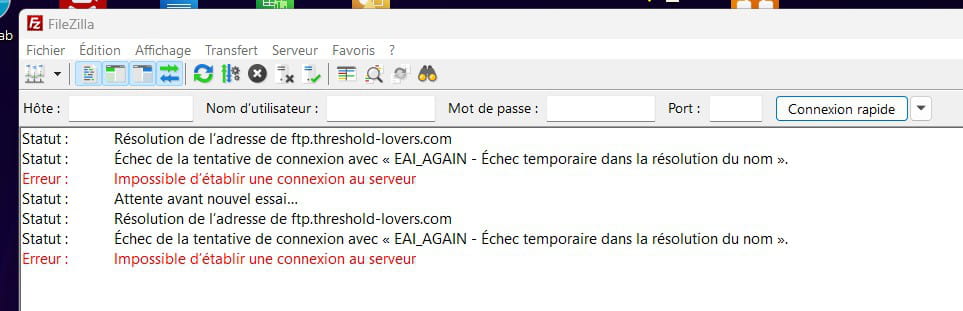
The error is visible in the attached screenshot, and the Filezilla error message when attempting to connect says:
“Resolving ftp.threshold-lovers.com address
Status: Connection attempt failed with “EAI_AGAIN - Temporary failure in name resolution”.
Error: Could not connect to server”
which leads me to think it might be a DNS issue, but I’m not sure.
What should I do?
2 answers
-
Contributor
Hello,
Here is the forum site for Hi-Fi enthusiasts
I think there is some confusion because it's not an FTP..
-
-
Contributor@Nounours18200
it doesn’t work because your site is not indexed in search engines... and consequently there is no link between your IP and the name of your site => the DNS
-
@jeannets
Hello,
It’s strange because the author reports that a friend is able to connect (we don’t know if it’s by IP or domain name).
It isn’t a search engine that indexes, but the hosting provider that allows you to set up such a domain name and configure access by IP and/or by domain name.
-
@brucine
ui Jeannets is right: if it were a DNS propagation issue, I doubt it would work for my friend and not for me...
In any case I solved the problem by entering the FTP server's IP address instead of its name: I'll see later if it works with the name (which would then confirm a DNS propagation problem?).
-
-
Contributor< p >Here’s what’s needed... A DynDNS see this explanatory site
In short, in your BOX you must configure this DDNS that communicates your site name to a DNS provider you signed up with... and provide the name of your site...
Your BOX sends it the IP number every day or every hour...
It’s the one that maps your IP to your name... and connect to you at home as soon as a user types that name in the search barYou should also watch for security... and don’t confuse FTP with HTTPS, for example..
this is only a summary.
