Help for a virus
Solved
Hello
I made the mistake of downloading and now I have viruses on my computer. Could someone help me solve my problem? Thank you all
15 answers
-
Moderator
Hello
KIS is useless if you have Windows 10 or 11
Let's start with a PC diagnosis:
Read the entire procedure carefully before posting the reports
Do not post them directly in the messages as they are unreadable and incompleteThe reports FRST.txt and Addition.txt are expected.
All reports should be hosted on https://security-x.fr/up/ and you should include the obtained links in your response.
---------------------------------------------------------------------------------------------
--> The SmartScreen filter may trigger an alert. Click on Actions or More Information and then on Run anyway.
---------------------------------------------------------------------------------------------
--> Download the FRST version of Farbar, compatible with your system, and save the file on your Desktop.
--> For a 32-bit system
--> For a 64-bit system
How to find out which version, 32-bit or 64-bit, is running on my system?
--> Wait for your browser to offer the download to save, without clicking anywhere, especially not on the ads on the page.
--> Close all applications, including your browser.
--> Double-click on FRST.exe and click Yes to accept the Disclaimer.
--> Under Vista, Windows 7 / 8 and 10, you must run the file by right-clicking -> Run as administrator.
--> Wait for it to indicate The tool is ready to run.
--> On the main menu, click on Scan and wait for the scan to complete.
--> At the end of the scan, the reports FRST.txt and Addition.txt are created. Post these reports in your next response.
--> The reports are saved in the same location as the tool and under C:\FRST\Logs
-
-
-
-
@Cerise
If you have a second computer, you can download it on the second PC, and then transfer it with a USB stick to the concerned computer.
-
@MisteryBean
I download with Chrome
-
-
-
Hello, here are the results for the FRST
Farbar analysis results... - TextUp
-
I don't know where to find the link
-
-
Hello,
has anyone been able to retrieve my 2 links, to know what I need to do now
-
Moderator
For the second time, wait for MisteryBean's response since he is the one who took charge of your issue. As for your links, the answer is yes, as your links are here.
-
-
Moderator
RE_
No infection on this PC, what makes you think you are infected?
Do you have any specific symptoms?
********
Uninstall Kaspersky
********
--> Copy what is here https://textup.fr/754395nD from start:: to end:: (without pasting it anywhere)
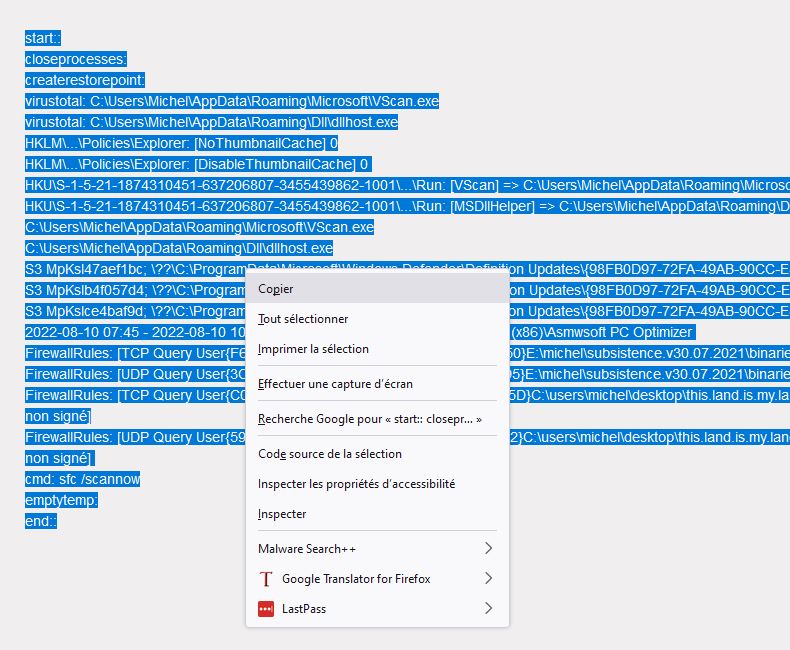
--> Open FRST (or FRST64) as administrator and click on Fix
If FRST seems to freeze or is not responding, let it run--> The PC will ask to restart, accept it
--> A fixlog file is created in the same location as FRST, post it like the other reports
-
Hello;
What makes me think that my computer is infected is because I have lots of windows popping up on the right side of my screen saying:
Trojan b901 virus detected
You have Trojan AL11 system at risk
You have a TrojanAL11 virus
I uninstalled Kaspersky
I will now do what you noted
-
https://textup.fr/754609pM
here is the link to fixlog
-
Moderator
RE_
OK, do you still have the messages in the bottom right?
-
No, it's fine, thank you very much.
Do I need to install an antivirus like Avast?
-
Moderator
RE_
No, it’s useless, Windows 10 and 11 already have an antivirus that is just as effective, if not better. See => HERE <=
Regarding your messages, you must have clicked on a window to accept notifications. A window like this:

If you have the problem again and/or if you want to block any future notification requests, see => HERE <= depending on your default browser.
If everything is OK and to finish:
To automatically remove all files/folders created by FRST and the tool itself, rename FRST/FRST64.exe to uninstall.exe and run it.
The procedure requires a restart
-
Thank you very much, do you think I can do the same thing on another computer that has become very slow and that I can no longer use (FRST64)?
-
thank you for everything, I will make a new request for my second computer, as it is very slow, thank you
-
Moderator
RE_
Thank you very much, do you think I can do the same thing on another computer that has become very slow and that I can no longer use (FRST64)
Yes, no problem.
If it is very slow, test your hard drives and give the result (color and status) or post a screenshot in your new topic: https://forums.cnetfrance.fr/tutoriels-logiciels-et-applis/487485-tester-son-disque-dur-ou-ssd-avec-crystaldiskinfo