Device security
Solved
Hello,
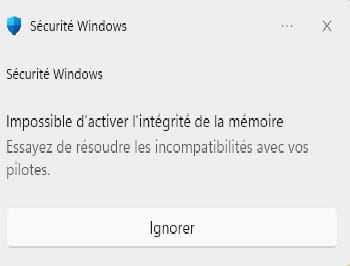
since this morning, I have a prompt telling me that memory integrity is disabled etc etc.... Unable to restore it.

I also have this,
Thank you for your help.
6 answers
-
Moderator
In the top tab "Drivers"
You should see the same unsigned drivers as in your first image at the top of your question.
Ability to right-click > Delete, but only for the drivers in this list.
Principally those should be the only ones you see in pink, or roughly, because they are not digitally signed.
-
hello fabulous,
that’s it I downloaded Autoruns and opened it as admin. I have quite a few drivers in pink.
and I don’t know what I should do with them or not

-
Moderator
Hello,
Look at the pink drivers in Autoruns64 run as Administrator, in the Drivers section to give another hint, or to remove if you wish, but beware /!\\
-
-
Moderator@talain29
I included a link to the Microsoft site to download Autoruns.zip, which contains Autoruns64.exe that you extract anywhere to run as Administrator.
-
-
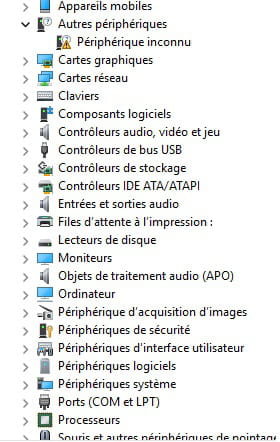
for the device manager I have something strange, but I can't figure out what it is and I've had it for a long time.
-
-
@jfmimi
Hello,
As mentioned previously, memory integrity does not have to do directly with a faulty driver and can very well occur without it; in the presence of the latest driver available for such software or hardware, this behavior will be observed if the driver in question is not compatible with this integrity because the publisher must reprogram or pay Microsoft to do so.
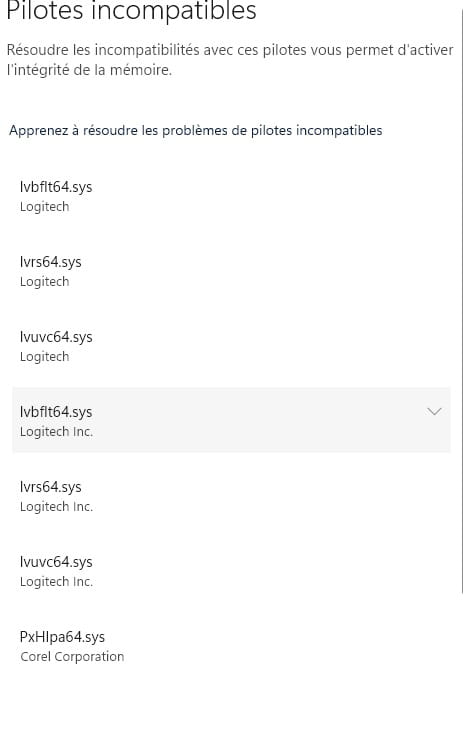
The potential driver update will only install the latest ones without necessarily changing anything; the Corel link in <1> for the PXHIpa64.sys case perfectly illustrates this situation, the Roxio software is obsolete and there is only a workaround by uninstalling it, migrating to a newer version (I assume for a fee) or by disabling memory integrity.
-
-
Contributor
Hello
go to the Device Manager and check if everything is OK
If my answer helped you, click the Thank you button.
Set as resolved if your problem is fixed. -
Hello,
It only takes one driver that is incompatible with memory integrity to disable it.
It does not have a fundamental role in the healthy use of the computer.
The Corel driver is due to an old version of Roxio; we can try to update it if it is of any use, otherwise remove Roxio.
Logitech hardware, keyboard and mouse software?
Same thing, look for up-to-date drivers or software.
If there are none that respect memory integrity, we can get rid of the message by disabling it, even if it is already done.