
Unwanted image
Hello,
I receive dozens of messages a day like this one:
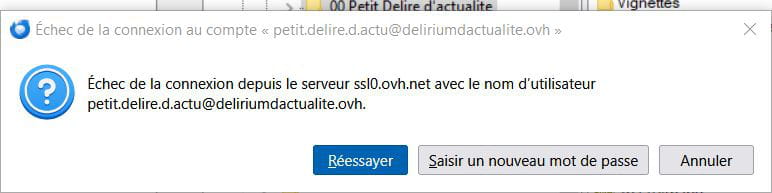
How can I make this stop?
Thanks in advance
2 answers
-
Moderator
Hello,
As in part #3 of my tutorial here
https://forums.commentcamarche.net/forum/affich-38206831-alors-vous-voulez-supprimer-les-virus-vous-meme-comment
... you can check which programs start automatically and disable anything that isn’t harmful but isn’t needed in real time, using Autoruns, Services.msc, and Process Explorer
Download Autoruns here, extract everything into a new folder anywhere, and run it as administrator.
If you get error messages, try version 13.98:
(Make sure to download Autoruns.zip, not some other software from the hosting site.)
Check all the details and do some research if needed.
In the “Logon” (Registry Run, Startup) and “Scheduled Tasks” tabs, disable or remove unnecessary third-party items that start automatically and aren’t important Microsoft or Windows items, either by unchecking them or by right-clicking > Delete.
Check the “Services” tab, but don’t disable services that might be useful sometimes; it’s better to set them to “Manual” (On demand) using Windows services.msc. Right-click the Start button > Run: services.msc
Autoruns gives you a list of non-Windows services, which helps a lot.
The changes will take effect after restarting Windows.
After restarting, with Process Explorer running as administrator, you should see almost exclusively Microsoft Corporation processes:
If you have problems with things that can’t be removed, see part #1 of the tutorial. -
Hello. I wouldn’t know how to interpret its contents, but TB, like Windows, records everything that happens. The log can be accessed from the three lines at the top right.
