
Brave and Javascript
Hello everyone,
I am currently trying out the Brave browser, which apparently has a good reputation for protecting privacy.
However, I have an issue with this browser. Although JavaScript is enabled in the browser settings, every time I visit a website that uses JavaScript, it doesn't work and I'm notified that I need to enable it.
I have checked tutorials online to enable it, but it is indeed enabled and still doesn't work. I tried uninstalling and reinstalling but that didn't change anything.
So for now, I'm sticking with Firefox and Opera, which are my favorite browsers.
Does anyone have a solution?
Note: I tried to post this message with Brave, and that also didn't work, whereas with Firefox, I had no issues.
3 answers
-
Hello,
Brave has a built-in ad blocker, which is usually the one that can cause issues; you just need to disable it for the problematic site(s).

-
Thank you for your response. But how do we quickly disable it?
Because if for each affected site we have to go to: menu > settings > shield >> disable tracking protection, it's going to be really cumbersome and annoying.
-
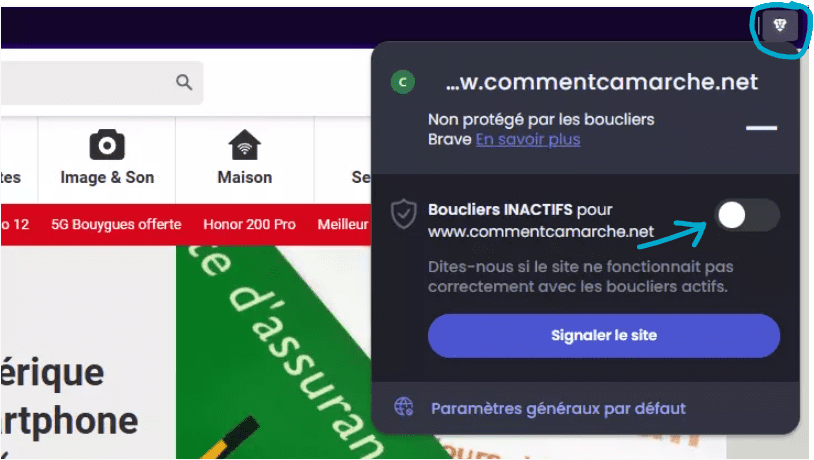
Look at my screenshot, you just need to click on the "lion head" logo to the right of the address bar and toggle the button to disable the blocker (effective only for the open site, you have to do it once for each problematic site).
There is also a button to report to Brave that the blocker is causing the site to bug.
-
-
Ok, thanks, it's definitely much more convenient this way
