
MySQL Collation
Lume56 Posted messages 41 Registration date Status Member Last intervention -
Hello,
I created a site in local mode that I uploaded to the Free server. The issue lies in exporting the database to the Free server.
I am using the client version of the database: libmysql - mysqlnd 8.3.6 while the Free server is using the MySQL client version: 5.1.61.
When I export the database, I get an error message because the collation of the database is utf8mb3_general_ci, which is not accepted by the Free version.
There are many posts, but I haven't found a solution until now.
Thank you.
3 answers
-
Hello,
I invite you to download MySQL Workbench.
MySQL Workbench is the official graphical tool from MySQL that allows you to manage databases, execute SQL queries, and export/import databases. You can modify the collation directly within it before exporting.
If you want to know how to export a database in a format compatible with MySQL 5.1, here’s the procedure in MySQL Workbench:
Modify the export to be compatible with MySQL 5.1
- Open MySQL Workbench and connect to your local database.
- Go to the "Server" tab > "Data Export".
- Select your database and choose "Export to Self-Contained File".
- In the Advanced Options section, check "Compatibility Mode" and select "MySQL 5.1".
- Export the database and open the
.sqlfile to check that the collation is correct (utf8_general_ciand notutf8mb3_general_ci). - Then import this file on Free via phpMyAdmin or from the command line.
If Free still refuses the import, open the SQL file and manually replace
utf8mb3withutf8. -
Hello,
Thank you for the promptness of your reply. I have downloaded Mysql-workbench-community but I am encountering a difficulty because the "Advanced Options" section does not offer a "Compatibility Mode."
I am unable to modify the collation.
I might not have downloaded the correct version... I will continue my research.
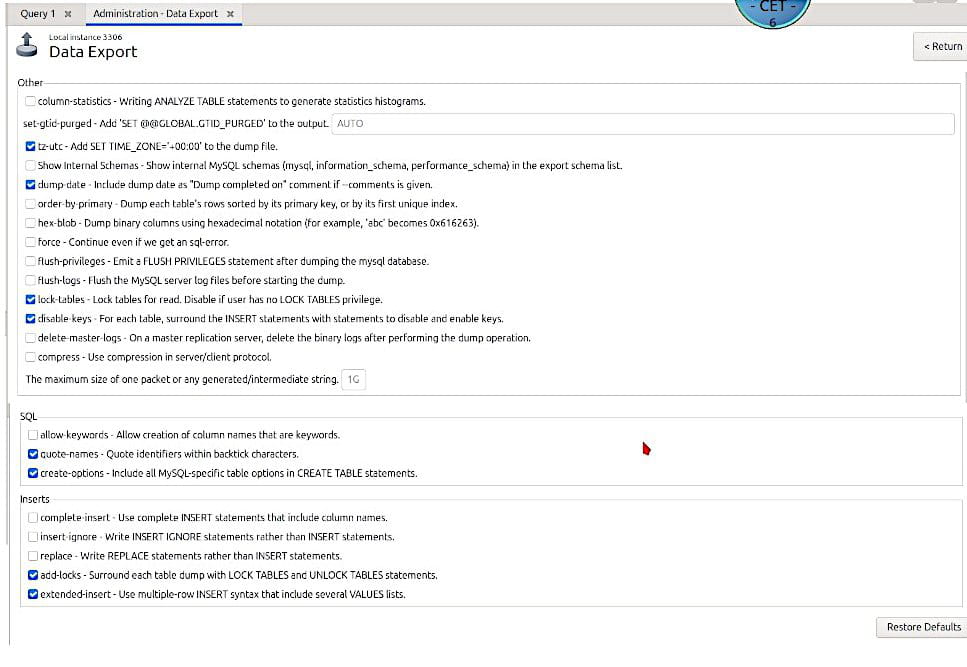
-
I just downloaded mysql-workbench-community-dbgsym_8.0.41-1ubuntu24.04_amd64.deb as well as mysql-workbench-community_8.0.41-1ubuntu24.04_amd64.deb but there are no changes in the "Advanced Options" menu...