
Disable Canon EOS R7 Exp.SIM
richard -
Hello,
I want to take a long exposure photo of the stars, but as soon as I try to take the picture, an Exp.SIM icon flashes and I can't take the photo. I understand that this indicates that the photo is overexposed or underexposed, but I can't find where to turn it off.
1 answer
-
Hello,
For star photos, you should set the priority to shutter speed, or better yet, to Bulb mode.
Be careful of the Earth's rotation; a long exposure time will lead to motion blur due to the Earth's rotation.
Exposure Simulation
With exposure simulation, the brightness of the images corresponds more accurately to the actual brightness (exposure) of the obtained photos.
-
Select [
 :Exposure sim.].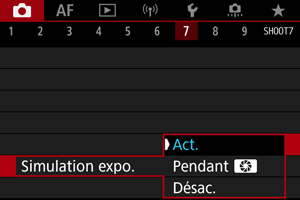
-
Adjust an option.
-
Act. (
 )
)The brightness of the displayed image will be close to the actual brightness (exposure) of the obtained image. If you adjust the exposure compensation, the brightness of the image will change accordingly.
-
During

In principle, the image is displayed at a standard brightness for easy visibility (
 ). It is only when you hold down the depth of field control button that the brightness of the image resembles the actual brightness (exposure) of the obtained image ().
 -
Desac. (
)The image is displayed at a standard brightness for easy visibility. Even if you have adjusted the exposure compensation, the image is displayed with a standard brightness.
-
https://cam.start.canon/fr/C004/manual/html/UG-03_Shooting-1_0350.html
</div></li></ol> -