
Spyhunter 5
Solvedbazfile Posted messages 58527 Registration date Status Moderator Last intervention -
Hello,
I need help to remove Spyhunter 5 from my PC.
Thank you!
Have a great day.
8 answers
-
Hello.
Two solutions:
1- If it is still part of your installed programs, uninstall Spyhunter using Revo Uninstaller in advanced scan mode.
Revo Uninstaller tutorial to read carefully.
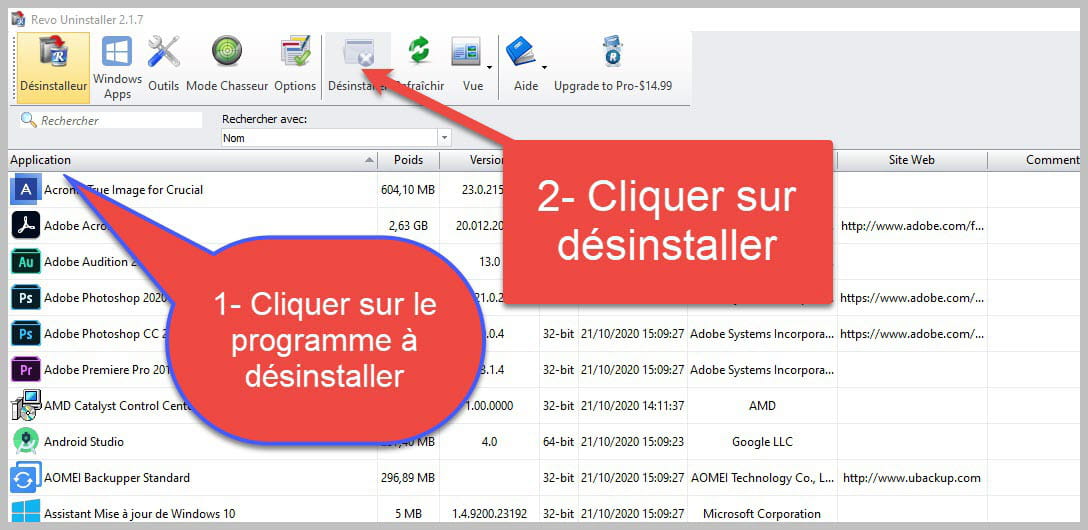

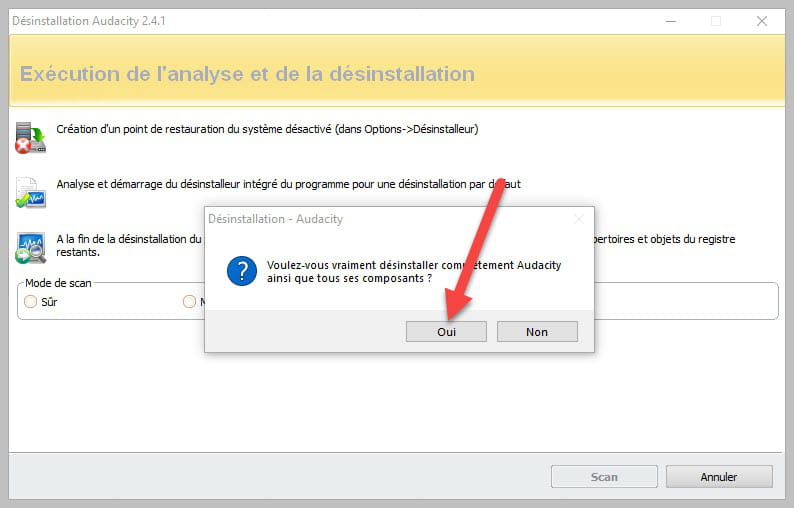
Accept the uninstallation of the program you want to uninstall, and if there is an error message saying that the uninstallation is impossible, close the error message and continue the procedure.

Check "Advanced Scan" then click on "Scan".

Click on "Select All" then on "Delete", if a second list appears do the same, then once everything is deleted click on "Finish", a restart may be requested.
2- If Spyhunter is not part of the installed programs do the following:
Download FRST once downloaded save it on the desktop then right-click on FRST and choose Run as administrator you will have this:

Click on Analyze

Warning, wait for the messages saying that the analysis is complete to appear.

At the end of the analysis you will have two text files on the desktop FRST and Addition.


Then send the FRST and ADDITION reports to PJJOINT see THIS TUTORIAL then provide the two links generated by PJJOINT in your response.
bazfile
Moderator/Contributor security.
a hello, a response, a thank you are always appreciated.-
Good evening
here is what I received
https://pjjoint.malekal.com/files.php?id=FRST_20230215_h8j9u10f15k7 for the frst txt
and https://pjjoint.malekal.com/files.php?id=20230215_o13t11p11x11s6 for the addition
thank you for helping me again
have a nice evening
-
-
There are only a few insignificant remnants of SpyHunter left, which is normal since you uninstalled it with RevoUninstaller.
However, I see why you used that piece of crap SpyHunter, your PC is infected. Once the disinfection is complete, I advise you to change your online passwords (email, site login for banking, social networks, etc.).
Procedure to follow in the order indicated:
1- Open FRST as an administrator by right-clicking on FRST and selecting run as administrator
2 - Copy the entire script that is in the box below:Start:: CreateRestorePoint: CloseProcesses: R3 EnigmaFileMonDriver; C:\Windows\system32\Drivers\EnigmaFileMonDriver.sys [83992 2023-02-07] (Microsoft Windows Hardware Compatibility Publisher -> EnigmaSoft Limited) 2023-02-07 21:18 - 2022-12-20 01:43 - 000083992 _____ (EnigmaSoft Limited) C:\Windows\system32\Drivers\EnigmaFileMonDriver.sys HKU\S-1-5-21-3617792983-1030854042-1699975501-1001\...\Run: [EpicGamesLauncher] => "C:\Program Files (x86)\Epic Games\Launcher\Portal\Binaries\Win64\EpicGamesLauncher.exe" -silent (File not found) HKU\S-1-5-21-3617792983-1030854042-1699975501-1001\...\Run: [HONEYGAIN] => D:\Honeygain.exe (File not found) HKU\S-1-5-21-3617792983-1030854042-1699975501-1001\...\Run: [Krisp] => "C:\Program Files\Krisp\Krisp.exe" -s (File not found) Task: {5AFE21BA-6339-432C-BC3A-9100E0F91DC4} - System32\Tasks\CorelUpdateHelperTask-7F44186A4726F6BB149BC7FDA77C58CF => C:\Program Files (x86)\Corel\CUH\v2\CUH.exe -resume (File not found) Task: {626C8CE8-9A2E-4FC6-80E6-45947E2197B0} - System32\Tasks\Red Giant Link => C:\Program Files (x86)\Red Giant Link\Red Giant Link.exe --silent (File not found) Task: {AA068A9C-013E-483A-BD46-614A76820F42} - System32\Tasks\IUM-F1E24CA0-B63E-4F13-A9E3-4ADE3BFF3473 => C:\Program Files (x86)\Intel\Intel(R) Update Manager\bin\iumsvc.exe --automatic (File not found) S2 AvgWscReporter; "C:\Program Files\AVG\Antivirus\wsc_proxy.exe" /runassvc /rpcserver [X] S3 BraveElevationService; "C:\Program Files\BraveSoftware\Brave-Browser\Application\110.1.48.158\elevation_service.exe" [X] S3 Rockstar Service; "E:\gta\RockstarService.exe" [X] U4 AppMgmt; no ImagePath U3 avgbdisk; no ImagePath U4 CscService; no ImagePath S3 mhyprotect; \??\C:\Users\Matis\AppData\Local\Temp\mhyprotect.sys [X] U4 napagent; no ImagePath U4 PeerDistSvc; no ImagePath HKLM\SOFTWARE\Microsoft\Windows Defender: [DisableAntiSpyware] Restriction HKLM\SOFTWARE\Microsoft\Windows Defender: [DisableAntiVirus] Restriction GroupPolicy: Restriction ? Policies: C:\ProgramData\NTUSER.pol: Restriction HKLM\SOFTWARE\Policies\Mozilla\Firefox: Restriction Task: {C4A403A6-81D8-4CCD-8670-0352C4696110} - System32\Tasks\Service\Diagnostic => C:\Users\Matis\AppData\Roaming\ServiceGet\Numedar.exe -> "C:\Users\Matis\AppData\Roaming\ServiceGet\Numedar.dat" HKLM\SOFTWARE\Policies\Microsoft\Internet Explorer: Restriction C:\Users\Matis\AppData\Roaming\ServiceGet Edge Extension: (No name) -> AutoFormFill_5ED10D46BD7E47DEB1F3685D2C0FCE08 => C:\Windows\SystemApps\Microsoft.MicrosoftEdge_8wekyb3d8bbwe\Assets\HostExtensions\AutoFormFill [not found] Edge Extension: (No name) -> BookReader_B171F20233094AC88D05A8EF7B9763E8 => C:\Windows\SystemApps\Microsoft.MicrosoftEdge_8wekyb3d8bbwe\Assets\BookViewer [not found] Edge Extension: (No name) -> LearningTools_7706F933-971C-41D1-9899-8A026EB5D824 => C:\Windows\SystemApps\Microsoft.MicrosoftEdge_8wekyb3d8bbwe\Assets\HostExtensions\LearningTools [not found] Edge Extension: (No name) -> PinJSAPI_EC01B57063BE468FAB6DB7EBFC3BF368 => C:\Windows\SystemApps\Microsoft.MicrosoftEdge_8wekyb3d8bbwe\Assets\HostExtensions\PinJSAPI [not found] CustomCLSID: HKU\S-1-5-21-3617792983-1030854042-1699975501-1001_Classes\CLSID\{45df690c-d6b8-bf0e-7f91-523cfddeb1e1}\localserver32 -> "E:\Voicemod Desktop\VoicemodDesktop.exe" -ToastActivated => File not found CustomCLSID: HKU\S-1-5-21-3617792983-1030854042-1699975501-1001_Classes\CLSID\{9e7f91c5-aed3-3d22-3972-382f622a25e7}\localserver32 -> "D:\voice\Voicemod Desktop\VoicemodDesktop.exe" -ToastActivated => File not found AlternateDataStreams: C:\ProgramData\agent.1632561892.bdinstall.v2.bin:94EC7D42AA [4298] AlternateDataStreams: C:\ProgramData\agent.uninstall.1642525421.bdinstall.v2.bin:ECE92B1313 [4298] AlternateDataStreams: C:\ProgramData\agent.update.1642522688.bdinstall.v2.bin:73F3645150 [4298] AlternateDataStreams: C:\ProgramData\mntemp:8EAD8B3507 [4298] AlternateDataStreams: C:\ProgramData\WnHqYU0nH4:D39ABDACE2 [4298] AlternateDataStreams: C:\ProgramData\Microsoft\Windows\Start Menu\desktop.ini:B1DA6C571C [4298] AlternateDataStreams: C:\ProgramData\Microsoft\Windows\Start Menu\Programs\Adobe After Effects 2020.lnk:C705C23FF2 [4298] AlternateDataStreams: C:\ProgramData\Microsoft\Windows\Start Menu\Programs\Adobe Premiere Pro 2020.lnk:E07F759D69 [4298] AlternateDataStreams: C:\ProgramData\Microsoft\Windows\Start Menu\Programs\Blend for Visual Studio 2015.lnk:978C073723 [4298] AlternateDataStreams: C:\ProgramData\Microsoft\Windows\Start Menu\Programs\Mister Horse Product Manager.lnk:2BCAEE29A6 [4298] AlternateDataStreams: C:\ProgramData\Microsoft\Windows\Start Menu\Programs\PC Health Check.lnk:F20EF51E1F [3442] AlternateDataStreams: C:\Users\Public\Shared Files:VersionCache [5260] cmd: netsh advfirewall reset EmptyTemp: End::3- Once the script is copied, click on Fix, FRST automatically takes the script that is in the clipboard.

Let the fix finish, once it’s done you will be prompted to restart your PC, do so as soon as you are asked, see below.
Then once your computer has restarted:
4- You will have a Fixlog file on your desktop, then send this report fixlog to PJJOINT, then give the link generated by PJJOINT in your response.5- CHECK AND TELL ME IF YOUR PROBLEM IS STILL PRESENT
bazfile
Moderator/Security Contributor.
A hello, a response, a thank you are always appreciated. -
Hello,
I am really sorry for my response time but I had issues with Orange who couldn't restore my connection.
Here is the link https://pjjoint.malekal.com/files.php?id=20230316_x10p10f15y5s12, however, I didn't have to restart my computer because the program crashed.
What do you mean by infected? Do you have more information about it, its nature?
Thank you for your help and your patience
Have a good evening
-
Your computer was infected by a Trojan horse; as a precaution, change all your online passwords (email, banking site logins, social networks, etc., etc.....).
The fixlog is OK.
If everything is also OK on your side, you can uninstall FRST, rename the FRST file you downloaded to uninstall, then once the file is renamed, open it, and the uninstallation will happen automatically via a restart of the computer.

bazfile
Moderator/Security Contributor.
a hello, a reply, a thank you are always appreciated. -
Hello
Thank you for all your help, but I wanted to ask one thing: how was the Trojan horse removed and what application could I use against it, because I'm using Avast but I still have a virus.
Have a nice day.
-
how was the Trojan horse removed
The Trojan horse was removed via my custom FRST script.
because I use Avast but I still have a virus
An antivirus does not protect against everything; Avast is far from the best. Windows 10 already has its own built-in antivirus, which is sufficient and effective—there's no need to pay for that. The Windows 10 antivirus activates automatically when no other antivirus is installed on the PC.
If you want to uninstall Avast one day, use its uninstallation tool named AvastClear because a standard installation does not completely uninstall it.
If you still wish to install a paid antivirus, choose Kaspersky Internet Security or Bitdefender.
-
-
Hello
I wanted to thank you for everything, but I wanted to know other things.
I was wondering why there is an uninstall file when we can't.
And I wanted to know what I should do to have an antivirus against Trojans because I have Avast and it hasn't helped me at all.

Have a nice day
-
And I wanted to know what I should do to get an antivirus against trojans because I have Avast and it didn't help me at all.
Read my previous message I edited it because it was posted before it was finished, in this message I answer all your questions.
I was wondering why there is an uninstall file when we can't.
These are simply two shortcuts for Spyhunter, it's of no importance, but if you want to delete them, do the following.
Procedure to follow in the order indicated:
1- Open FRST as an administrator, for that right-click on FRST and choose run as administrator
2 - Copy the entire script in the box below:Start:: C:\ProgramData\Microsoft\Windows\Start Menu\Programs\Startup\EnigmaSoft End::3- Once the script is copied, click on Fix, FRST automatically takes the script that is in the clipboard.

Let the fix be done, once it is finished, you will be notified.
4- You will have a Fixlog file on your desktop, then send this fixlog report to PJJOINT then provide the link generated by PJJOINT in your reply.
-
-
Hello, I wanted to apologize for the delay; I didn't see that you had sent another message. I'm sending you a message because I have a question.
I wanted to know how to understand if there is a virus on my PC using FRST and PJJPoint like you did. I would like to become a bit more independent regarding the protection of my PC. I installed a Premiere Pro crack and I would like to check that it doesn't contain anything harmful.
Thank you, have a nice day.
-
Hello,
I understand, it's a shame, thank you anyway for getting back to me.
Have a nice day (if I need to get in touch with you again).
