Refresh the Recycle Bin W11

pistouri Posted messages 19010 Registration date Status Contributor Last intervention -
Hello, I can't refresh the recycle bin (full recycle bin / empty recycle bin) in Windows 11. I can't find the recycle bin icons in regedit. Thanks to anyone who can help me.
j
2 answers
-
pistouri Posted messages 19010 Registration date Status Contributor Last intervention Ambassador 8 730
Hello,
Location of the Recycle Bin in the Windows Registry:
HKEY_LOCAL_MACHINE\SOFTWARE\Microsoft\Windows\CurrentVersion\Explorer\Desktop\NameSpace\{645FF040-5081-101B-9F08-00AA002F954E}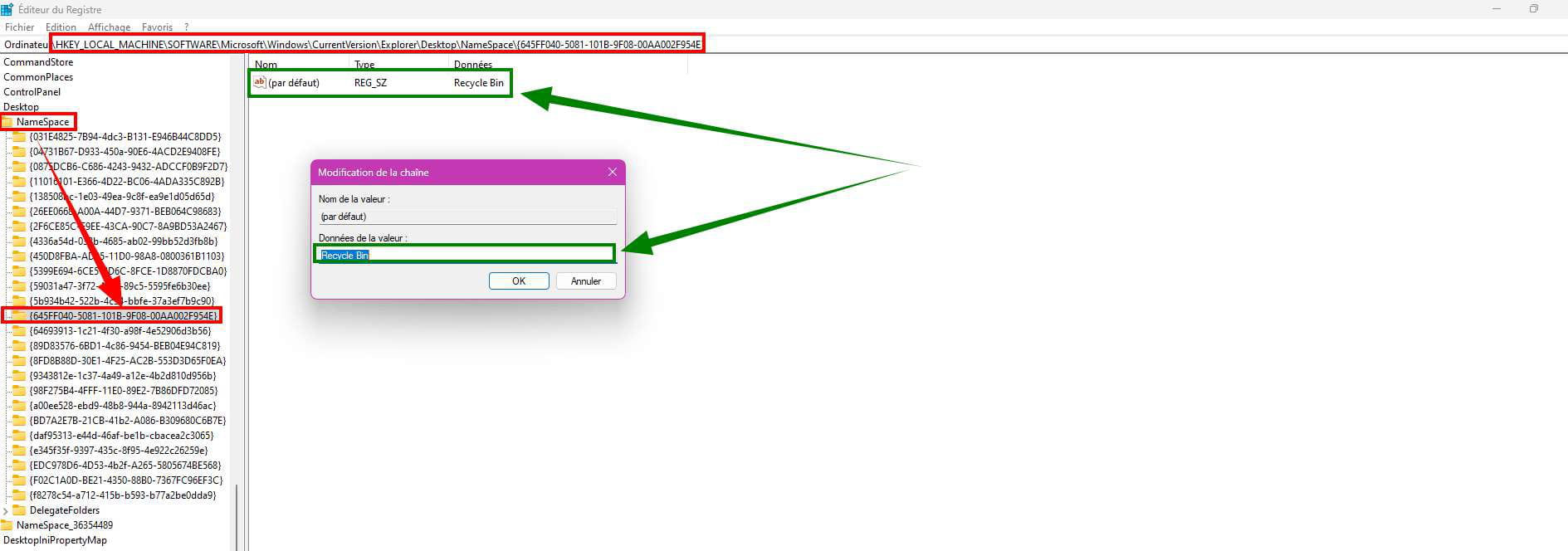
Repair the Recycle Bin
Open a command prompt (CMD) as Administrator.
Copy and paste these 2 commands.
Press the enter key after each command.
Once finished, type exit or close the command prompt window (CMD).
RmDir /S "C:\$Recycle.Bin" RmDir /S "C:\RECYCLER"
Re-register the Recycle Bin:
Register this reg file ==► Recycle Bin
Run the reg file
Yes, Yes, OK.
Restart the PC.

@+
-
Hello, thank you very much for the follow-up. I followed the instructions exactly, but it still doesn't work...
-
-
Hello,
The modification or reassignment of icons is done:
-graphically: Settings-Personalization-Themes-Desktop Icon Settings: change the full and empty recycle bin icons.
-or directly in the registry at
Computer\HKEY_CURRENT_USER\SOFTWARE\Microsoft\Windows\CurrentVersion\Explorer\CLSID\{645FF040-5081-101B-9F08-00AA002F954E}\DefaultIcon
The respective empty and full values are %SystemRoot%\System32\imageres.dll,-55 and %SystemRoot%\System32\imageres.dll,-54 -
-
Settings --►Customization --►Themes --►-Desktop Icon Settings

In the Windows registry: Full Recycle Bin and Empty Recycle Bin.
HKEY_CURRENT_USER\SOFTWARE\Microsoft\Windows\CurrentVersion\Explorer\CLSID\{645FF040-5081-101B-9F08-00AA002F954E}\DefaultIconempty (Empty Recycle Bin)

full (Full Recycle Bin)

I didn't have the correct registry path for Full Recycle Bin and Empty Recycle Bin.
Congratulations Brucine.
@+
-