
File opening issues with Firefox
Solvedaxel_8410 Posted messages 429 Registration date Status Member Last intervention -
For the past few days with Firefox, when I open a file to read, it automatically downloads and this happens with all types of files: PDF, Excel, Word, etc...
However, I have configured Firefox correctly by checking to always ask for all files.
Configuration: Windows / Firefox 98.0
24 answers
- 1
- 2
-
pistouri Posted messages 19010 Registration date Status Contributor Last intervention Ambassador 8 732
Hello,
Try this:
Open Firefox.
Clear everything in the address bar (URL) or open a new tab.
Type or copy/paste --►about:config
Click on "Accept the Risk and Continue"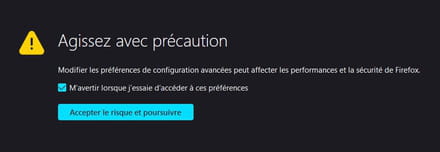
In the box ''Search for a preference name''
Copy/paste --►browser.download.improvements_to_download_panel
Double-click on --►True
To change the value to --►false
--------------------------------------------------------------------------------------------------------------------------------------------------------------------------------
To revert to the default value, double-click on --►false
Double-click on --►false
To change the value to --►true
--------------------------------------------------------------------------------------------------------------------------------------------------------------------------------
No need to restart Firefox or refresh the page (F5).
The change (in the configuration editor) is immediate.
This will do the trick and restore the old download experience that we knew before in Firefox 98
And even since version 96 of Firefox.
The dialog box is likely restored.
Talk to you later
-
Thank you very much! I just tried, but it still doesn't work.
-
pistouri Posted messages 19010 Registration date Status Contributor Last intervention Ambassador 8 732
-
Yes! That's what I did, and by the way, Firefox gives me the option to open or download; I choose "open with," and it still downloads anyway.
-
pistouri Posted messages 19010 Registration date Status Contributor Last intervention Ambassador 8 732
Test
Test on an online PDF file
With message settings 1 and message 3
Clear everything in the Firefox address bar
Copy/paste
https://www.google.com/search?client=firefox-b-d&q=cours+cuisine+en+pdf+en+ligne&pccc=1
Or type --►cooking course in PDF
Open the link --► MOOC-Cuisine-Afpa-Season-1.pdf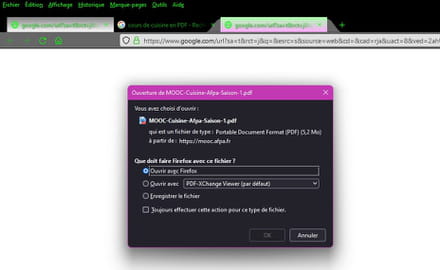
Except for the last line ---►Always perform this action for this type of file.
If you don't have a PDF software extension (no matter which Adobe Acrobat, PDF Xchange, Foxit...)
Select --► open with Firefox
The PDF should display: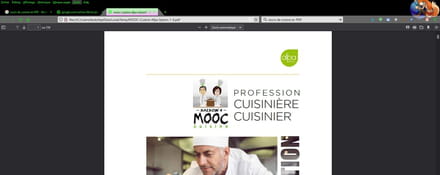
But it is downloaded in the TEMP folder
C:\Users\pistouri\AppData\Local\Temp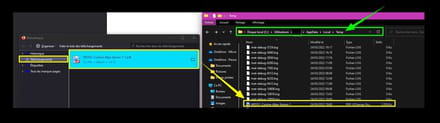
A disk cleanup will remove it.
Check again ---► browser.download.improvements_to_download_panel
Value --► false
Message #1
@+
--
pistouri -
Thank you very much, it looks like it's working.
-
pistouri Posted messages 19010 Registration date Status Contributor Last intervention Ambassador 8 732
As long as it lasts...
Because with Mozilla Firefox there are sometimes surprises and this is the case with the download flow.
Things to ponder :
 1-The prompt dialog was useful to alert that something had been attempted to be downloaded. From now on, the download panel appears to inform you of the same thing.
 2-If you have been under the impression so far that files would only be downloaded once you approved, you are mistaken. The process occurs in the background while the dialog box is displayed on the screen.
 3-Mozilla believes that too many download prompts are unnecessary. The company thinks that downloads are generally intentional.
 4-While commonly used files like executables will be downloaded automatically, for certain types of files, you can configure the behavior in the settings to "always ask" or you can right-click on that file in the Downloads panel and select "Always open similar files".
Here’s how you can restore the old behavior in Firefox where the prompt always appears for downloading and the download panel does not show up.
Restore the download prompt in Firefox 98
Visit about: config in the address bar
 Click on "Accept the risk and continue"
 Type panel in the search bar, wait for the results to display.
 Find browser.download.improvements_to_download_panel
 Toggle its value to false.
This is message #1 in this post.
This will do the trick and restore the old download experience you know from Firefox 97 and earlier. But be aware that this is a short-term solution and Mozilla might remove the about: config pref after a few versions.
Source
As for version 100 of Firefox (but also Google Chrome) I mentioned it in a previous post, it could create problems on some websites.
Version 100 of Chrome and Firefox concerns Mozilla and Google
Scheduled release date --►May 2022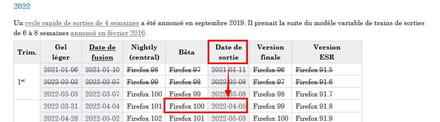
See you later
--
pistouri -
Thank you for taking the time to help me with this problem.
Have a good evening. -
pistouri Posted messages 19010 Registration date Status Contributor Last intervention Ambassador 8 732
-
pistouri Posted messages 19010 Registration date Status Contributor Last intervention Ambassador 8 732
Hello,
Change of circumstances.
Mozilla Firefox brings back the download prompt window allowing users to choose to open or save files.
This follows feedback received from the Mozilla community.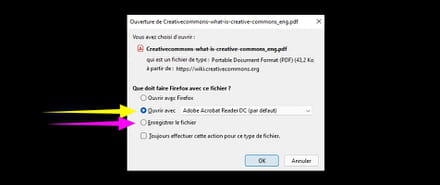
Another change:
Mozilla plans to add an option to use the temporary folder to start downloads.
The option will not be enabled by default. (I advise against this method, a cleanup of Firefox or the PC (temporary files) and goodbye download).
This is starting right now with Firefox 101 Beta.
The stable version will follow. (the version for everyday users).
Source.
@+
-
pistouri Posted messages 19010 Registration date Status Contributor Last intervention Ambassador 8 732
Hello,
opt-in
Additional information regarding the opt-in option (a method I advised against).
The use of a temporary folder at the start of downloads will be reactivated in future versions of Firefox:
A number of product and engineering people have come together to discuss the feedback here.
Based on this feedback, we will add a about:config option and an enterprise policy that will reactivate the use (of a subfolder) of the temporary folder at the start of downloads. We considered a number of other options such as subfolders in the main downloads directory, automatic file deletion, moving files from the downloads folder to temp for only open files, and others, but each of these options has its own drawbacks, and none would address all the feedback here (for example, using subfolders or automatic deletion would not resolve performance issues regarding download locations on network shares).
This new option will be opt-in. We do not intend to revert to the previous default behavior. Due to the inherent downsides of using the temporary folder, we believe the new default value is better suited for new users as well as the majority of existing users. Those who choose to change this preference or the enterprise policy should be aware of these downsides and make an informed decision.
As an administrative note, we are reopening this bug as we will need it to facilitate the implementation of this new option, but we will not reopen comments/discussions on this bug as it would divert attention from this work.
Mozilla feared that people would lose files, but these concerns could only stem from a fundamental misunderstanding of the "Open" function versus "Save" in the first place. They literally did not even know what they were deleting when they got rid of opening from the temporary folder.
Save files to :You can temporarily change the folder next to "Save files to:" to something you can empty when you want to clear. Firefox will use this folder for "Open with [relevant application]" in the Downloads dialog and "Use [relevant application]" on the Settings page, Applications list. Then, configure Firefox to "Always ask you where to save files" so that when you actually want to save a file, you can place it somewhere useful.
Bugzilla source
The new feature is explained in detail here
--► Manage file types and download actions in Firefox
(set the version to 101 in the right sidebar). It will certainly not be removed, but the default value will obviously remain "Save files". This is a feature intended for advanced users
The process :
Modifying download actions
You can change the action taken by Firefox for defined content types. This will not affect media embedded in a webpage - only links to the files themselves.
Click the Fx89menuButton menu button and select Settings .
In the General panel, go to the Applications section.
Select the Content Type entry for the action you want to modify. (You may see multiple entries for the same file format or extension, as some file types include multiple content types.)
The Action column will give you a dropdown menu with options on the action to take.
Open in Firefox: Select this option if you want Firefox to display the content. It only applies to a limited number of content types that Firefox is capable of decoding (PDF, AVIF, XML, SVG, and WebP Image).
Always ask
Always ask: This will show you a prompt asking What should Firefox do with this file? ( see below ) so that you can choose the action you want to take. This can be useful if Firefox is automatically saving this type of file or always opening it with a certain application, and you want to be asked what to do.
Save file
Save file: This will always save the file to your computer when you download this type of file. For more information, see Where to find and manage downloaded files in Firefox .
Use Windows default application
Use Windows default application: This will open the file with the default application set in your operating system. This is only shown for content types that include the Open in Firefox option (PDF, AVIF, XML, SVG, and WebP image files) and is available when your system has another application set to open this type of file by default.
Use < application name >
Use < application name > : opens the file or handles the protocol with this application. (Some content types, such as mailto, irc, and ircs, are protocols and not file types.) Options may include one or more web applications to handle the protocol or an installed application.
Use other…: This opens the Select an application dialog, where you can choose the application you want to use.
Application details
Application details… : If other web applications or installed applications other than the system defaults are listed, this opens a dialog where you can know the location of these applications or remove an application as an available option.
Closes the about:preferences page.
All changes you made will be automatically saved.
--------------------------------------------------------------------------------------------------------------------------------------------------------------------------------
Reset download actions for all content types :
If you're experiencing issues with how Firefox handles file downloads that you cannot resolve, or if you just want to start fresh, you can restore content types and default actions by manually deleting the file that stores these settings.
This will remove all custom content type actions. You will need to redo these changes after following the steps below.
Open your profile folder:
Click the Hamburger (the horizontal lines at the top right), click Help and select Troubleshooting Information.
The Troubleshooting Information tab will open.
Under the Application Basics section next to Profile Folder, click on--►Open containing folder
Your profile folder will open.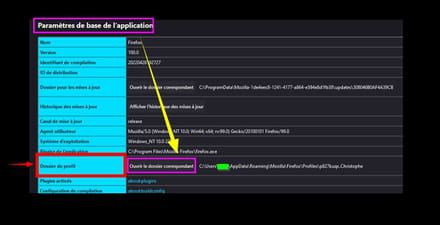
Delete (or rename) the file --► handlers.json
For renaming for example --► handlers.json.old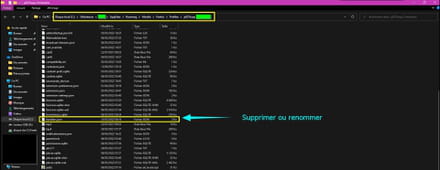
Restart Firefox.
@+
--
scalpel -
pistouri Posted messages 19010 Registration date Status Contributor Last intervention Ambassador 8 732
Hello,
Mozilla in version 101.0 has restored the behavior of downloaded files.
Firefox 101.0 was released on May 31, 2022.
Update the Firefox browser if necessary.
--►Update Firefox

Restore the old behavior of downloaded files.
Clear everything in the Firefox address bar and type or copy/paste:about:preferences
Or in the Menu bar --►Tools --►Options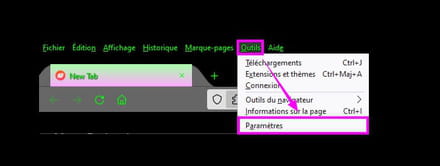
Scroll down to the section --►Applications
Here 2 options to choose from:
What should Firefox do with other files?
1- ► Save files
2--► Ask whether to open or save files
It is option 2 that was added in version 101 of Firefox on May 31, 2022: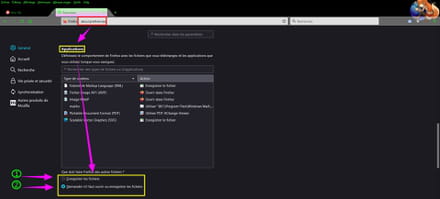
@+
--
scalpel -
Hello,
Thanks for the info, it works "perfectly"!!
See you! -
pistouri Posted messages 19010 Registration date Status Contributor Last intervention Ambassador 8 732
Info new Firefox 101.0 :
It's your choice!
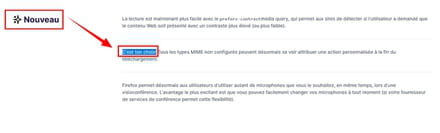
It's your choice!
All unconfigured MIME types can now be assigned a custom action at the end of the download.
MIME is a video format.
PDF
Version 102 will introduce a setting in about:config (browser.downloads.start_downloads_in_tmp_dir) that properly fixes this issue, as downloads like PDFs are still saved in your user’s download folder rather than temporary as before, so still not ideal.
Have a good day.
--
pistouri -
pistouri Posted messages 19010 Registration date Status Contributor Last intervention Ambassador 8 732
Hello Ritchie03,
Firefox 102
There’s something new with the release of Firefox 102 (released on June 28, 2022) for the Downloads panel.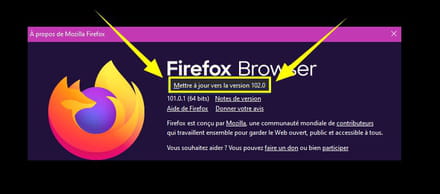
Additional options
New options are available.
==► Show, hide the Firefox 102 download panel
Aside from that, I’m wondering if userChrome.css is still functioning 100% in FF 102.
Because I’m encountering a minor display issue with the tabs in my .css code.
It’s not a big deal, but I had code with curved tabs which is no longer the case (the last tab is now rectangular).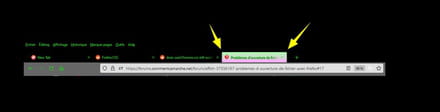
There may be some posts on CCM for those who have installed userChrome.css.
Stay tuned.
@+
-
pistouri Posted messages 19010 Registration date Status Contributor Last intervention Ambassador 8 732
Hello,
Firefox Suite 102
Firefox 102 is not without its faults.
In private messages on CCM, it was pointed out to me that the box ''Automatically delete history'' remains unchecked even after restarting Firefox.
Settings -► Privacy
In the right-hand part, scroll down to the section -► Cookies and site data
The line --► Delete cookies and site data when Firefox closes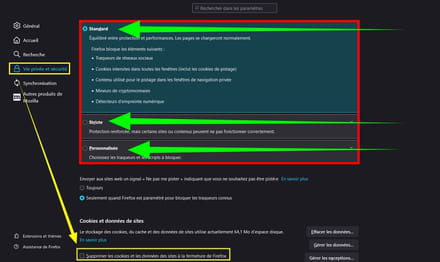
This is the case regardless of the mode chosen for cookie tracking (The trackers).
- Standard
- Strict
- Custom
But upon closer inspection, one can see in the menu bar by clicking on ''History' that it is indeed deleted upon the next opening of Firefox, at least that's what I've observed.
A discussion is ongoing about cookies and third-party cookies in Firefox on a bugzilla forum regarding this ''ghost'' box.
Another bug observed is that the drag/drop of a site by clicking on the padlock at the beginning of the address bar results in a blank page when creating a shortcut on the Desktop.
Opening it with Firefox leads nowhere.
Nothing will display on Firefox. (A black page).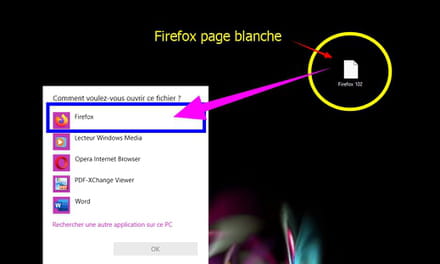
Other bugs may yet be discovered.
@ bug.
--
pistouri -
Hello,
Mozilla Firefox is up to date.
The value of browser.download.improvements_to_download_panel is properly set to false.
I have checked "Always ask" yet it still downloads files automatically... What should I do, please?
-
pistouri Posted messages 19010 Registration date Status Contributor Last intervention Ambassador 8 732
Hello,
@Rachaachaa
Follow the procedure from message #14
Select:
2--► Ask whether to open or save files
Install the extension --► Open in Browser
Download a file.
Before clicking, select --► Open in browser/Server send MINE
Click on --►OK

The extension supports the following files:
- Text
- Web page
- XML
- PDF
- Server send MINE
That is, the most common ones.

Extension Preferences:
To find the preferences of the extension in the menu bar, click on ''Tools'' and then on ''Open in Browser ''
Then click on --►Preferences

You can always force the display of an "Open in browser" dialog by using the menu "Tools" > "Open in Browser".
Enable the option --►Never ask to confirm ''Save file'' action (Never ask to confirm action)

@ +
-
Thank you for your response.
2--► Ask whether to open or save the files --> the option was indeed checked
I successfully downloaded the Open in browser addon and checked the never ask option.
Unfortunately, Firefox continues to save the files despite choosing the open in Firefox option. Knowing that now, with the addon, I have two windows opening, first the open whatever window and then Firefox afterwards.



