Exponent
Solved
Hello,
I am using the PDF-Xchange Viewer software
I can't figure out how to write a number with an exponent
Thank you in advance for your help
Best regards
Name removed CCM Moderation
Configuration: Windows / Firefox 74.0
I am using the PDF-Xchange Viewer software
I can't figure out how to write a number with an exponent
Thank you in advance for your help
Best regards
Name removed CCM Moderation
Configuration: Windows / Firefox 74.0
2 answers
-
ModeratorHello,
I am not familiar with your software. If it works like other software of the same kind, it's once you start writing that the font options appear, including superscript.
I recommend Foxit Reader (free software) which has the ability to format text in superscript.
https://www.commentcamarche.net/telecharger/bureautique/10297-foxit-pdf-reader/
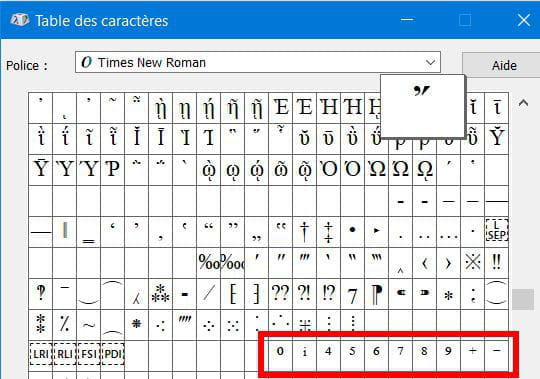
If you are still having trouble, as a last resort, you can use the Windows character map. It contains superscript numbers. Press Win + R to open the Run window and in this window, type charmap and press Enter.
You will need to look around a bit to find the superscript numbers, as they are not all in the same place:
At the beginning of the table:
In the last third:
You select, copy, and then paste. It's not the easiest way, but it works! -
Hello,
Write the number normally, then select it, right-click, Format >> set to superscript.
Ctrl + Shift + "+" (from the numeric keypad)