
Bootsect issue
-
Hello
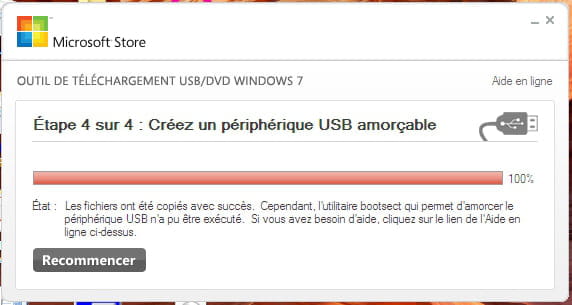
I have a problem creating a bootable USB drive for Windows 7. When it finishes copying the files, it tells me that the bootsect utility that allows for booting could not be executed. What should I do? I'm attaching the screenshot of the message. By the way, I'm using the "Windows 7 USB/DVD Download Tool".
I have a problem creating a bootable USB drive for Windows 7. When it finishes copying the files, it tells me that the bootsect utility that allows for booting could not be executed. What should I do? I'm attaching the screenshot of the message. By the way, I'm using the "Windows 7 USB/DVD Download Tool".
1 answer
-
ModeratorHello,
Use Rufus,
Launch Rufus and specify the path of the ISO file
In partition scheme, choose GPT.
For more details, refer to this tutorial for specifics: how to create a bootable USB installation drive for Windows
You should choose GPT if the computer is recent and supports UEFI (check in the boot options of the BIOS).
Otherwise select MBR (more than 4 years old).
--
Please press any key to continue the disinfection...
