
Installing Scribus on Mac
david88700
Posted messages
711
Registration date
Status
Member
Last intervention
-
_Ritchi_ Posted messages 21130 Registration date Status Contributor Last intervention -
_Ritchi_ Posted messages 21130 Registration date Status Contributor Last intervention -
Hello,
I want to install Scribus, but it tells me to install another program with Ghostscript-9.26 and I don't know how to do it.
I want to install Scribus, but it tells me to install another program with Ghostscript-9.26 and I don't know how to do it.
1 answer
-
Hello,
Did you successfully download the "Mac OS X Mountain Lion (10.8.x) or higher (DMG)" version available here:
https://sourceforge.net/projects/scribus/files/scribus/1.4.8/
If you click on this link, scroll down a bit on the displayed page to find the file named "scribus-1.4.8.dmg": that's the one you need to download as it is for Mac OS.
After a few minutes of downloading, you should have the file scribus-1.4.8.dmg weighing 110.7MB.
Right-click on this file, choose the submenu "Open"
You will get this window: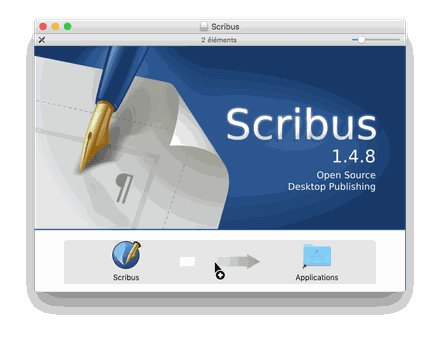
As indicated by the small drawing, to install Scribus, you just need to drag the Scribus icon onto the "Applications" icon
A window should prompt you to authenticate as an administrator of the Mac: click on the "Authenticate" button, enter the name and password of the administrator account
Wait a bit
Open the Applications folder to discover your new application.
For the first launch, I recommend right-clicking on the Scribus icon in the Applications folder and choosing the submenu "Open." A window telling you that the application is from an unidentified developer... will appear. Still, click on "Open" and re-enter the name and password of the administrator account.
The first launch is very long, as it needs to check/create the font caches, profiles, etc.
So be patient...
Then, indeed, you will get a window indicating the absence of GhostScript: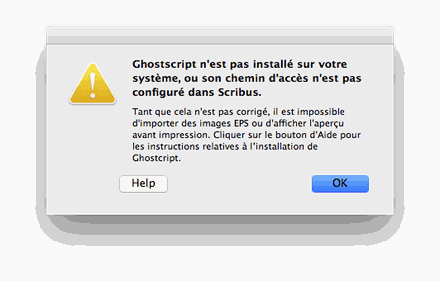
This is not blocking if you do not plan to import/export images in PostScript (PS), Extended PostScript (EPS), and PDF files as images.
If you want to do just that, then I invite you to follow the Scribus wiki regarding this topic:
https://wiki.scribus.net/canvas/OS_X_-_Installing_Scribus_on_your_Mac_the_easy_way#Installing_GhostScript
You need to:
- Quit the Scribus application
- download GhostScript "Ghostscript 9.26" from this site: https://pages.uoregon.edu/koch/
- do not take 9.27: for me, with El Capitan, it did not work
- to install Ghostscript 9.26, double-click on the file "Ghostscript-9.26.pkg"
- accept all default choices
- type the name and administrator password when prompted
- wait a bit and click on "Close": the installation is finished
Restart Scribus: everything is OK !!
Ritchi


