YOUTUBE : Titles Not Matching the Video
Solved
DeMonsternel
Posted messages
71
Status
Member
-
e.t Posted messages 5626 Status Member -
e.t Posted messages 5626 Status Member -
Hello everyone,
Recently, while searching for videos on YouTube, I've noticed that the title of the first search remains displayed under the second search, but sometimes also appears next to the video suggestions in the right column.
A picture is worth a thousand words, so I'm attaching this photo.

Example here: I searched for "Bottle" then "Soft Music"
While the title is: "Soft Music: Relaxing, Calm - Nature Relaxation".
It says: "From plastic bottle to sharp knife ... "
Thank you in advance for any help you can provide.
Best regards to all.
Recently, while searching for videos on YouTube, I've noticed that the title of the first search remains displayed under the second search, but sometimes also appears next to the video suggestions in the right column.
A picture is worth a thousand words, so I'm attaching this photo.
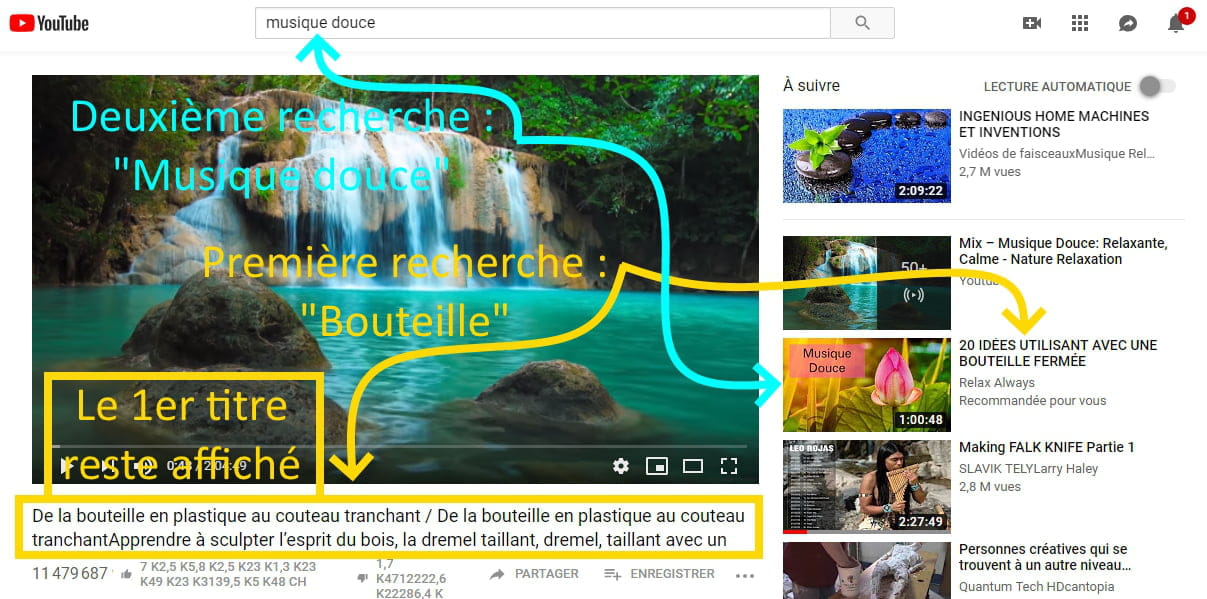
Example here: I searched for "Bottle" then "Soft Music"
While the title is: "Soft Music: Relaxing, Calm - Nature Relaxation".
It says: "From plastic bottle to sharp knife ... "
Thank you in advance for any help you can provide.
Best regards to all.
4 answers
-
OK, but have you tried clearing your history directly from "YouTube" itself (and not just refreshing)?
--
"The one who asks a question is a fool for five minutes. The one who doesn't ask is a fool for life."
-
Hello,
I suggest you clear your cache and delete your browser cookies.
--
Best regards ☆ HelpiOS
We do everything we can to help you.-
Hello HelpiOS,
Actually, the first search remains displayed and the second one adds to the end of the title of the first as follows:
"This man couldn't believe his eyes"
"This man couldn't believe his eyesAcademy Iris Dance"
"This man couldn't believe his eyesWith rope"
I tested your method ... it works for a while then the problem persists.
However, I clicked in the white part of the page and hit "Refresh" and then everything goes back to normal.
Hoping that our ideas will help those who are in this kind of trouble.
We are doing everything we can to share our ideas and tips.
Best regards -
As a keen DIY enthusiast, I search for creative ideas all over the internet.
For my research, I only use Google and YouTube.
As for other browsers... I don't know.
My access procedure is: Google... connect to YouTube and browse for my research.
The problem is recurring after only 4 or 5 searches on YouTube, as mentioned in the previous message. It happened again yesterday... "Refresh" and everything goes back to normal.
Next time, I'll take a photo of the page with the bug.
-
-
Hello, clear your search history in the settings
"you tube"?
Best regards.
--
"He who asks a question is a fool for five minutes. He who does not ask is a fool for life."
-
Here is the first title, and the second one stuck at the end:

Parts of text from the first search appear in the right column and here it is under the video (blue arrow).
And as previously mentioned, everything goes back to normal after "Refreshing".
Win7 + Avast + Clearing history before leaving Google + adwcleaner regularly ... + Regular cleaning and registry checking with CCleaner