WPF Canvas Overlay
Solved
Hello,
I am looking to create a railway network view composed of different objects such as RightPoints, LeftPoints, RightTracks, CurvedTracks, SignalLights, etc. For now, I have created two classes for RightPoints and LeftPoints (not to be confused with the positions of Direct or Diverging points).
All these elements are described in an XML file (posX, posY, angle, etc.).
For testing, I have two ListBoxes, each with a Canvas to display and position my elements like this, and I can activate each control which then modifies its graphical appearance and updates the TextBox in the top left corner.

If I overlay my two Canvas, which is necessary to build my network view, I can do it visually, but the clicks on the controls of the lower Canvas are not detected.

That was my fear; I am not really surprised, but perhaps there is a way?
I tried with a CANVAS integrating both ListBoxes, but in that case, I lose the benefit of programmed positioning, and my controls are displayed as they are in ListBox.

Is there a way to integrate a collection of objects into a Canvas in XAML without being subjected to the formatting imposed by a ListBox?
Thank you for your responses and suggestions.
Best regards, Roland
Configuration: Windows / Chrome 72.0.3626.109
I am looking to create a railway network view composed of different objects such as RightPoints, LeftPoints, RightTracks, CurvedTracks, SignalLights, etc. For now, I have created two classes for RightPoints and LeftPoints (not to be confused with the positions of Direct or Diverging points).
All these elements are described in an XML file (posX, posY, angle, etc.).
For testing, I have two ListBoxes, each with a Canvas to display and position my elements like this, and I can activate each control which then modifies its graphical appearance and updates the TextBox in the top left corner.

If I overlay my two Canvas, which is necessary to build my network view, I can do it visually, but the clicks on the controls of the lower Canvas are not detected.
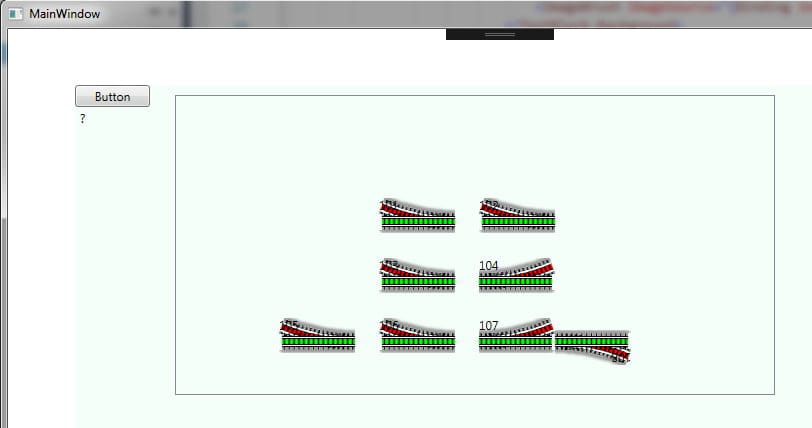
That was my fear; I am not really surprised, but perhaps there is a way?
I tried with a CANVAS integrating both ListBoxes, but in that case, I lose the benefit of programmed positioning, and my controls are displayed as they are in ListBox.

Is there a way to integrate a collection of objects into a Canvas in XAML without being subjected to the formatting imposed by a ListBox?
Thank you for your responses and suggestions.
Best regards, Roland
Configuration: Windows / Chrome 72.0.3626.109
8 answers
-
Good evening,
I don't understand the need to overlay the Canvases.
Can't you display all the guidings in a single Canvas?
--
When I was little, the Dead Sea was only sick.
George Burns-
Good evening Whismeril
Can't you display all the switches in a single Canvas?
I don't think so because I have two classes of switches, Left and Right, which I could probably merge into one, but I have other elements like curves, straight tracks, signals, and sections to represent
I was thinking I could overlay multiple Canvases (one per class of objects)
My need is to put all these elements in one Canvas to symbolize the network and control different components by clicking on them like in this small example
With my current knowledge, I've used ListBox to serve the XAML because I don't know if there's another way to display a collection
or should I design a global class for all types of elements to display and only have one ListBox in that case?
-
-
Since you want to position your elements like on a map, the listbox doesn't seem suitable.
The Canvas is more appropriate in the sense that it allows positioning.
As this is a control I have used very little and not for a long time, I need to dive into it to bind a collection.
At worst, you can place your collection(s) in the code behind.
I have two classes for switches, Left and Right, that I could probably merge into one.
Assuming that the differences between the two justify two classes, I think there is still a majority of shared code.
In this case, it is (more than just advice) necessary to write three classes: one class "Switch" that contains all the shared code, and two classes that derive from it containing the specific codes.
Advantages:- the shared code is written once and maintained once
- you can create a collection of switches that includes both left and right (polymorphism)
And just to be able to create a collection of all your rail elements, you should write a class that they all derive from, even if there is very little (if any) shared code (I see at least one image).
Polymorphism is a foundational mechanism of object-oriented programming.
Previously, when in a button click, we cast sender (of type object, Microsoft doesn't bother...) to Button, it's thanks to polymorphism. Everything derives from object, so a Button is necessarily an object and can go through the sender variable, but when we need something coming from Control or Button, we cast sender into one or the other type and access it.
--
When I was little, the Dead Sea was only sick.
George Burns-
I didn't know that on CCM we could benefit from private lessons, that's great, thank you very much!
I completely agree on the inadequacy of the ListBox, but I don't have another solution yet to enumerate my switch collection in the XAML, I'm looking for one...
Polymorphism, another big word that I'm going to have to add to my vocabulary.
As you express it, I understand the interest well; I had thought about combining these two classes, but I was approaching the problem the wrong way.
In fact, I should even be able to create a Component class and derive each previously mentioned variant from it, as they will all share many common attributes such as number, posX, posY, angle, image, ......
I would even like to bind
<code c>MouseLeftButtonDown="{Binding ClickAiguillage}"<code>
but I don't believe it's possible
Thank you for your advice; I'm diving into my Classes and will keep you updated.
-
Hello
because I will need to tackle the route manager
that's something that can turn out to be very complex.
You will need to work on graph theory (I don't master it at all), here http://www.laas.fr/files/MOGISA/PresentationMathese.pdf page 11, it lists the algorithms you can use.
--
When I was little, the Dead Sea was just ailing.
George Burns -
Maybe you can take a look at my tutorial about the object in .net.
I tried to explain it clearly
--
When I was little, the Dead Sea was only sick.
George Burns -
Good evening
I haven't had much time to look into binding in a Canvas.
But apparently, it is possible to use an ItemControl and make it behave like a Canvas.
https://stackoverflow.com/questions/2317713/binding-wpf-canvas-children-to-an-observablecollection
--
When I was little, the Dead Sea was just sick.
George Burns -
Hello
thanks for the tip, I will dig into it
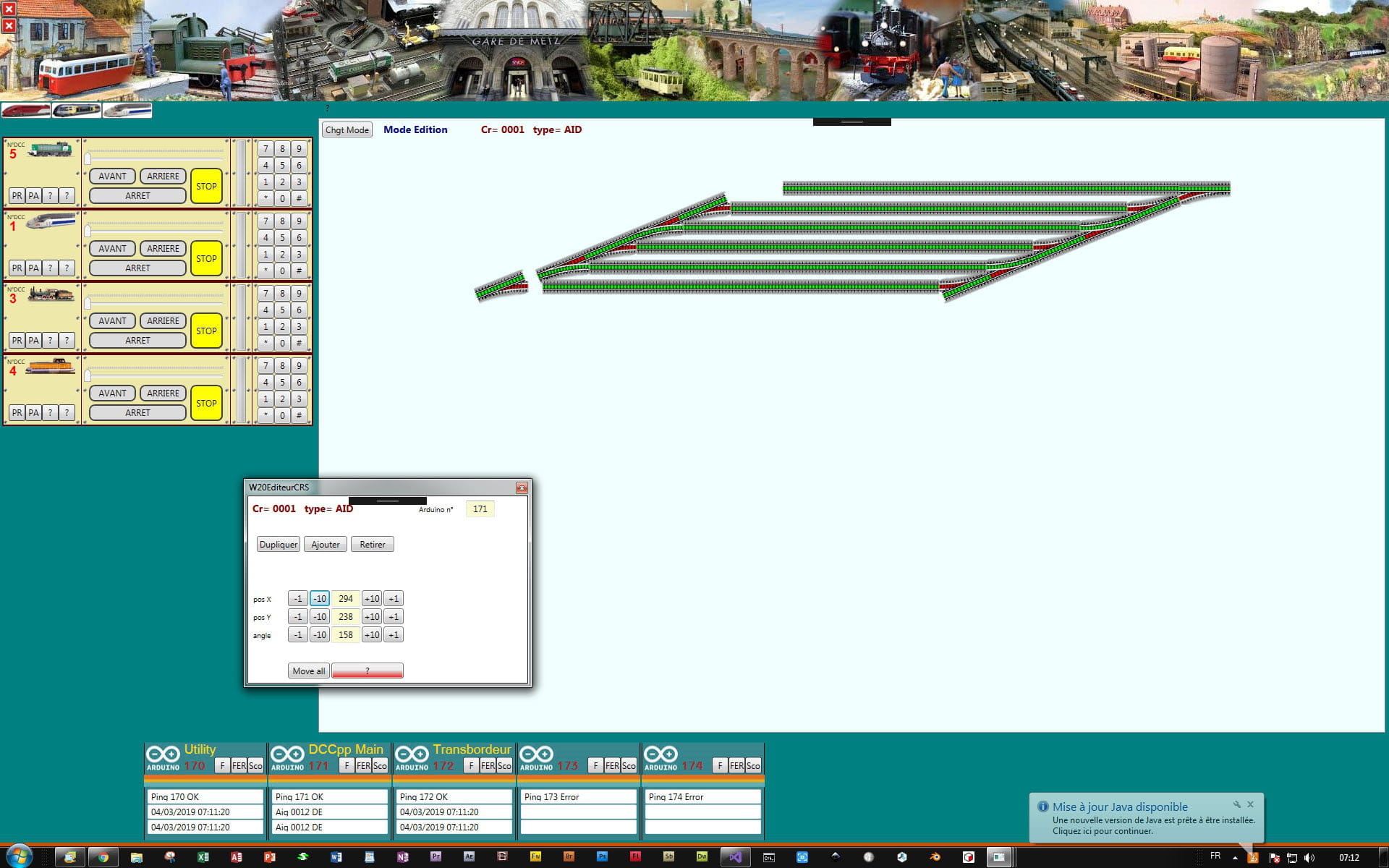
for now I've stuck with a ListBox because I've been able to unify my symbols and have just one class, and it's working well
on my network view I have a command mode and an edit mode
in edit mode, clicking on a symbol opens a small window that allows me to position, add, delete ... the corresponding object
I'll try drag & drop later
in command mode, clicking on a switch symbol creates a command that is sent to the Arduino object which then sends it over Ethernet, we see the command and its response on the screen

I'm now going to create and position the traffic lights
you see my project is progressing and my questions are becoming less pressing but it won't be long because I'll need to tackle the route manager, I'll talk to you about it
A+ Roland -
Hello everyone and as usual, hello to Whismeril
although marked resolved, the rest on this thread is still ongoing
I have implemented ItemsControl<ItemsControl Name="icTodoList" DataContext="{Binding .}" ItemsSource="{Binding Crs}" >
it's exactly what I was looking for
I found a great example of panning and zooming
I'll be able to trace my network in a single window and move around at will
I will still plan some buttons for quick access to standard views


I am impressed by the possibilities of WPF, it's true that it isn't easy to dive in, but when you see the result with so little code, it whets the appetite, thanks again to Whismeril for helping me overcome my beginner's difficulties, which I still have... -
You're welcome and good luck
--
When I was little, the Dead Sea was just sick.
George Burns