Sort my favorites alphabetically
Solved
mausy
Posted messages
104
Registration date
Status
Member
Last intervention
-
pistouri Posted messages 19010 Registration date Status Contributor Last intervention -
pistouri Posted messages 19010 Registration date Status Contributor Last intervention -
Hello,
I'm not sure if I'm on the right forum to ask my question, but I'm giving it a try...
I imported my bookmarks a long time ago into Google, but I can no longer organize my favorites, resulting in an inextricable mix...
Can you please help me?
Thank you to all who take the time to respond to me.
I'm not sure if I'm on the right forum to ask my question, but I'm giving it a try...
I imported my bookmarks a long time ago into Google, but I can no longer organize my favorites, resulting in an inextricable mix...
Can you please help me?
Thank you to all who take the time to respond to me.
3 answers
-
pistouri Posted messages 19010 Registration date Status Contributor Last intervention Ambassador 8 732
Hello,
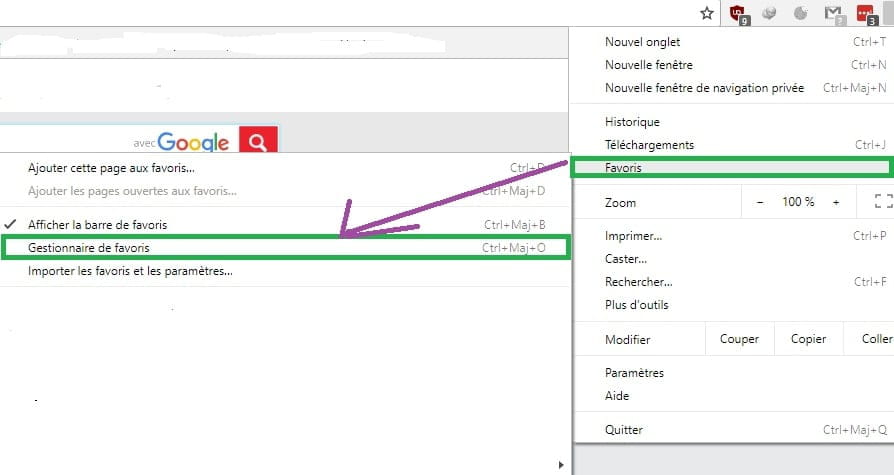
Open your Google Chrome browser
Go to the three little dots located at the top right
Select the line → Favorites
Then the line → Bookmark Manager

Another method to access the Bookmark Manager
Clear everything in the URL bar and do a copy/paste
chrome://bookmarks/
Then press enter or right-click and paste the URL to access it
Now look at the top right, you see three vertical dots

Click on the three vertical dots
Click on → Sort by name

Your Google Chrome favorites are now sorted alphabetically
No need to restart Google Chrome
That's it.
A+