
JTables with JButtons (Swing)
Solved
mikis69
Posted messages
174
Status
Member
-
mikis69 Posted messages 174 Status Member -
mikis69 Posted messages 174 Status Member -
Hello everyone,
As part of a personal project, I'm using JTables but I have a major problem with selecting a row.
An image is worth a thousand words, so here is the image of my JTable.

As you can see in the image, when a row is selected, only the "String" columns have a blue/gray background and the "JButton" columns do not. However, I really want all columns to have a blue/gray background when a row is selected.
I have tried many things, but nothing I have done so far has solved the problem.
If anyone has advice on how to make the JTable more aesthetically pleasing, I’m all ears ^^
Thank you for your help,
Mikis
As part of a personal project, I'm using JTables but I have a major problem with selecting a row.
An image is worth a thousand words, so here is the image of my JTable.
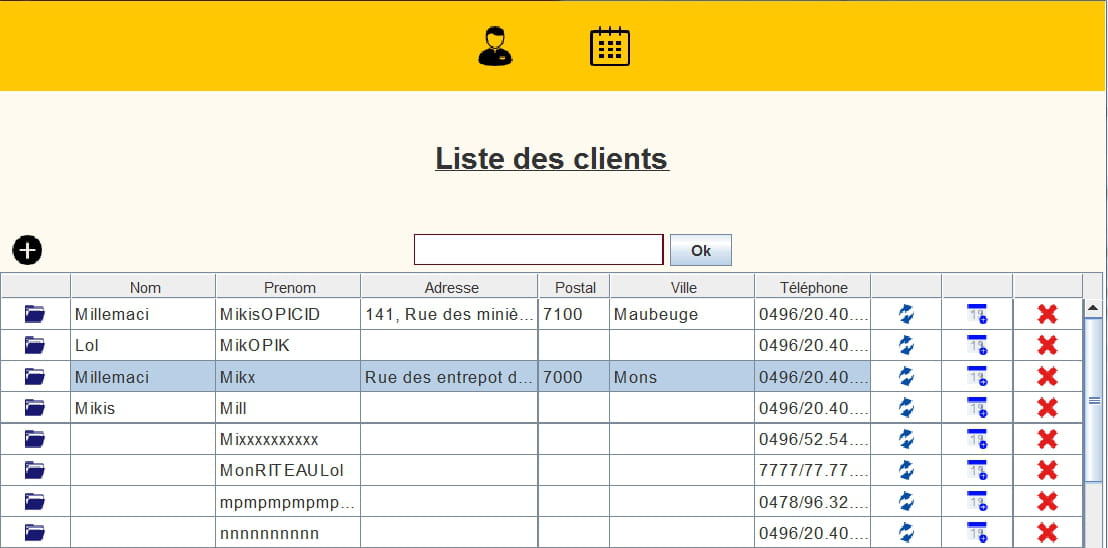
As you can see in the image, when a row is selected, only the "String" columns have a blue/gray background and the "JButton" columns do not. However, I really want all columns to have a blue/gray background when a row is selected.
I have tried many things, but nothing I have done so far has solved the problem.
addMouseListener(new TableMouseListener(this)); setDefaultRenderer(Object.class, new TableCellRenderer()); setSelectionMode(ListSelectionModel.SINGLE_SELECTION); setRowHeight(25);
public class TableCellRenderer extends DefaultTableCellRenderer { @Override public Component getTableCellRendererComponent(JTable table, Object value, boolean isSelected, boolean hasFocus, int row, int column) { super.getTableCellRendererComponent(table, value, isSelected, hasFocus, row, column); setBorder(BorderFactory.createEmptyBorder(0, 3, 2, 0)); setFont(getFont().deriveFont(14f)); if(value instanceof Button) { return (Button) value; } return this; } } If anyone has advice on how to make the JTable more aesthetically pleasing, I’m all ears ^^
Thank you for your help,
Mikis
3 answers
-
Hello,
The problem is that your button takes up the entire size of the cell, which doesn't allow the background of the row to show through when the color changes.
You could use the isSelected parameter to identify when the row is selected and change the background color of the button accordingly.
Example:
import java.awt.*; import javax.swing.*; import javax.swing.table.DefaultTableCellRenderer; public class Test { public static void main(String[] args) { Object[][] rowData = { { "a1", "b1", new JButton("c1") }, { "a2", "b2", new JButton("c2") } }; String[] numColumns = { "a", "b", "c" }; JTable table = new JTable(rowData, numColumns); table.setSelectionBackground(Color.YELLOW); table.setDefaultRenderer(Object.class, new DefaultTableCellRenderer() { @Override public Component getTableCellRendererComponent(JTable table, Object value, boolean isSelected, boolean hasFocus, int row, int column) { if (value instanceof JButton) { JButton button = (JButton) value; button.setBackground(isSelected ? table.getSelectionBackground() : table.getBackground()); return button; } else { return super.getTableCellRendererComponent(table, value, isSelected, hasFocus, row, column); } } }); JFrame frame = new JFrame(); frame.setDefaultCloseOperation(JFrame.EXIT_ON_CLOSE); frame.add(table); frame.pack(); frame.setVisible(true); } }Trust does not exclude control. -
Well, after what you told me:
"So the problem might come from the way you coded this class"
I went to check the class in question and here is the code that was there:
public Button(String icon, ActionListener action) { super(new ImageIcon("icons" + File.separator + icon)); addActionListener(action); setBorderPainted(false); setBorder(null); setBackground(null); setMargin(new Insets(0, 0, 0, 0)); setContentAreaFilled(false); }
The issue was therefore the setContentAreaFilled(false) that I had set to avoid the color changing when clicking a button. Unfortunately, the rendering on JTable was not great since the buttons had no background.
I then replaced the code above with this one
public Button(String icon, ActionListener action) { super(new ImageIcon("icons" + File.separator + icon)); addActionListener(action); setBorderPainted(false); setBorder(null); setBackground(null); setMargin(new Insets(0, 0, 0, 0)); addChangeListener(new ChangeListener() { @Override public void stateChanged(ChangeEvent e) { ((JButton) e.getSource()).setContentAreaFilled(false); } }); }
And for some reason, it works perfectly now.
In the tables, the result is great and when I click on a button, there is no color change.

Thanks anyway! -
"The problem is that your button takes up the entire size of the cell, so it doesn't allow the background of the row, which changes color, to show through."
"However, when I do a
table.setBackground(Color.ORANGE);
I get this

And I even tried something to make it look nicer. Alternating the color every other line, but the result on the buttons is still "colorless" (the default color of the JTable)

I believe there is something I haven't understood in the Renderers or Editors that would allow my button and the background of the cell to appear."-
Here is the table that you color in orange; I am talking about coloring only the button, like in my example.
if (value instanceof JButton) { JButton button = (JButton) value; button.setBackground(isSelected ? table.getSelectionBackground() : table.getBackground()); return button; } -
-
-
-
Ah... is this not the Button class from java.awt?
It was a bad idea to name it like a standard Java class.
So the problem might come from the way you coded this class... except that this is not part of the pieces of code you provided.
Note: you can test the code I posted earlier (it's a main to run) and you will see that it works very well and that the button is indeed highlighted.

-


