Insert an image in HTML
Solved
Hello everyone,
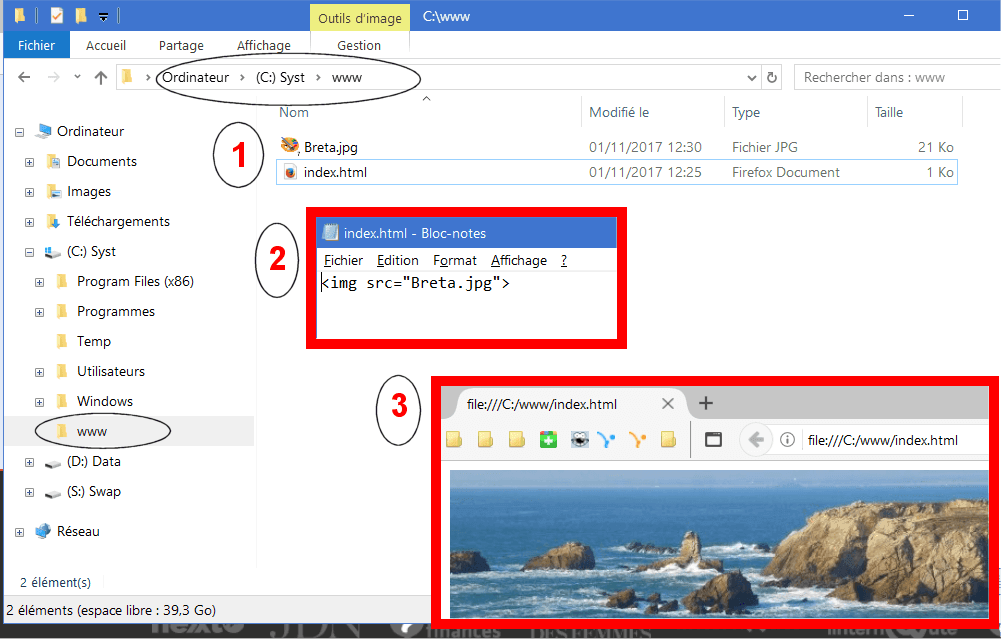
I'm a beginner and I made a small program in HTML to write a title, change its color, etc... I would like to insert a .jpg image.
I created a folder on my desktop containing the image and the small program via Notepad. This program is also saved as .html to be opened with Firefox.
And there, the text and the title are visible, but the image doesn't appear....
Here is the work:
<html>
<head>
<title> Toto </title>
</head>
<body>
<!--see if it will be visible --><font color="red"> <h1> THE TITLE </h1></font>
<font color="blue"> This is my first program in HTML</font>
<img src="Breta.jpg">
</body>
</html>
Where did I go wrong?
Thank you in advance for your help.
Regards.
Configuration: Windows / Firefox 56.0
I'm a beginner and I made a small program in HTML to write a title, change its color, etc... I would like to insert a .jpg image.
I created a folder on my desktop containing the image and the small program via Notepad. This program is also saved as .html to be opened with Firefox.
And there, the text and the title are visible, but the image doesn't appear....
Here is the work:
<html>
<head>
<title> Toto </title>
</head>
<body>
<!--see if it will be visible --><font color="red"> <h1> THE TITLE </h1></font>
<font color="blue"> This is my first program in HTML</font>
<img src="Breta.jpg">
</body>
</html>
Where did I go wrong?
Thank you in advance for your help.
Regards.
Configuration: Windows / Firefox 56.0
15 answers
-
ModeratorHello,
That seems correct. Are you sure about the name Breta.jpg, not Breta.jpeg?
Are you opening the .html by going into the directory and double-clicking on the file?
Best regards
a stranger is a friend we haven't met yet. -
ContributorGood evening, are you sure that the image file has the correct name and is in the right location?
-
Good evening and thank you for the feedback.
I just checked the name again, just in case.
YES I launch the .html by going into the folder on my desktop where the image.jpg is, then the small program: test html and finally the same program to which I added the .html. It has the Firefox logo and by double clicking on it, I open it on the internet, but there is no image or rather there is a small square with a zigzag inside...-
Moderator"then the small program: test html and finally the same program to which I added the .html " I don't quite understand. Are there 2 files in addition to the image? For me, there should just be one .html file and the image
You should copy the image to the root of the C:\ drive
and put<img src="C:\Breta.jpg">
in the .html to see if the issue comes from the image path.
-
-
Good evening, I will continue tomorrow...
Have a good evening. -
Good evening
I also reply to yg_be.
Yes, apparently everything is in the same folder...
See you tomorrow.
Best regards -
Hello everyone,
I just followed the instructions you gave me: copying the image to the root of C:\. I even copied the "www" folder containing the small test program and the photo to the root of C:\, but nothing works....
However, in the "www" folder at the root of C:\, I do have 3 files, and that might be where the issue lies... To open the "test" program, I rename it to "test.html" and by double-clicking on it, I open it with Firefox, but it doesn't include the photo....
With only 2 files, the HTML program and the photo, how can I view it online? -
ModeratorIf you placed the files in a www folder on C:, the path of the image
is<img src="C:\www\Breta.jpg">
or does it remain<img src="Breta.jpg">
when the .html and the image are in the same directory?
I still don't understand your 3 files ;-)
First a bit of terminology, the term "program" is not appropriate. For a local html file, which is executed by a browser, we will talk about "web page" or "web source" or even "html source".
An html source is a file that has an .html (or .htm) extension. To run it locally, you double-click on it, and it opens in your default browser (IE, Firefox, ...). To modify it, you will use a text editor, the simplest being Windows Notepad. So you open Notepad, go to File > Open (all files *.*), and navigate to the directory where the html file is located. Not a manipulation with renaming and 3 files, just the .html and the jpg file.
Your issue may be that in your explorer you do not see file extensions. To display them: Explorer/View/Options/View + uncheck "Hide extensions for known file types". -
Hello and thank you for all your interesting explanations for me.
I will digest what you have indicated and I will come back with the results...
Thanks again jee pee. -
Regarding the extensions, it's resolved, I made the change you suggested and it's good.
As for the rest, I'm struggling... Maybe I need to delete everything and start from scratch? -
ModeratorOriginally, it's all simple, not orthodox, but the .html file can contain just one line

Are you sure that the image is indeed a jpg, which corresponds to the file extension?
--
A stranger is just a friend we haven't met yet. -
It seems indeed simple, for me... it's something else.
From your demo and the image, it almost looks like you're on my computer... Breta.pg is indeed an image of Brittany...
I'll try to do it like you, to see if it works. -
I think I did the same as you: see the link.
http://www.cjoint.com/c/GKbnsi8Pd3d
Still, the result on the Internet is a blank page that I get...
I don't understand anything anymore...-
-
-
Moderator@jordane45Indeed, I missed it there > absent
-
-
PHEW! With your help, I finally did it.
Thank you Jordane45 for pointing out that I hadn't closed the img tag.
So I'm going to try again to add my little original title to see if everything works... If that's the case, I will continue to try to improve in learning HTML. I'm interested, I'm discovering, but I'm a beginner, it's not easy... -
ModeratorIn programming, syntactical perfection is essential.
Then comes logical perfection.
--
a stranger is a friend you haven't met yet. -
My experiment worked, titration plus photo.
Thank you both for helping me in my venture...
Surely, see you soon...
Best regards to you.