
Gimp - no little wolf icon
Solved
max850
Posted messages
312
Status
Member
-
Luke1 Posted messages 18751 Registration date Status Contributor Last intervention -
Luke1 Posted messages 18751 Registration date Status Contributor Last intervention -
Hello,
I just downloaded GIMP 2.8.22 via CCM and from the gimp.org website.
The download goes normally.
The execution of the program seems to go well: no error messages.
But I don't have an icon on my desktop.
When I perform a search by right-clicking on my desktop,
the shortcut gives me access to these programs,
but no little wolf in sight.
I tried downloading directly from the gimp.org website,
same problem.
Can you help me solve this issue?
Thank you.
Configuration: Windows / Chrome 61.0.3163.100
I just downloaded GIMP 2.8.22 via CCM and from the gimp.org website.
The download goes normally.
The execution of the program seems to go well: no error messages.
But I don't have an icon on my desktop.
When I perform a search by right-clicking on my desktop,
the shortcut gives me access to these programs,
but no little wolf in sight.
I tried downloading directly from the gimp.org website,
same problem.
Can you help me solve this issue?
Thank you.
Configuration: Windows / Chrome 61.0.3163.100
6 answers
-
Well, I've found a solution on the other PC running Windows...
Go to: C: --> Programs --> GIMP --> bin and the launch icon is inside.
Right-click --> Send to --> Desktop (create shortcut) and then just move the shortcut wherever you want (taskbar or Start menu)...
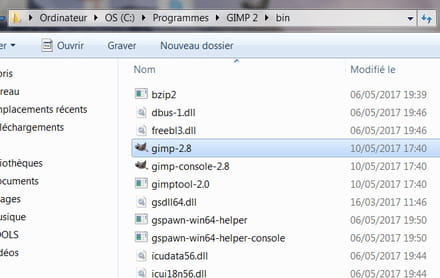
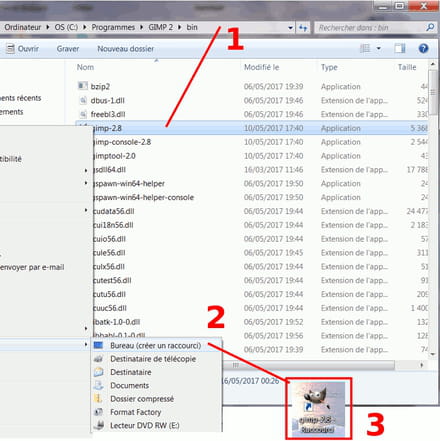
Luke.
PS: if the images are not clear enough, click on them and then view the image, and it should be fine...
The price of software is inversely proportional to its usability... ;-) -
Good evening,
I don't have a Windows device handy, but if I remember correctly (I no longer have Windows and even less a Mac), you just need to go to the GIMP folder, right-click on the launch icon --> Send to --> Desktop (create shortcut), then you can drag it into your quick launch bar. If you know how to do it, you can also drag it into the Start menu of your Windows...
It's a shame I'm too lazy to plug in another computer right now, but if it doesn't work like this, I'll check on a PC under Windows (the one that needs to be plugged in)...
Luke.
--
The price of software is inversely proportional to its usability... ;-) -
Hello Luke
Thank you for your response. I know how to do all the tasks you mention.
My problem: I don't have a launch icon in the Gimp folder. -
Hello,
I will see if there is a way to work around the issue with Windows and I'll post the result...
Luke.
--
The price of software is inversely proportional to its usability... ;-) -
Good evening Luke
I found another solution. A simple thing
I just had to click on customize at the beginning
Thank you for the time you dedicated to me-
Good evening,
Glad to know you got it sorted... ;)
I've never had this problem, is it at the installation of GIMP that you choose between standard installation and custom installation?
The other solution also works very well and I took the opportunity to test it on the Windows that I rarely use, something that might help someone else who has troubles one day...
Have a good evening. ;)
Luke.
-
-
Hello Luke
Yes, during the installation you should choose customize
I had also set it up using your solution
But I still found it strange that there wasn't an easier solution
I tried it on my other PC by clicking customize during the installation and there it was, bingo
Have a nice day-
Good evening Max,
I hadn't noticed this detail at the installation, but to be fair, GIMP is pre-installed on my operating systems, and since it has been installed for a long time with the Windows I've had, I never really paid attention to this detail...
Thank you for your reply.
Have a good end of the evening. ;)
Luke.
-
