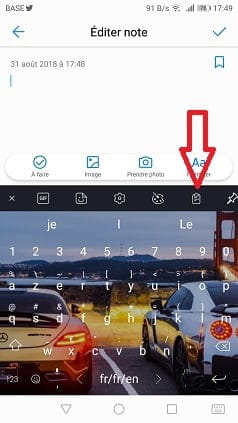
Clipboard on Huawei P8
Solved
madodanmado
Posted messages
49
Status
Member
-
Liladeroma -
Liladeroma -
Hello,
I would like to know where the clipboard is located on a Huawei P8 mobile phone.
And how to retrieve a message from this clipboard.
Thank you for your reply.
I would like to know where the clipboard is located on a Huawei P8 mobile phone.
And how to retrieve a message from this clipboard.
Thank you for your reply.
2 answers
-
Hello
There is no real paper as you believe.. it's just a simple copy and paste.. for example, you hold your finger on your message and you will see "copy" appear so you copy it, then you paste it onto another message by holding down on your message bubble... but if you do another copy and then paste, the last one replaces the first, and so on...-
Thank you for your response. I would like to save a message received on my mobile and be able to store it and keep it until the end of the warranty;
How do I do that?
Thank you- You're welcome.. for your SMS and MMS backup, which is important for backups that will prevent you from losing them in case of problems, and we can never say it enough.. so go to the Play Store and install this
https://play.google.com/store/apps/details?id=com.zegoggles.smssync&hl=en
then open this app, connect via Wi-Fi preferably, and back up to your Google Gmail account.. when you open your Gmail inbox, you will see a new SMS folder.. and you can even print them.. small downside at this time, in case of restoration it cannot restore images from MMS, only text...
you can also install this one which does complete restorations, you back up to Google Drive.
https://play.google.com/store/apps/details?id=com.riteshsahu.SMSBackupRestore&hl=en
in summary, install both.
-
-