How to determine the size of an image in bytes?
Solved
Greenlantern64
-
sarahmoon Posted messages 600 Status Contributor -
sarahmoon Posted messages 600 Status Contributor -
Hello
After searching everywhere, I couldn't find the answer to my question.
The problem is that here is my statement:
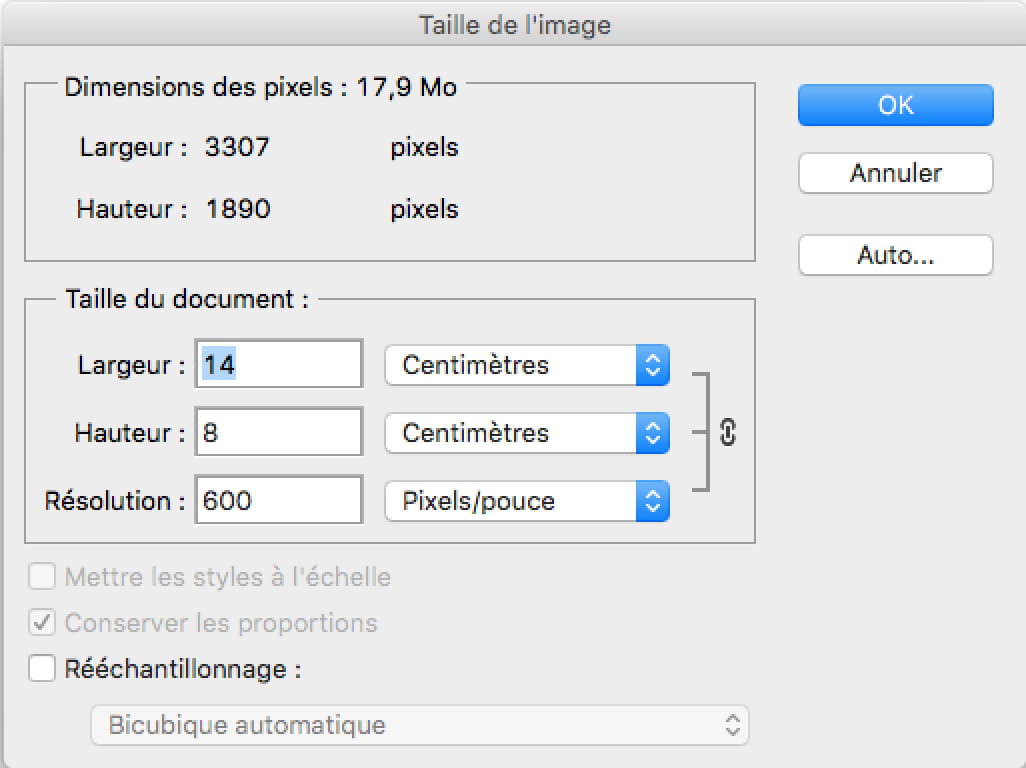
"We want to scan an image sized 14cm by 8cm using a scanner with a resolution of 600dpi.
Determine the file size in bytes and in kB while detailing the calculations."
And so I am having trouble finding the formula because I feel like there are missing data.
If someone could enlighten me. Thank you.
After searching everywhere, I couldn't find the answer to my question.
The problem is that here is my statement:
"We want to scan an image sized 14cm by 8cm using a scanner with a resolution of 600dpi.
Determine the file size in bytes and in kB while detailing the calculations."
And so I am having trouble finding the formula because I feel like there are missing data.
If someone could enlighten me. Thank you.
1 answer
-
Hello,
1 inch = 2.54 cm.
An image is encoded in 24 bits/pixel.
1 byte weighs 8 bits.
1 pixel weighs 3 bytes in RGB (3 channels) (24 ÷ 8).
The missing information: we do not know if you are in RGB or grayscale.
Assuming it's RGB:
Resolution: 600 dpi.
14 cm x 600 ÷ 2.54 = 3,307 pixels.
8 cm x 600 ÷ 2.54 = 1,890 pixels.
Now that you have your size in pixels, you can calculate the weight (1 pixel: 3 bytes)
3,307 x 1,890 x 3 = 18,750,690 bytes.
1 KB = 1,024 bytes.
18,750,690 ÷ 1,024 = 18,311 KB = 18 MB
If I am not mistaken…

In grayscale:
1 pixel = 1 byte.
3,307 x 1,890 x 1 = 6,250,230 bytes.
6,250,230 ÷ 1,024 = 6,103 KB
6,103 KB = 6 MB