
How to resolve "Upgrade Outlook Connector" message?
francine1407
Posted messages
8
Status
Member
-
Bhavish -
Bhavish -
Hello everyone,
I don't know how to solve this problem, but I haven't been receiving or able to send emails for 2 days. When checking in file > information, there is a message at the top saying Upgrade in progress in red, and at the bottom, Upgrade Outlook Hotmail Connector. You need to upgrade to the latest version of Outlook Hotmail Connector to continue using this email account. The problem is that I don't even have a Hotmail account. Here are the details according to this image:

I would appreciate your guidance on how to resolve this issue.
Thank you in advance
Configuration: Windows / Chrome 52.0.2743.116
I don't know how to solve this problem, but I haven't been receiving or able to send emails for 2 days. When checking in file > information, there is a message at the top saying Upgrade in progress in red, and at the bottom, Upgrade Outlook Hotmail Connector. You need to upgrade to the latest version of Outlook Hotmail Connector to continue using this email account. The problem is that I don't even have a Hotmail account. Here are the details according to this image:
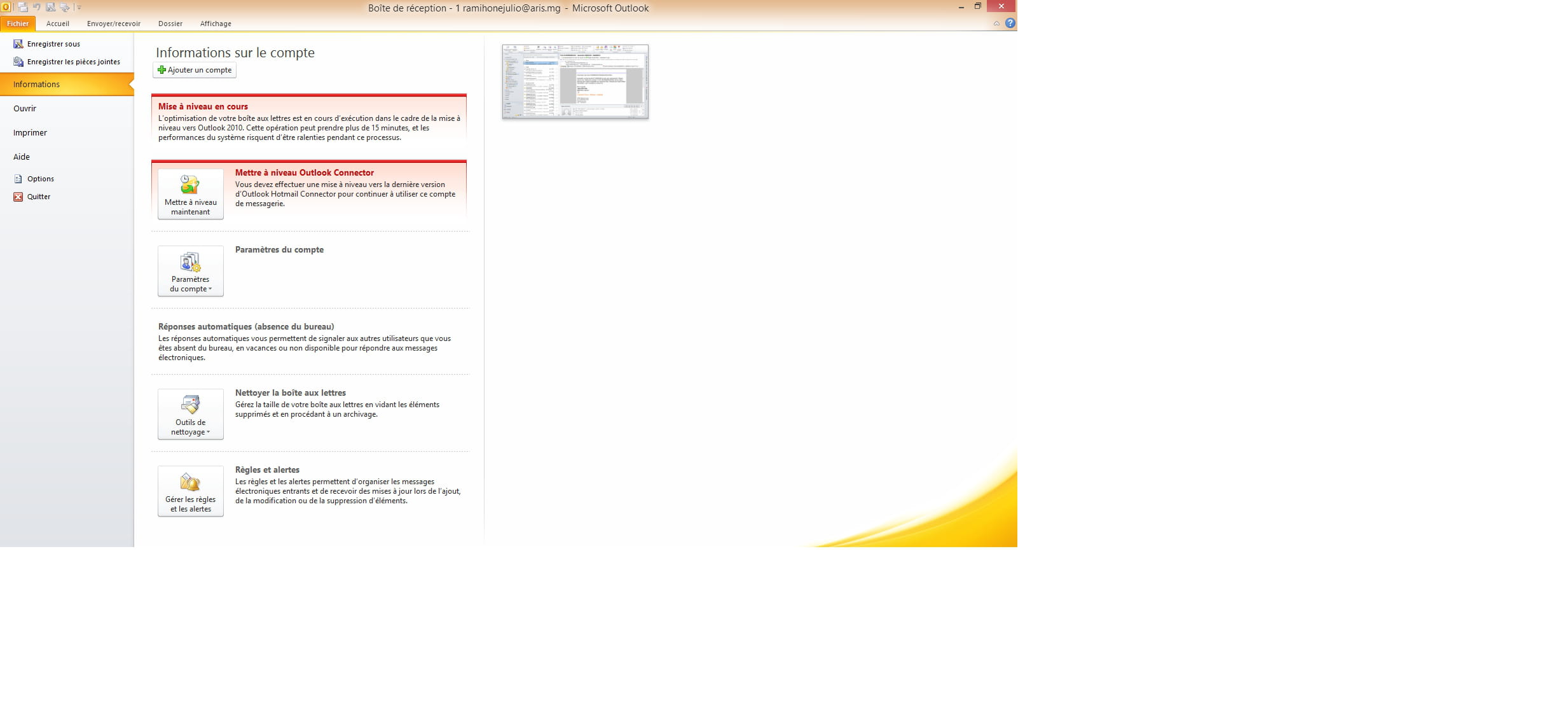
I would appreciate your guidance on how to resolve this issue.
Thank you in advance
Configuration: Windows / Chrome 52.0.2743.116
1 answer
-
Hello, upgrading Outlook Connector is necessary if you have set up mailboxes using IMAP (Hotmail/Outlook/Gmail, etc.)
The message is misleading; it's not because you don't have a Hotmail account that you don't need to upgrade.
Close Outlook
Download and install the Outlook Hotmail Connector corresponding to your version of Microsoft Outlook.
For the 32-bit version of Outlook 2003, 2007, and 2010
http://www.microsoft.com/downloads/details.aspx?FamilyID=d9662d20-ad27-45a6-9184-f906dd63ddaa
For the 64-bit version of Outlook 2003, 2007, and 2010: http://www.microsoft.com/downloads/details.aspx?FamilyID=bd0bcb57-d408-4d4a-8f1e-d737d8c27098
Fred.ml
