Display issue on Preview
Solved
Hello!
Since yesterday, I have a problem with the Preview application: it no longer displays images, or does so only intermittently (meaning the image appears partially, disappears, reappears...) when I open them.
I often work with Preview to do image copy-pasting, and yesterday I opened a file larger than usual. Maybe this is the source of the problem?
I have read several other forum posts regarding a bug with Preview, but none seem to match my issue exactly.
Thank you very much for your help!
Alix
EDIT: I tried opening an image with Preview in my computer's guest session, as some forum posts suggested, and it worked there.
Configuration: Mac OS X (10.9.5) / Chrome 52.0.2743.116
Since yesterday, I have a problem with the Preview application: it no longer displays images, or does so only intermittently (meaning the image appears partially, disappears, reappears...) when I open them.
I often work with Preview to do image copy-pasting, and yesterday I opened a file larger than usual. Maybe this is the source of the problem?
I have read several other forum posts regarding a bug with Preview, but none seem to match my issue exactly.
Thank you very much for your help!
Alix
EDIT: I tried opening an image with Preview in my computer's guest session, as some forum posts suggested, and it worked there.
Configuration: Mac OS X (10.9.5) / Chrome 52.0.2743.116
2 answers
-
Hello,
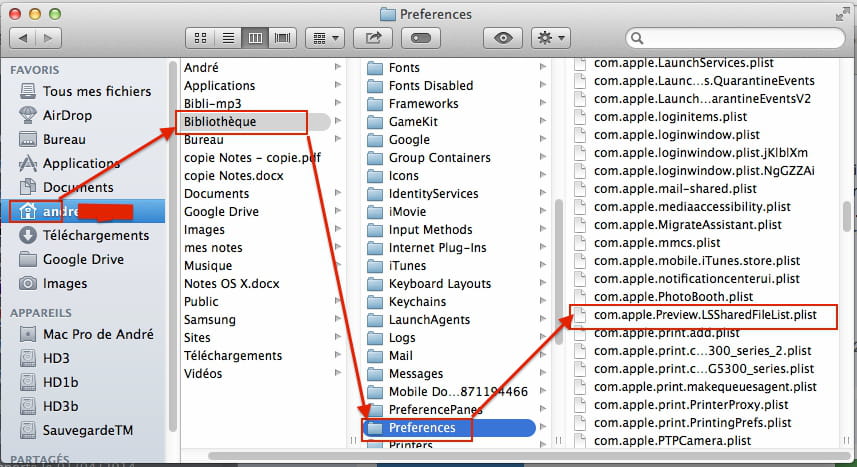
Go to your user library. To access it, from the Finder/Go menu, hold down the Option (Alt) key, you'll see it in the drop-down menu, Preview closed, open it/Preferences and move the file "com.apple.preview.plist" to the trash (without emptying it), relaunch Preview, if it works, you can empty your trash.
--
When it's urgent, it's already too late (Talleyrand)-
Hello!
First of all, thank you for your responsiveness.
Once I’m in Preferences, I see many files named the same way, but not the "preview"; even when searching by filename, Finder can’t find anything containing the name "preview"... (I also took a look, just in case, for a folder that might be called "aperçu" but nothing there either!)
Thank you very much,
Alix
-