
Installing Ubuntu alongside Windows
-
Hello,
I started installing Ubuntu using a live CD that I burned, but I am facing a difficulty and I don't dare to go further for fear of erasing all the data on my Windows. So I am asking for help on this forum.
I have a fairly recent Dell laptop that has Windows 8.1 (8.0 at purchase).
I would like to do a dual boot so that the computer offers me at startup either Windows or Ubuntu.
I have a single 1 terabyte hard drive that I partitioned into two equal parts. Half of it is the C drive used by Windows, and the other half is the D drive which is completely empty and reserved for Linux.
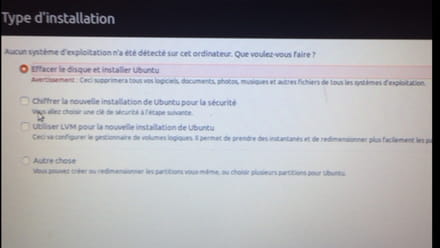
My problem is that after trying Ubuntu and starting the installation, it tells me that "no operating system was detected on this computer."
It then offers me two choices: "erase the disk and install Ubuntu" or "something else" (manual installation).
My question is whether choosing the erase option will only erase the D drive as I wish, or will it also erase the C drive and Windows... I think it will erase everything, and that's why I'm asking for help.
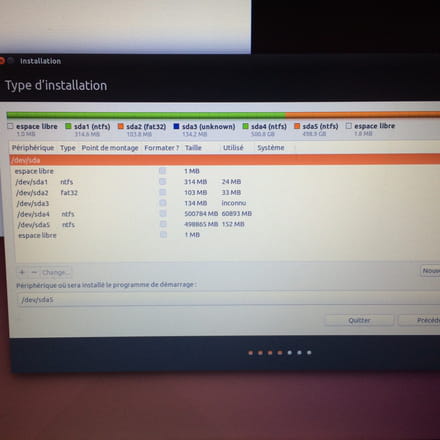
By selecting "something else," I find myself facing the state of my entire computer (500GB for sda4 (ntfs) and 498GB for sda5 (ntfs), which represent the C and D drives, and then three other sda 1, 2, 3 which are almost empty).
What should I do to erase the D drive and install Ubuntu on it, without touching the C drive? Could you help me and indicate what to do, please?
Thank you in advance.
I started installing Ubuntu using a live CD that I burned, but I am facing a difficulty and I don't dare to go further for fear of erasing all the data on my Windows. So I am asking for help on this forum.
I have a fairly recent Dell laptop that has Windows 8.1 (8.0 at purchase).
I would like to do a dual boot so that the computer offers me at startup either Windows or Ubuntu.
I have a single 1 terabyte hard drive that I partitioned into two equal parts. Half of it is the C drive used by Windows, and the other half is the D drive which is completely empty and reserved for Linux.
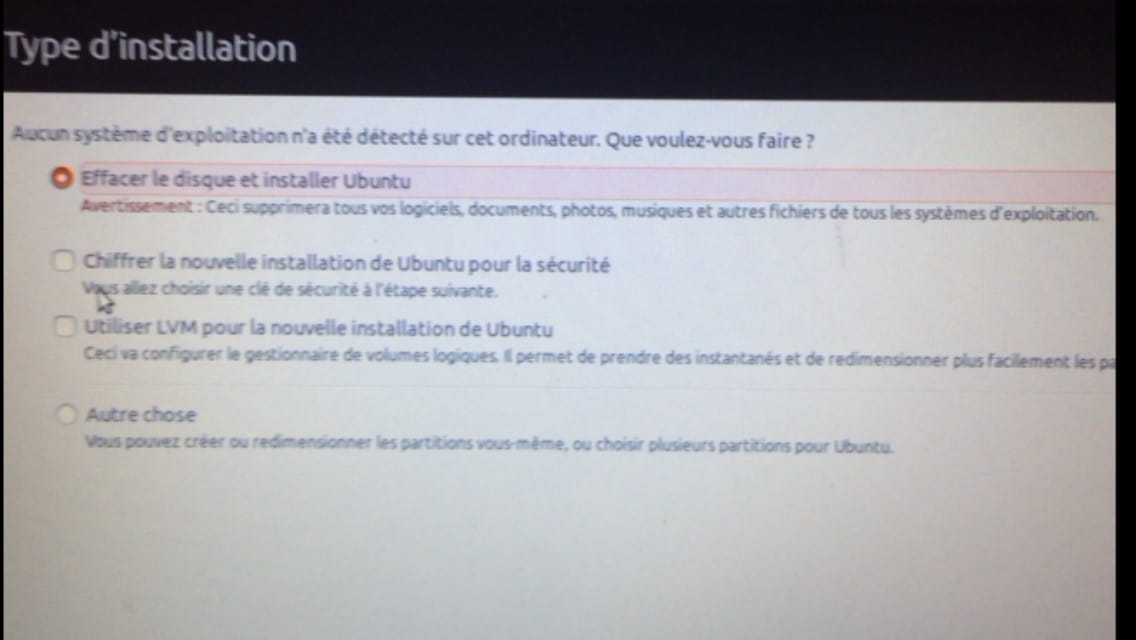
My problem is that after trying Ubuntu and starting the installation, it tells me that "no operating system was detected on this computer."
It then offers me two choices: "erase the disk and install Ubuntu" or "something else" (manual installation).
My question is whether choosing the erase option will only erase the D drive as I wish, or will it also erase the C drive and Windows... I think it will erase everything, and that's why I'm asking for help.
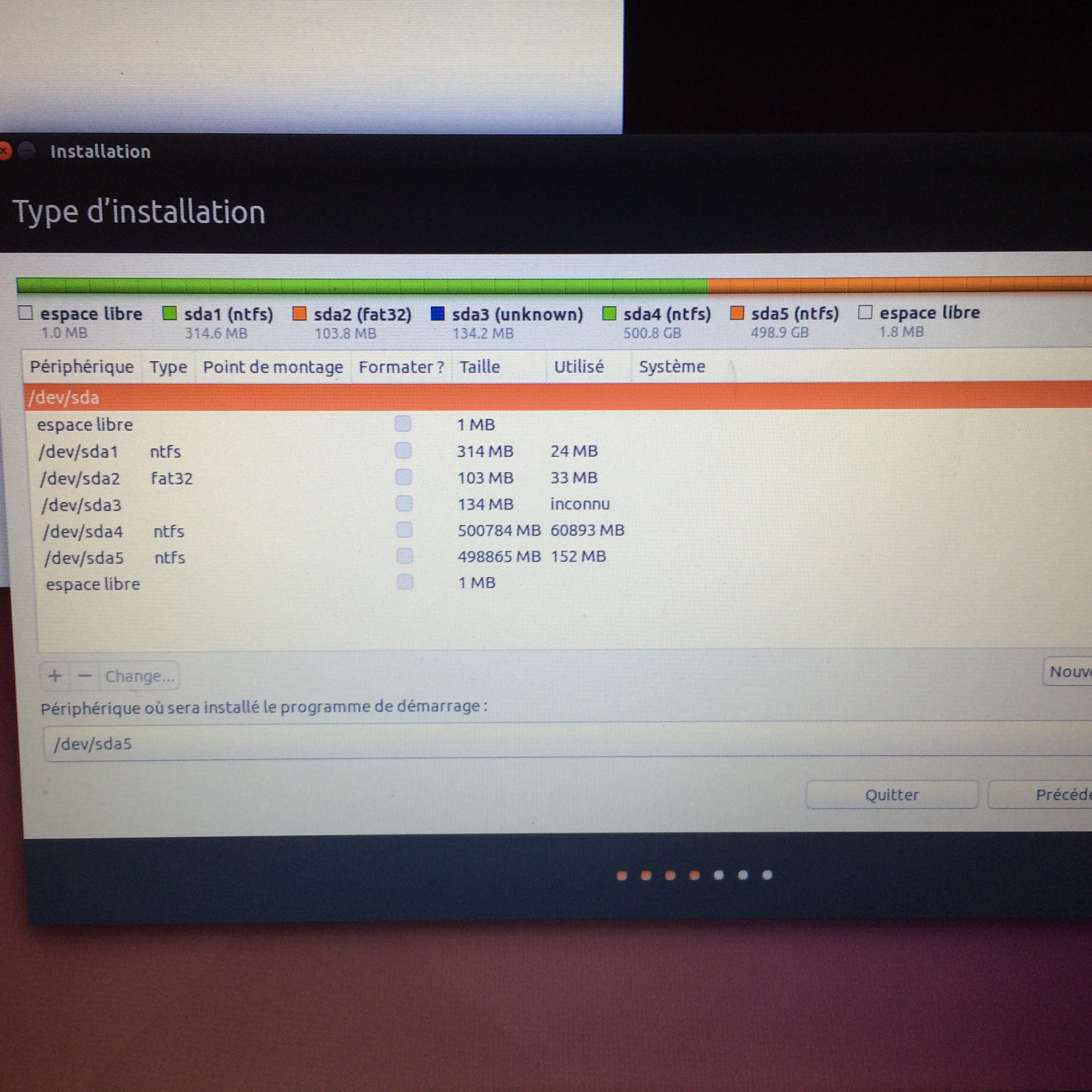
By selecting "something else," I find myself facing the state of my entire computer (500GB for sda4 (ntfs) and 498GB for sda5 (ntfs), which represent the C and D drives, and then three other sda 1, 2, 3 which are almost empty).
What should I do to erase the D drive and install Ubuntu on it, without touching the C drive? Could you help me and indicate what to do, please?
Thank you in advance.
1 answer
-
hi
all you have to do is click on /Sda5 and continue, no changes will be made to your C partition
---
-
the swap partition is not needed, a root partition, it did it all by itself, it will be the partition "/"
anyway, you are guided from start to finish, if linux doesn't like something, it will tell you
and your partition will be formatted in a format that the OS recognizes.
so there's nothing to worry about.
furthermore, you will have the option, after the installation, to choose the system you want to boot from, thanks to GRUB
what version of Linux do you want to install? -
-
I just tried and it's not enough.
I selected /dev/sda5 as the "device where the bootloader will be installed" and then clicked on install now, and I'm getting the message "no root file system" "no file system has been chosen as root."
What should I do to fix this?
Click on sda5, then on "change," choose a size (which one?), choose a response to "use as" (which one? Root is not in there, but there is ntfs, swap, bios, etc.)
I need help please.
Thank you. -
-