Adrenaline software edition
SolvedHello,
I want to install Adrénaline Software Edition to modify the frequency and voltage of my graphics card. When I start the installation, I get a message asking me to accept the license agreement, but there is no 'Accept' button, only a 'Close' button. I clicked the link to display the clauses of the contract, but that does not change anything.
I am on Windows 11 and my graphics card is an NVIDIA RTX 3060 TI
Thank you in advance for your help.
10 answers
-
Moderator
Hello,
Are you sure a product developed by AMD can work on an Nvidia graphics card?
Very difficult to catch a black cat in a dark room.
Especially when it isn’t there... -
Hello,
I have checked the packaging of this graphics card purchased in 2023. It is an MSI GeForce RTX 3060 Ti GAMING X TRIO 8GD6X. In the list of devices under Windows 11, the reference for this card is 'NVIDIA Geforce RTX 3060 TI'. I downloaded and installed 'MSI Afterburner'. At the launch of the application, everything is grayed out. In the general settings, in the GPU selection box, only the mention 'GPU1 NVLDDMKM' appears and there is no other option. I have checked the drivers but no newer version than the ones installed is offered.
Thanks in advance for your help. -
ModeratorTotally amateurish on the subject, I cannot guide you any further.
MSI Afterburner is indeed a tool that is supposed to be able to perform the modifications you want if I trust what you can find on the web.
There is also, for Nvidia, GeForce Experience and the more recent Nvidia APP, but no idea what that might bring you.
---
It is very difficult to catch a black cat in a dark room. Especially when it isn’t there... -
Hello,
Thank you for your reply.
Indeed GPU1 NVLDDMKM corresponds to the AMD Ryzen 7 5800X8 processor, but that processor has no integrated graphics and it is impossible to force the graphics card choice. I tried NVIDIA App but cannot modify the frequency. As for GeForce Experience, this application is not compatible with my graphics card.
I will continue to search.
Thanks again for your help.
-
ModeratorIt would seem that NVLDDMKM is indeed the manifestation of an error
MSI Afterburner could not communicate with your graphics card due to a driver issue (information provided by Google’s AI)
Very difficult to catch a black cat in a dark room. Especially when it isn’t there... -
Indeed, I launched NVIDIA App which proposed a driver update for the card. After installation, the card is properly recognized by MSI Afterburner.
Thanks again for your help.
-
Moderator
Great...
Thanks for the feedback.
Very hard to catch a black cat in a dark room.
Especially when it isn’t there... -
Hello,
I’m trying to modify the clock speed of the graphics card, MSI GeForce RTX 3060 TI Gaming X Trio, using the MSI Afterburner app. When I go to forums to understand how to do it, most of the time the display does not match what the app I downloaded offers. Moreover, the area to modify the frequency shows 'Core Mhz + 0' as with memory. I don’t see how to make the values appear in MHz.
In advance, thank you for your help
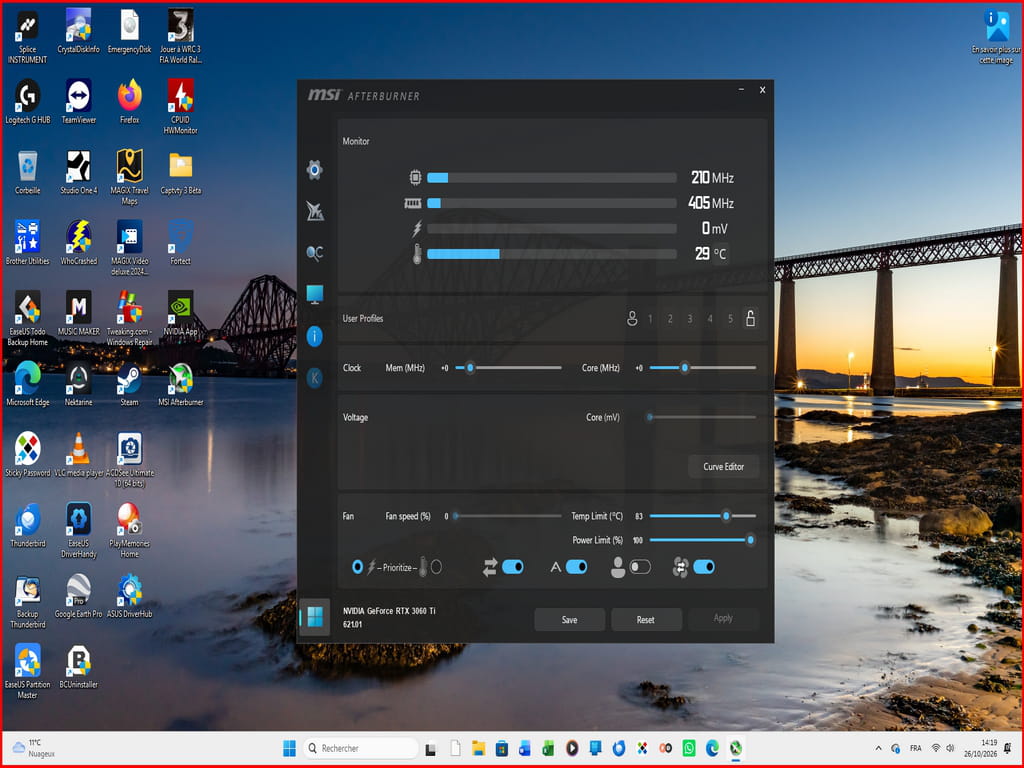
-
Moderator
As I already said earlier, I am completely incompetent in this area.
The only advice I can give you would be to search Google for tutorials on the MSI Afterburner application.
It's very difficult to catch a black cat in a dark room.
Especially when it isn't there... -
Thank you for your response.