
BFM Marseille
Hello, when I tune to channel 30 (BFM Marseille), the TV turns off after a few seconds. This happens on only one TV in the house and only with this channel since 25/10/2025. Strange, isn't it?
8 answers
-
Moderator
Hello,
What are the references (Brand and model) of this TV allergic to BFM Marseille?
If you change the TV's location (replacing it with another one), do you still have the same problem? Does the issue follow the TV or not?
It's very difficult to catch a black cat in a dark room.
Especially when it's not there... -
Hello, thank you for your quick response.
The TV is a Sony KDL-46EX650.
It's too complicated to move it. It's heavy, mounted on the wall, and connected to everything else: Box, TV decoder, PC, and home theater.
I haven't changed anything in the apartment's installation. It was working perfectly until last week. BFM Marseille works normally on the bedroom TV and on this one through the SFR TV decoder No. 284. I've never seen this elsewhere and I don't understand.
-
Moderator
Hard to understand, I can admit that.
You say that this Sony television is connected, among other things, to a TV decoder. When the problem occurs, who provides the image? The TV decoder or directly from the television via the aerial?
Very difficult to catch a black cat in a dark room.
Especially when it's not there... -
Through the TNT antenna. Like the bedroom TV which, on the other hand, continues to work normally. Mystery...
-
Moderator
When you say the TV turns off, is it going into standby mode (with the standby light in red) or does the screen simply go black (no image)?
On the Sony television itself, although I don't really believe what I see:
https://helpguide.sony.net/gbmig/C5671001/v1/fre/index_631_636.html#ts_TSPwrOff_exceptUC
Now, it would still be interesting to connect one of your 2 other televisions to the antenna socket used by the Sony to determine if the issue comes from the television or the antenna socket.
Very difficult to catch a black cat in a dark room.
Especially when it's not there... -
There is an image and sound for a few seconds (sometimes 2 seconds, sometimes 10 seconds) and then we hear a "beep" like a "car horn" and it turns off and restarts by itself. If we don't change the channel immediately, it keeps repeating endlessly.
I will try to connect another TV to the antenna socket.
-
Moderator
OK, it has nothing to do with standby mode...
It's more like the TV is having trouble decoding the signal from channel 30 of the digital terrestrial television.
It might be a good idea to try a new automatic search for digital channels. https://helpguide.sony.net/gbmig/C5671001/v1/fre/c_digi_europe_co_datuning.html
-
-
I did it, still the same
-
Moderator
So we still need to test another television in that location.
And, if it turns out that the issue is related to the Sony television, try to explain the problem to them
https://services.sony.fr/supportmvc/fr/Contact/Email?cat=televisions-projectors1
and/or
by phone: 0170700778, Monday to Friday, from 10:30 AM to 7:30 PM. -
@baladur13
Try with another TV instead, everything works normally.
I plug the Sony back in which refuses BFM Marseille, and there, it's a disaster, nothing at all!
It won't turn on, no light, as if it wasn't plugged in.
I tried unplugging it, checked the remote control, tried the manual controls on the TV, nothing works. It's been 2 days now, I really think this time it's going to the trash, unfortunately.
-
Moderator@jamiri
Have you accidentally cut the power by unintentionally pressing the on/off switch located on the right side of the television?
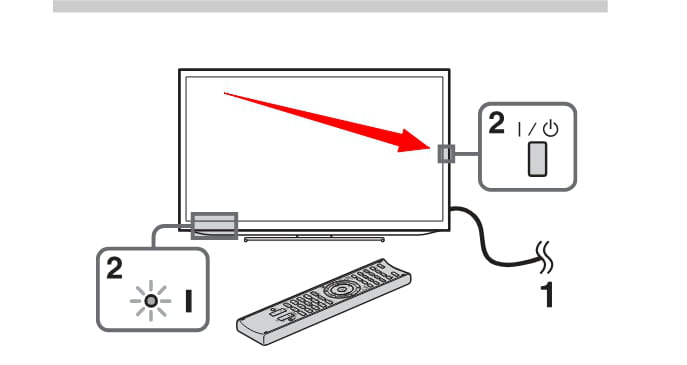
-
-
Hello,
You can also try resetting your television!
There may be a problem on their end.
https://www.recevoirlatnt.fr/liste-incidents
Pierre
November 2, 2025, at 3:18 PM
Hello, for about two weeks now, when I watch BFM Regions on TNT, my TV emits a whistling sound and reboots every 10 to 20 seconds, making it impossible to watch your shows. All other channels are fine.
Jean
October 31, 2025, at 3:50 PM
Hello, for about two weeks now, when I watch BFM Regions on TNT, my TV emits a whistling sound and reboots every 10 to 20 seconds, making it impossible to watch your shows. All other channels are fine.
https://www.totalbug.com/bfm-tv/comment-page-11/#comments

