Connect PIXMA TS 3350
kaneagle Posted messages 86298 Registration date Status Moderator Last intervention -
Hello,
Does anyone know how to wirelessly connect a Canon PIXMA TS 3350 printer to an SFR box?
4 answers
-
-
Unfortunately, my printer model is not on the list, and the video does not match the model.
-
https://www.canon.fr/support/consumer_products/videos/pixma-ts3350/
See here too with the WPS button present on your box.
https://blog.bureau-vallee.fr/comment-connecter-une-imprimante-canon-en-wi-fi/
-
-
Hello,
The simplest way is to establish the connection using WPS.
A video on YouTube: https://www.youtube.com/watch?v=D7lakNJhPWU
It's in English, but the subtitles are available below the video, and you can request the translation in French.
What is well conceived is clearly expressed,
And the words to say it come easily.
(Boileau) -
Hello,
If it doesn't work, try this driver --> PIXMA TS3350
After extracting the driver:
Turn on the printer
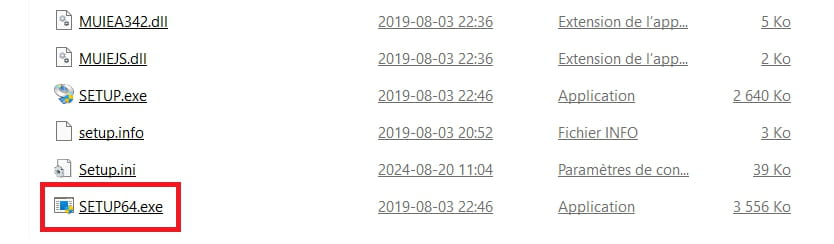
Go to the folder of the unzipped driver --> md__-win-ts3300-1_04-ea34_2
Folder --> DrvSetup
Launch --> SETUP64.exe
Follow the instructions.