
My Opera browser won't open anymore!
ZebuGigantesque83 Posted messages 6 Status Member -
Hello, and suddenly Opera won't display anymore! When I click on the Opera icon, the only reaction is that 4 white rectangles appear one after the other and then nothing!
Any idea? I'm using Windows 11, I've uninstalled and reinstalled Opera but it doesn't change anything!
2 answers
-
Hello.
Uninstall Opera using Revo Uninstaller in advanced scan mode.
Then reinstall Opera.
Revo Uninstaller tutorial to read carefully.
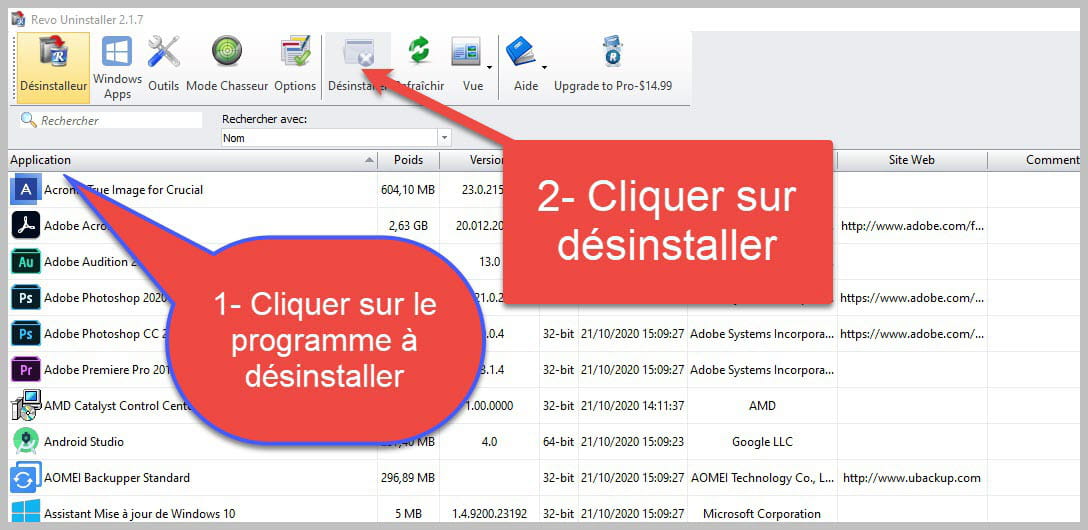

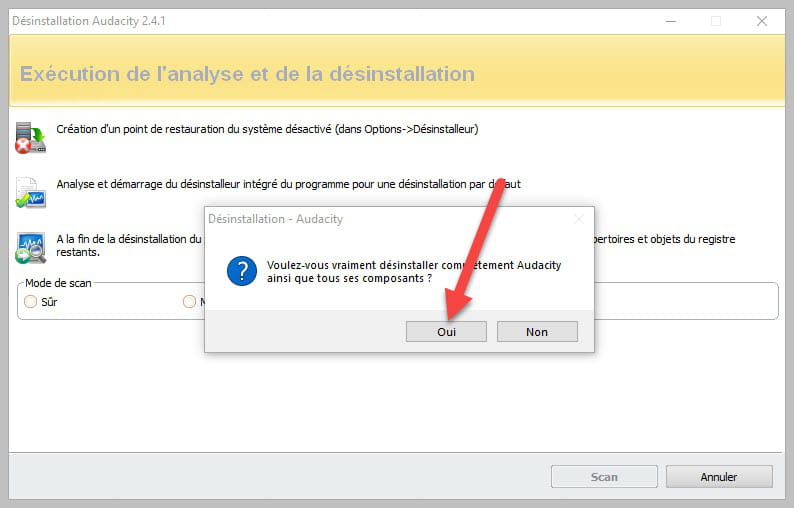
Accept the uninstallation of the program you want to uninstall, and if there is an error message saying that uninstallation is impossible, close the error message and continue the procedure.

Check "Advanced scan" then click on "Scan".

Be careful, it is very important to delete the remaining registry items.
Click on "Select all" then on "Delete"; if a second list appears, do the same, and once everything is deleted, click on "Finish"; a restart may be requested.
bazfile
Moderator/Security Contributor.
A hello, a response, a thank you are always appreciated.-
Hello, I followed your instructions to the letter and now that Opera is uninstalled, and I have deleted the remnants of Opera, what do I do next? I wasn't asked to restart, but I did it anyway, it can't hurt!
So without further instructions, I think I need to reinstall Opera again? Which I did, and I ended up in the same situation! Once the installation is complete, the same white rectangles appear and Opera still doesn’t show up on the screen! So the question is: Why?
Thank you for giving me hope, but there must be something else with this browser. I've been using it for years and it's unthinkable that it would suddenly disappear.
And oops, sorry, I hadn't seen that you mentioned reinstalling Opera at the beginning!
-
-
-
pistouri Posted messages 19010 Registration date Status Contributor Last intervention Ambassador 8 732
Hello,
Step 1:
Save your Opera bookmarks.
Press the keyboard shortcut Windows + R
Copy and paste:
%appdata%\Opera Software\Click on =►OK
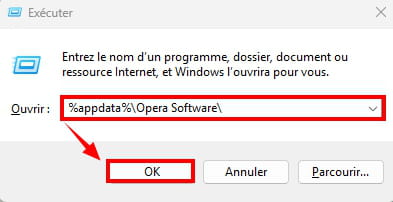
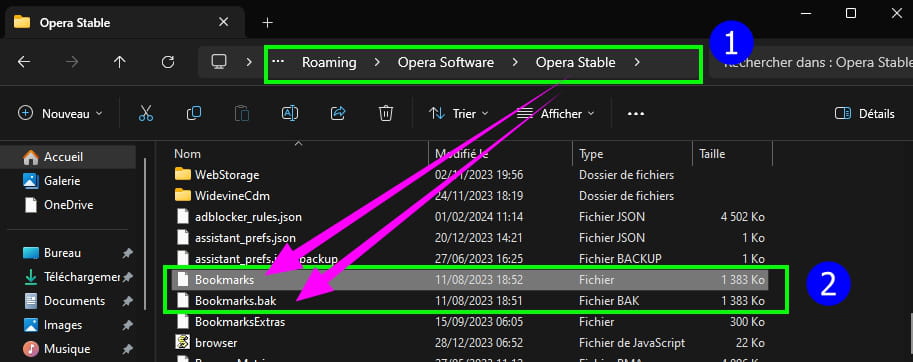
Scroll down and save these 2 folders which are the Opera bookmarks:
(Copy and paste them to your Desktop or a USB drive, for example).
-► Bookmarks.
-► Bookmarks.bak
Step 2:
Delete the folder Opera Software.
Copy and paste:
%appdata%\Opera Software\Right-click on ==►Opera Stable
Click on =►Delete

Close the window.
Step 3:
Download ==► Opera
Step 4:
Install Opera.
Launch Opera.
Or launch the Opera shortcut on your Desktop or from the taskbar if it's present.
Opera should now open.

Step 5:
Replace the bookmarks with the 2 original files in the Opera Software folder.
Follow the same procedure as in step 1.
Copy and paste the 2 files Bookmarks and Bookmarks.bak.
Click on the line =► Replace the files in the destination

That's it.
-
Hello, your idea is certainly interesting, but in this case I am supposed to "already have" Opera! But if I have indeed downloaded and run Opera, at the end of the installation the only reaction that appears is the emergence of 4 white rectangles in a row, and Opera seems to want to stay in its box and doesn't want to come out and show itself on my screen!!
Yet I have been using this software for years and its sudden disappearance leaves me speechless and without Opera! It may have become shy and no longer wants to show itself to me.
I'm joking, but I would really like to know why. And well, thank you for trying to help me, and if you have any other ideas, don't hesitate to let me know.
-

